 ---
## How Ask Eddy AI works
Understanding what happens under the hood helps you get better results and set the right expectations.
1. **Indexing** — after you enable Ask Eddy AI, Document360 begins indexing all published content in your knowledge base, including text, tables, code blocks, LaTeX, tabs, step-by-step guides, content reuse elements, and PDF attachments up to 40 MB.
2. **Query processing** — for complex or multi-part questions, Eddy automatically breaks them down into smaller, focused sub-queries and runs them simultaneously, so every part of your question is addressed in a single response, even if you ask two things at once.
3. **Content retrieval** — Eddy uses an improved matching process to consistently identify the most relevant content from your knowledge base. Results are reliable regardless of how a question is phrased — a slight variation in wording will not cause relevant articles or content to be missed.
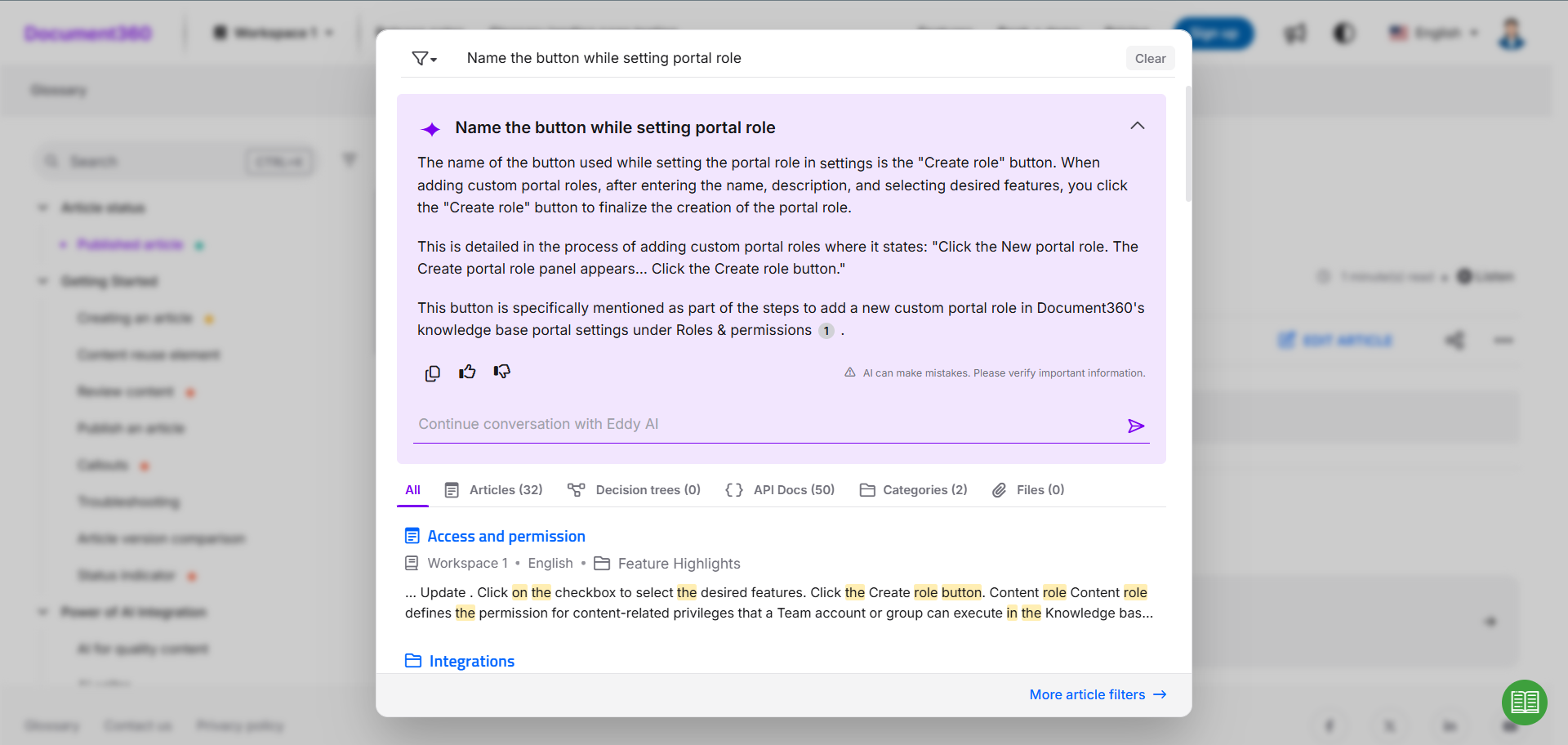
4. **Answer generation** — Eddy synthesizes a clear, structured response from the retrieved content, using paragraphs or lists as appropriate. Each response includes numbered citations linking back to the source articles for verification.
5. **Context window** — Eddy retains context across the last five queries in a session, enabling follow-up questions without losing the thread.
6. **Content refresh** — when you publish changes to an article, Eddy's index updates within approximately 15 minutes. Deleted articles are also removed from Eddy's responses within 15 minutes.
:::(Warning) ( WARNING)
Eddy is a language model, not a computational engine. It generates responses based on text patterns and semantic understanding. It is not designed for mathematical calculations, precise date arithmetic, or analytical reasoning. For date-based or numerical queries, results may be approximate.
:::
:::(Info) ( NOTE)
**Scope** — Ask Eddy AI does not limit its search to the article a reader is currently viewing. It searches across the entire workspace (based on your language and workspace filters) to return the most relevant answer.
:::
:::(Info) ( NOTE)
**Strikethrough text** — any text formatted with strikethrough is treated as hidden content and is excluded from Eddy's search results.
:::
---
## Multilingual support
Ask Eddy AI supports over 20 languages in the KB widget, enabling a seamless experience for global audiences without requiring separate knowledge bases.
**Supported languages:** English (en-US, en-GB), French (fr), Spanish (es), German (de), Norwegian (no), Dutch (nl), Portuguese (pt), Swedish (sv), Italian (it), Korean (ko), Finnish (fi), Polish (pl), Arabic (ar), Hebrew (he), Danish (da), Brazilian Portuguese (pt-br), Japanese (ja), Czech (cs), Lithuanian (lt), Spanish Mexico (es-mx), and Greek (el).
For more information, read [Integrating Eddy AI in the KB widget](/help/docs/knowledge-base-widget-getting-started).
To learn about all languages supported by Eddy AI assistive search (including non-widget search), see the [Eddy AI language support](/help/docs/ai-search-suite#multilingual-support-for-eddy-ai-search-suite) article.
---
## Fetching results from external sources
By default, Ask Eddy AI retrieves answers exclusively from your Document360 knowledge base. The [Adding external sources for AI Assistive search](/help/docs/eddy-ai-federated-search) feature enables federated search, allowing you to configure and pull information from multiple external sources alongside your knowledge base content. This broadens the scope of answers Eddy can generate and helps surface information that lives outside Document360.
---
## Data privacy and security
- **No PII collected** — Ask Eddy AI does not collect any Personally Identifiable Information (PII). The data collected includes prompts (questions), Eddy's responses, citation articles, and feedback, all of which is available as part of **Eddy AI Search Analytics**.
- **OpenAI data handling** — data is sent to OpenAI via their API. OpenAI's policy explicitly states they will not use API-submitted data to train their models or improve their services. Read the complete [OpenAI API data usage policies](https://openai.com/policies/api-data-usage-policies).
- **Access control** — Ask Eddy AI respects your knowledge base access settings. If a logged-in user does not have permission to view a specific article, Eddy will not include that content in its answer — it will respond with "I do not know" for questions whose answers exist only in restricted articles.
- **Prompt security** — Ask Eddy AI includes built-in defenses against advanced prompt injection techniques, including adversarial attacks and DAN (Do Anything Now) attacks, preventing misuse or manipulation of Eddy's responses.
- **Compliance** — Document360 is SOC 2 compliant. Both Document360 and OpenAI comply with GDPR.
:::(Info) ( NOTE)
Ask Eddy AI uses OpenAI APIs in its backend. Data transmitted to OpenAI is governed by their API privacy policy, which explicitly prohibits using customer API data to train their models. If you have any queries regarding Document360's data policy, read the [Document360 Privacy policy](https://document360.com/privacy/).
:::
---
## FAQ
---
## How Ask Eddy AI works
Understanding what happens under the hood helps you get better results and set the right expectations.
1. **Indexing** — after you enable Ask Eddy AI, Document360 begins indexing all published content in your knowledge base, including text, tables, code blocks, LaTeX, tabs, step-by-step guides, content reuse elements, and PDF attachments up to 40 MB.
2. **Query processing** — for complex or multi-part questions, Eddy automatically breaks them down into smaller, focused sub-queries and runs them simultaneously, so every part of your question is addressed in a single response, even if you ask two things at once.
3. **Content retrieval** — Eddy uses an improved matching process to consistently identify the most relevant content from your knowledge base. Results are reliable regardless of how a question is phrased — a slight variation in wording will not cause relevant articles or content to be missed.
4. **Answer generation** — Eddy synthesizes a clear, structured response from the retrieved content, using paragraphs or lists as appropriate. Each response includes numbered citations linking back to the source articles for verification.
5. **Context window** — Eddy retains context across the last five queries in a session, enabling follow-up questions without losing the thread.
6. **Content refresh** — when you publish changes to an article, Eddy's index updates within approximately 15 minutes. Deleted articles are also removed from Eddy's responses within 15 minutes.
:::(Warning) ( WARNING)
Eddy is a language model, not a computational engine. It generates responses based on text patterns and semantic understanding. It is not designed for mathematical calculations, precise date arithmetic, or analytical reasoning. For date-based or numerical queries, results may be approximate.
:::
:::(Info) ( NOTE)
**Scope** — Ask Eddy AI does not limit its search to the article a reader is currently viewing. It searches across the entire workspace (based on your language and workspace filters) to return the most relevant answer.
:::
:::(Info) ( NOTE)
**Strikethrough text** — any text formatted with strikethrough is treated as hidden content and is excluded from Eddy's search results.
:::
---
## Multilingual support
Ask Eddy AI supports over 20 languages in the KB widget, enabling a seamless experience for global audiences without requiring separate knowledge bases.
**Supported languages:** English (en-US, en-GB), French (fr), Spanish (es), German (de), Norwegian (no), Dutch (nl), Portuguese (pt), Swedish (sv), Italian (it), Korean (ko), Finnish (fi), Polish (pl), Arabic (ar), Hebrew (he), Danish (da), Brazilian Portuguese (pt-br), Japanese (ja), Czech (cs), Lithuanian (lt), Spanish Mexico (es-mx), and Greek (el).
For more information, read [Integrating Eddy AI in the KB widget](/help/docs/knowledge-base-widget-getting-started).
To learn about all languages supported by Eddy AI assistive search (including non-widget search), see the [Eddy AI language support](/help/docs/ai-search-suite#multilingual-support-for-eddy-ai-search-suite) article.
---
## Fetching results from external sources
By default, Ask Eddy AI retrieves answers exclusively from your Document360 knowledge base. The [Adding external sources for AI Assistive search](/help/docs/eddy-ai-federated-search) feature enables federated search, allowing you to configure and pull information from multiple external sources alongside your knowledge base content. This broadens the scope of answers Eddy can generate and helps surface information that lives outside Document360.
---
## Data privacy and security
- **No PII collected** — Ask Eddy AI does not collect any Personally Identifiable Information (PII). The data collected includes prompts (questions), Eddy's responses, citation articles, and feedback, all of which is available as part of **Eddy AI Search Analytics**.
- **OpenAI data handling** — data is sent to OpenAI via their API. OpenAI's policy explicitly states they will not use API-submitted data to train their models or improve their services. Read the complete [OpenAI API data usage policies](https://openai.com/policies/api-data-usage-policies).
- **Access control** — Ask Eddy AI respects your knowledge base access settings. If a logged-in user does not have permission to view a specific article, Eddy will not include that content in its answer — it will respond with "I do not know" for questions whose answers exist only in restricted articles.
- **Prompt security** — Ask Eddy AI includes built-in defenses against advanced prompt injection techniques, including adversarial attacks and DAN (Do Anything Now) attacks, preventing misuse or manipulation of Eddy's responses.
- **Compliance** — Document360 is SOC 2 compliant. Both Document360 and OpenAI comply with GDPR.
:::(Info) ( NOTE)
Ask Eddy AI uses OpenAI APIs in its backend. Data transmitted to OpenAI is governed by their API privacy policy, which explicitly prohibits using customer API data to train their models. If you have any queries regarding Document360's data policy, read the [Document360 Privacy policy](https://document360.com/privacy/).
:::
---
## FAQ
How does Ask Eddy AI protect your data?
Document360 uses industry-standard security practices, reputable sub-processors with SOC 2 compliance, and provides the controls needed for organizations to meet their data protection requirements. No PII is collected, OpenAI does not use submitted data to train its models, and all responses respect your knowledge base access settings. See Data privacy and security for full details.
How quickly does Eddy AI's response reflect new content?
After updating or publishing an article, it generally takes approximately 15 minutes for Eddy AI's responses to reflect the changes. Similarly, when an article is deleted, Eddy AI typically takes about 15 minutes to stop referencing content from that article.
What happens if I select French as the workspace language but ask questions in English?
Eddy AI will respond in English. Eddy responds in the language the question is asked in, provided the query is three or more words. For one- or two-word queries, Eddy responds in the knowledge base site's default language.
Is Eddy AI available in the API documentation?
Yes. Eddy AI assistive search is available in both the Knowledge Base site and API documentation.
Can Eddy AI answer questions that involve restricted articles?
No. Eddy AI answers questions based on the user's access control and permissions. If a logged-in user does not have access to a specific article and asks a question related to it, Eddy AI will respond with "No results found".
Will Eddy AI return results from content inside accordions, even if they are collapsed by default?
Yes. Eddy AI indexes and retrieves content from within accordions regardless of whether they are collapsed or expanded by default. All relevant information inside accordions is included in search results.
Does Ask Eddy AI use the content of the current page to answer questions?
No. Ask Eddy AI does not limit its response to the article or page the reader is currently viewing. It searches across the entire workspace (based on the language and workspace filters applied) to fetch the most relevant information from all available articles.