Eddy AI es el asistente de IA integrado en Document360. Ayuda a tu equipo a trabajar más rápido, escribir mejor contenido y facilitar la búsqueda de información para los usuarios, todo ello sin tener que cambiar entre aplicaciones o herramientas.
Eddy AI está organizado en tres suites, cada una construida alrededor de una parte específica de tu flujo de trabajo. Puedes habilitar cada suite de forma independiente para que Eddy AI soporte exactamente lo que necesitas.
La página de Eddy AI es tu centro de encuentro para configurar y personalizar Eddy AI para que se ajuste a cómo trabaja tu equipo. Ya sea que crees contenido, gestiones una base de conocimientos o apoyas a los usuarios mediante búsqueda y chatbots, Eddy AI te ayuda a hacer más en menos tiempo.
Suites de IA de Eddy de un vistazo
Suite de escritura de IA
La AI Writer Suite agiliza la creación de contenido poniendo un conjunto completo de herramientas de escritura al alcance de tu mano. Es ideal para cualquiera que redacte, edite o publique artículos regularmente en Document360.
Capacidades clave de la suite de escritura con IA
- Genera esquemas estructurados de ensayos al instante.
- Extiende o amplía el contenido existente para añadir profundidad.
- Ajusta el tono y la voz para que se ajusten a tu marca o audiencia.
- Divide frases largas y complejas en frases claras y concisas.
- Optimizar el contenido para los motores de búsqueda (SEO).
- Obtén sugerencias inteligentes para artículos y etiquetas relacionadas que mejoren la visibilidad.
La suite incluye el AI Writing Agent, una herramienta potente que puede gestionar tareas de escritura de extremo a extremo dentro de tu espacio de trabajo.
Para más detalles, consulta la documentación de AI Writer Suite .
Suite de búsqueda de IA
La AI Search Suite mejora cómo los usuarios encuentran información en tu base de conocimiento, widgets y chatbots. En lugar de devolver una simple lista de enlaces, ofrece respuestas precisas y contextuales a las consultas de los usuarios.
Capacidades clave de la suite de búsqueda de IA
- Activa la búsqueda impulsada por IA en tu base de conocimiento, widgets integrados y chatbots.
- Destaca artículos recomendados dinámicamente que sean relevantes para lo que el usuario está leyendo.
- Resume automáticamente los artículos para que los usuarios obtengan los puntos clave sin leer la página completa.
Para más detalles, consulta IA para la documentación del sitio de la base de conocimiento .
Suite premium de IA
La AI Premium Suite desbloquea capacidades avanzadas diseñadas para equipos que necesitan una estructura de contenido más rica y mayor coherencia en toda su documentación.
Capacidades clave de la suite premium de IA
- Utiliza el generador de glosarios de IA para identificar, organizar y definir automáticamente los términos clave en todo tu contenido.
- Mejora la claridad y comprensión para los lectores manteniendo una terminología coherente en toda tu base de conocimientos.
Para más detalles, consulte la documentación de pulsos de conocimiento de IA .
Habilitar las suites de IA Eddy
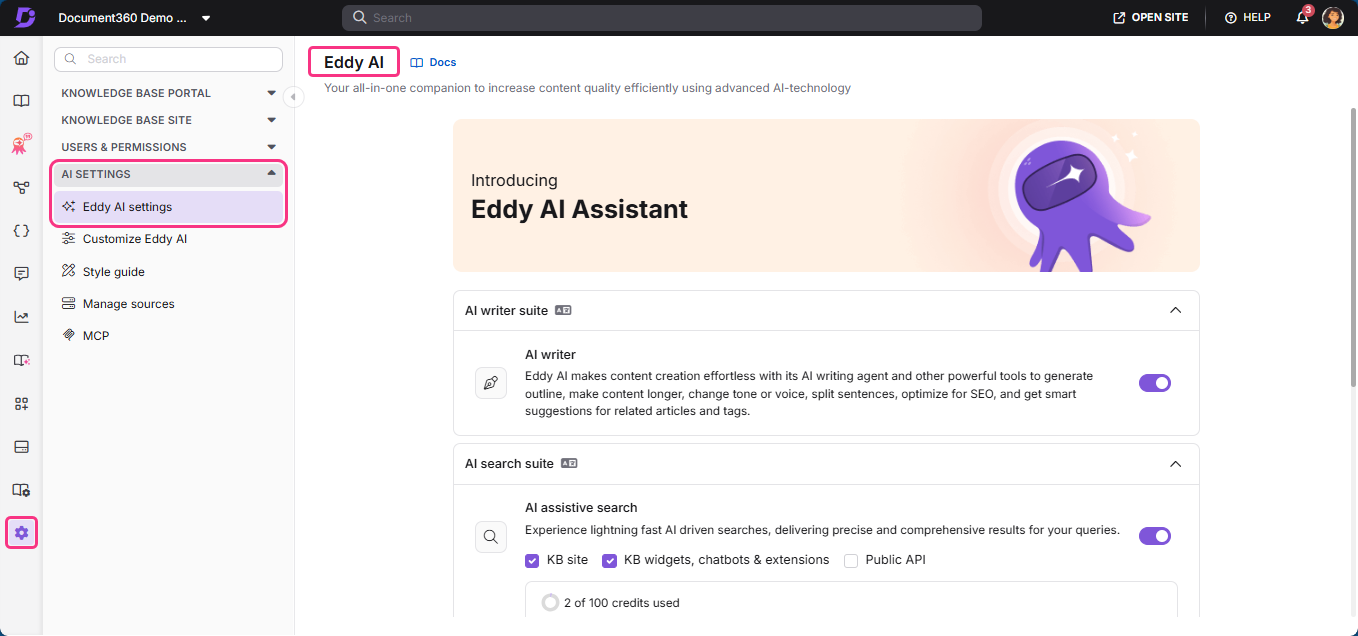
- Navega a Configuración () > ajustes de IA en la barra de navegación izquierda del portal de la Base de conocimientos.
- En el panel de navegación izquierdo, navega a la configuración de Eddy AI.
- Amplía el acordeón para la suite de IA que quieras configurar: suite de escritores con IA, suite de búsqueda con IA o suite premium de IA.
- Activa o desactiva funciones individuales según las necesidades de tu equipo.
Mejores prácticas
- Alinea las suites con los roles - Empareja la suite con quién la usa. Los escritores se benefician más de la suite de escritores de IA, el equipo de soporte de la suite de búsqueda de IA.
- Revisa sugerencias de IA - Revisa siempre el contenido generado por IA antes de publicarlo para garantizar la exactitud.
Preguntas frecuentes
¿En qué se diferencia Eddy AI de un chatbot?
Un chatbot es una interfaz conversacional. Los usuarios interactúan con él haciendo preguntas y obteniendo respuestas en formato de chat. Normalmente está diseñado para usuarios finales que buscan información o soporte.
Mientras que Eddy AI es un conjunto de herramientas de IA integradas integradas en Document360. Ayuda a los escritores, impulsa resultados de búsqueda inteligentes y genera automáticamente términos de glosario.
| Aspecto | Chatbot | Eddy AI |
|---|---|---|
| Estilo de interacción | Conversacional | Herramientas integradas |
| A quién sirve | Usuario final haciendo preguntas | Escritores, editores y gestores del conocimiento |
| Donde vive | Una ventana de chat o widget separado | Integrado en el editor y la configuración de Document360 |
| Producción | Respuestas por texto | Mejoras de contenido, resultados de búsqueda, entradas de glosario |
| Control por parte del usuario | Impulsado por prompts | Activar/desactivar cada función |