
Document360 v12.2.1 is now live, bringing new features and meaningful improvements that help teams manage access more securely, keep content accurate, and scale knowledge operations with confidence. This release focuses on strengthening editorial workflows, improving table interactions in the editor, enhancing SEO behavior across workspaces and localizations, and expanding API capabilities for better automation and performance. Together, these updates help teams collaborate more effectively, maintain content with greater precision, and ensure your knowledge base stays consistent, discoverable, and easy to maintain as it grows.
Features/Enhancements
Improved Workflow assignments for better collaboration and ownership
Category: Workflow status | Improvements
You can now assign multiple users or groups to a workflow stage, allowing shared ownership during reviews, approvals, or content updates. Default assignees can be configured at the workflow level for each status. When an article is moved to a specific state, the default assignees are automatically applied, while still allowing users to modify the workflow assignment at the article level when needed. When multiple users or groups are assigned to a workflow stage, everyone involved can clearly see the individual completion status of each assignee. This makes it easier to understand who has completed their part of the work and allows teams to confidently move articles forward.
.png)
For more information, read the article on Managing workflow status
Table usability enhancements
Category: Editor | Improvement
We’ve improved table interactions to make working with large and content-rich tables easier and more intuitive:
You can now freeze rows and columns in tables to keep headers and key identifiers visible while scrolling, making large tables easier to read and navigate, similar to spreadsheet-style behavior.
Enhanced text selection within cells for greater accuracy and control:
Single-click to place the cursor exactly where you click
Double-click to select a word (or a character, if applicable)
Triple-click to select an entire line
Quadruple-click to select all cell content, including text, images, and lists
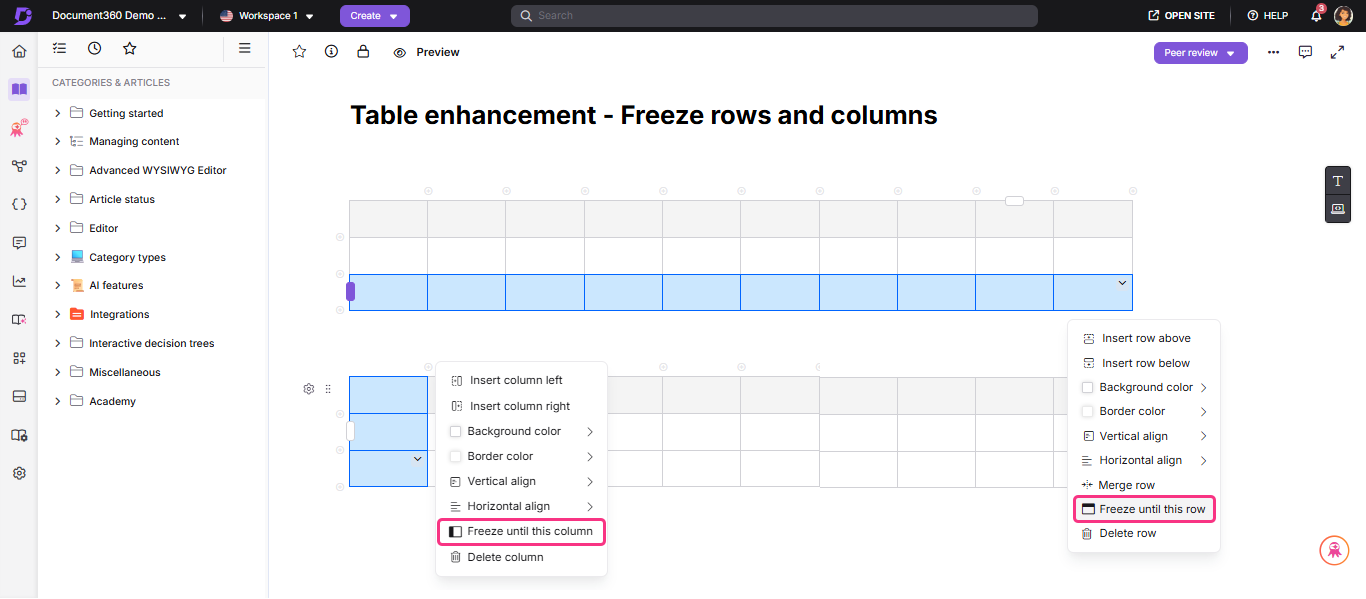
For more information, read the article on Tables in advanced WYSIWYG editor
API support for offline documentation exports
Category: API | Improvement
The existing ‘Start a new export’ API endpoint has been refined to improve clarity and flexibility for automated offline documentation exports. You can programmatically trigger exports and optionally limit them to specific workspaces, categories, or languages. We’ve also improved parameter handling and clarified documentation to ensure consistent behavior, while maintaining backward compatibility with existing integrations.
For more information, refer to the API documentation for the Start a new export endpoint.
Strikethrough removed from Eddy AI search results
Category: AI search | Improvement
Strikethrough formatting has been removed from Eddy AI search results to improve readability and clarity. Eddy now presents only content that is not crossed out, making responses easier to scan and understand while searching the most relevant information and content discovery.
Support for linking hidden articles
Category: Content management | Improvement
You can now link to hidden articles directly within the article editor that are not publicly visible. This allows teams to prepare internal references in advance and build complete content structures before articles are made visible to readers. This improvement is especially useful during content planning, reviews, and internal QA workflows. Teams can interlink related articles while they are still in hidden states, without needing to revisit and update links after publication. Once the linked articles are unhidden, the links work without any additional changes.
Other updates
The Knowledge base widget now maintains session continuity for Non–Single Page Application (Non-SPA) websites. This behavior was previously supported in SPA environments and has now been extended to Non-SPA websites as well. If a user reloads the page, navigates elsewhere, or signs in midway during the same session, the widget automatically reopens the last viewed article, allowing users to continue without restarting their search.
Newly created and forked articles will no longer be automatically added to the Unassigned list in the Tasks page. Articles will now appear in the Tasks page only when the workflow status is updated, a reviewer is assigned, or a due date is set. This helps prevent unnecessary task creation and keeps dashboards focused on actionable items. These articles remain accessible from the All articles page, where workflow status updates and assignments can be managed directly.
You can now update workflow status directly from the All articles page, making it easier to manage workflow transitions in bulk.
A new “Workflow Assigned To” filter has been added to the All articles page. You can filter articles by assignment status, including Unassigned, All Users, or specific users, providing better visibility into ownership and workload distribution.
Increased the maximum character limit for the Writing Agent style guide from 3,000 to 25,000 characters, allowing teams to define more comprehensive writing standards and guidelines.
Added pagination support to the Project Versions Articles API to improve performance and enable efficient handling of large result sets.
When “Block inherited account” is enabled under Manage content access, the workflow assignee dropdown now displays only users who have access to the selected article or category. In general, only users with access to an article or category can be assigned in a workflow status.
NOTE
Minor security updates, bug fixes, and performance improvements have also been implemented across the Knowledge base portal and Knowledge base site.