Quando sua base de conhecimento estiver visualizada no modo escuro, faça as caixas de chamada. Informações, Erros e Avisos podem se tornar difíceis de ler. Seus fundos e textos claros padrão foram projetados para o modo Claro, e no modo Escuro podem parecer desbotados, de baixo contraste ou visualmente inconsistentes com o restante da página. Você pode sobrescrever as cores de chamadas do modo Escuro usando um trecho CSS para garantir que as chamadas permaneçam claras e acessíveis em ambos os temas.
Quando usar isso
Use essa personalização quando quiser:
- Mantenha a legibilidade das caixas de chamada quando o modo Escuro estiver ativado como padrão ou disponível para os leitores.
- Aplique cores personalizadas de marca em chamadas de Informação, Erro e Aviso especificamente no modo Escuro, sem afetar a aparência do modo Claro.
- Garanta contraste suficiente entre cenários de chamada, texto e bordas em documentação com tema escuro.
Antes de começar
- Você precisa de acesso às Configurações () > site de base de conhecimento > Personalização do site > CSS & JavaScript personalizados no portal da base de conhecimento.
- Este CSS tem como alvo o modo escuro especificamente usando o
html[data-bs-theme=dark]seletor. Isso não afeta a aparência de chamadas no modo Luz. - Decida as cores que você quer para cada tipo de chamada antes de começar. O trecho cobre três tipos de chamada: Informação (
.infoBox), Erro (.errorBox) e Aviso (.warningBox). Cada um possui três propriedades personalizáveis: cor de fundo, cor do texto e cor da borda.
Como mudar as cores de chamada no modo Escuro
-
Navegar até Configurações (
) > Site da base de conhecimento > Personalização do site > CSS & JavaScript personalizados no portal da base de conhecimento.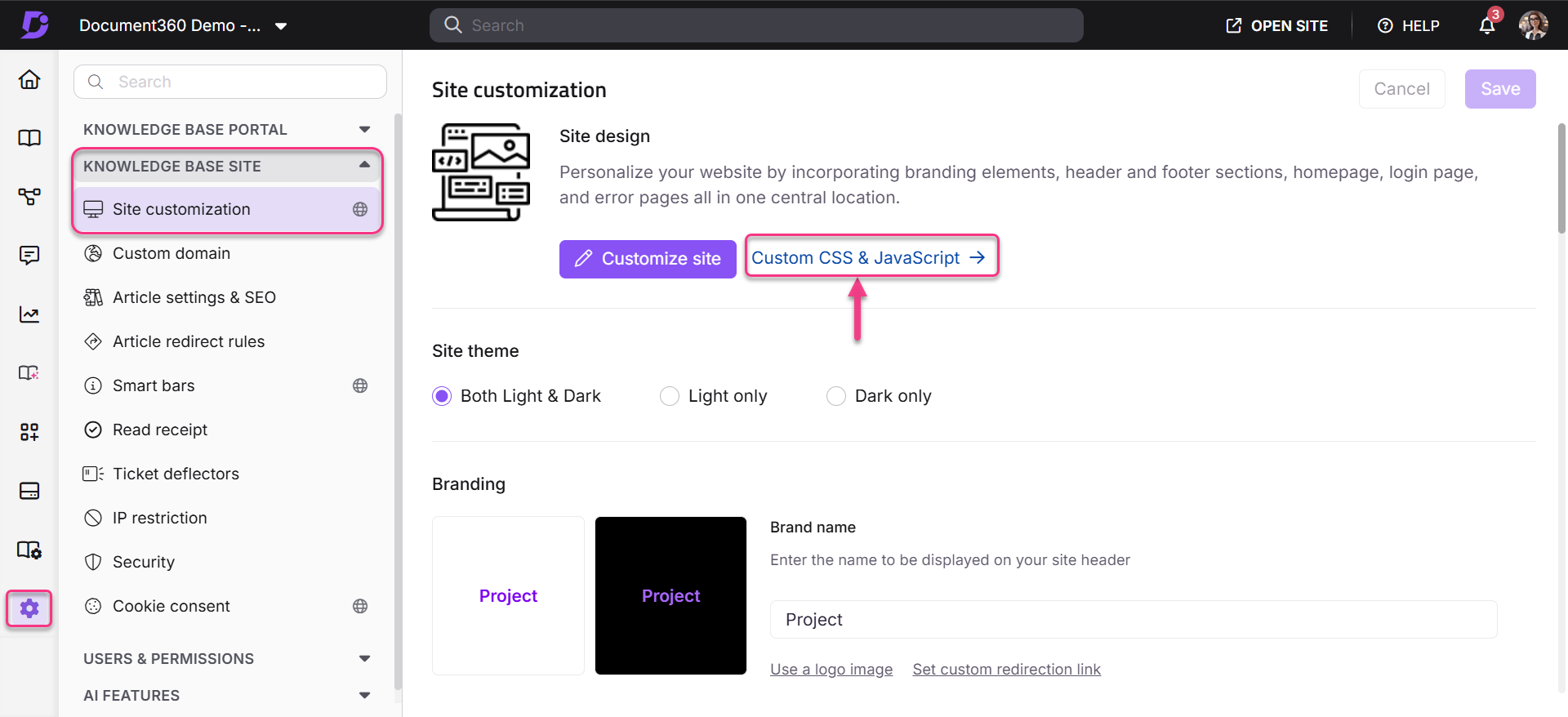
-
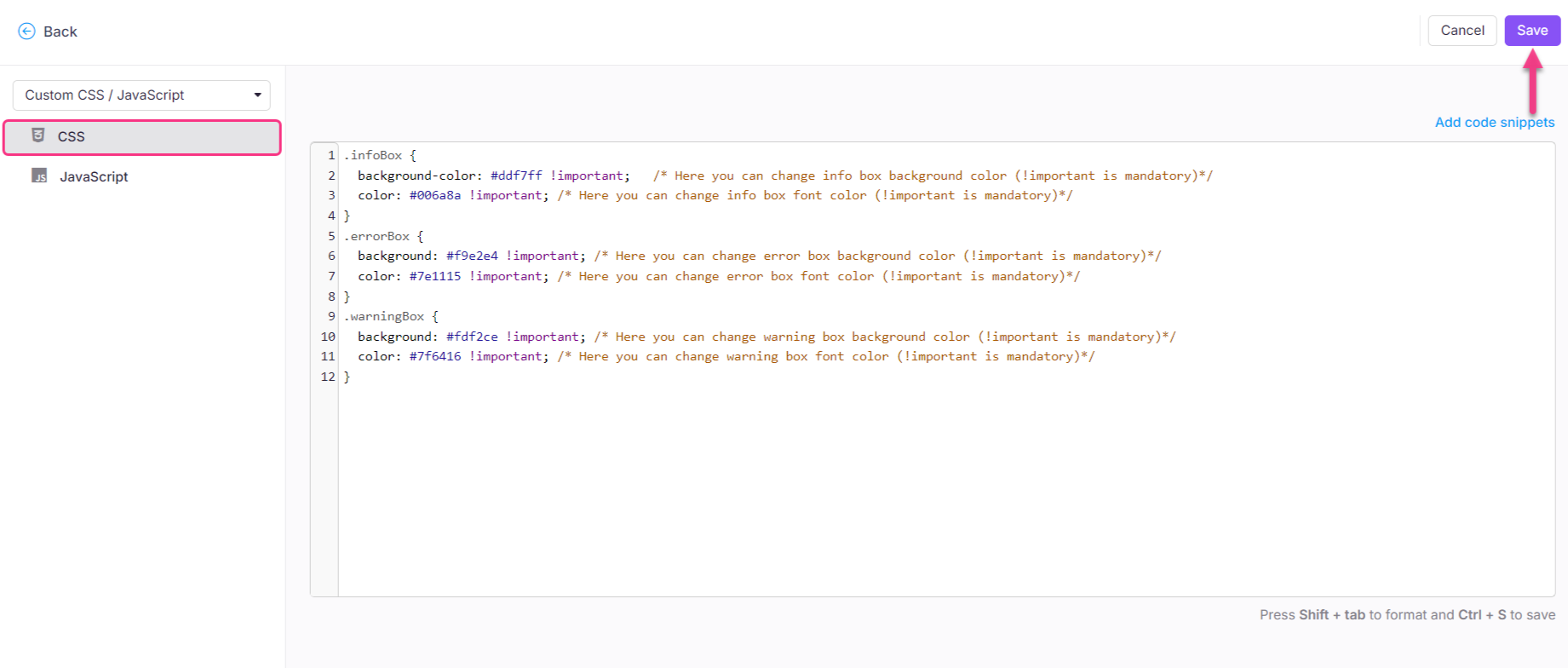
No painel de navegação à esquerda, selecione a aba CSS e cole o seguinte trecho de CSS:
html[data-bs-theme=dark] .infoBox {
  background-color: #ddf7ff !important;   /* Here you can change info box background color (!important is mandatory)*/
  color: #006a8a !important; /* Here you can change info box font color (!important is mandatory)*/
  border-left: 4px solid #006a8a !important; /* Here you can change info box border color (!important is mandatory)*/
}
html[data-bs-theme=dark] .errorBox {
  background: #f9e2e4 !important; /* Here you can change error box background color (!important is mandatory)*/
  color: #7e1115 !important; /* Here you can change error box font color (!important is mandatory)*/
  border-left: 4px solid #7e1115 !important; /* Here you can change info box border color (!important is mandatory)*/
}
html[data-bs-theme=dark] .warningBox {
  background: #fdf2ce !important; /* Here you can change warning box background color (!important is mandatory)*/
  color: #7f6416 !important; /* Here you can change warning box font color (!important is mandatory)*/
  border-left: 4px solid #7f6416 !important; /* Here you can change info box border color (!important is mandatory)*/
}
- Atualize os valores de cor para cada tipo de chamada. O trecho contém três propriedades por chamada:
| Propriedade CSS | O que ele controla |
|---|---|
background-color / background |
A cor de preenchimento da caixa de chamada |
color |
A cor do texto dentro do chamado |
border-left |
A cor da borda de destaque esquerda do chamado |
NOTA
colorcontrola a cor do texto.background-colorControla a cor de preenchimento da caixa de chamado.
A!importantdeclaração é obrigatória em todos os valores; sem ela, a sobreposição do modo Sombrio não se aplica.
-
Clique em Salvar.
Melhores práticas
- Mantenha
!importanttodos os valores. O seletor de modo escuro tem menor especificidade do que os estilos de temas embutidos do Document360. Remover!importantde qualquer propriedade fará com que essa propriedade volte à cor padrão do modo escuro. - Mantenha as razões de contraste. Escolha pares de cor de fundo e texto que atendam aos padrões de contraste WCAG AA (mínimo 4,5:1 para o texto principal). Ferramentas como o WebAIM Contrast Checker podem ajudar a verificar suas combinações de cores antes de salvar.
- Mantenha a semântica do tipo callout intacta. Avisos de Informação, Erro e Aviso sinalizam diferentes níveis de urgência para os leitores. Ao personalizar, mantenha a distinção visual entre eles — evite usar cores semelhantes para os três.
- Teste no modo Escuro antes de publicar. Depois de salvar, mude sua base de conhecimento para o modo Sombrio e abra um artigo contendo os três tipos de chamadas para confirmar que cada um renderiza corretamente.
- Você pode omitir tipos de chamadas que não precisa personalizar. Se você só quiser mudar a caixa de Informações, remova os
.errorBoxblocos e.warningBoxdo trecho. Os outros continuarão usando as cores padrão do modo escuro.