Der benutzerdefinierte Footer erlaubt es dir, den Standard-Footer auf deiner Knowledge Base-Seite durch dein eigenes HTML- und CSS-Layout zu ersetzen. Im Gegensatz zu den vorgefertigten Footer-Optionen gibt Ihnen der benutzerdefinierte Footer vollständige Kontrolle darüber, was am unteren Rand jeder Seite erscheint – einschließlich mehrspaltigen Linkgruppen, Ihrem Logo, Copyright-Text, Kontaktdaten, sozialen Symbolen oder allen anderen Inhalten, die Ihre Marke benötigt. Um einen benutzerdefinierten Footer zu erstellen, braucht man praktische Kenntnisse in HTML und CSS.
Wann man den benutzerdefinierten Fuß verwendet
- Mehrspalten-Layouts – wenn Sie Fußzeilen-Links in beschriftete Spalten (wie Produkt, Ressourcen und Unternehmen) organisieren müssen, reicht das einfache Einzeilenformat des Grundsatzes nicht aus.
- Markenkonsistentes Design – wende die genauen Farben, Schriftarten und den visuellen Stil deiner Marke auf den Fuß an, ohne durch die feste Struktur des Grundunterhalts eingeschränkt zu sein.
- Rich Footer-Inhalte – fügen Sie ein Logo, ein Leitbild, Büroadressen, Kontaktdaten oder eingebettete soziale Symbole hinzu, die über die vier im Grundtext hinaus unterstützt werden.
- PDFs oder Dateien verknüpfen – bette Links zu Dateien, die auf deinem Drive gespeichert sind, direkt im HTML-Footer ein.
Wie man einen benutzerdefinierten Fuß erstellt
- Navigieren Sie in der linken Navigationsleiste des Wissensdatenbank-Portals zu () > Knowledge base site .
- Im linken Navigationsfenster navigieren Sie zur Site-Anpassung.
- Klicken Sie auf die Schaltfläche "Website anpassen ".
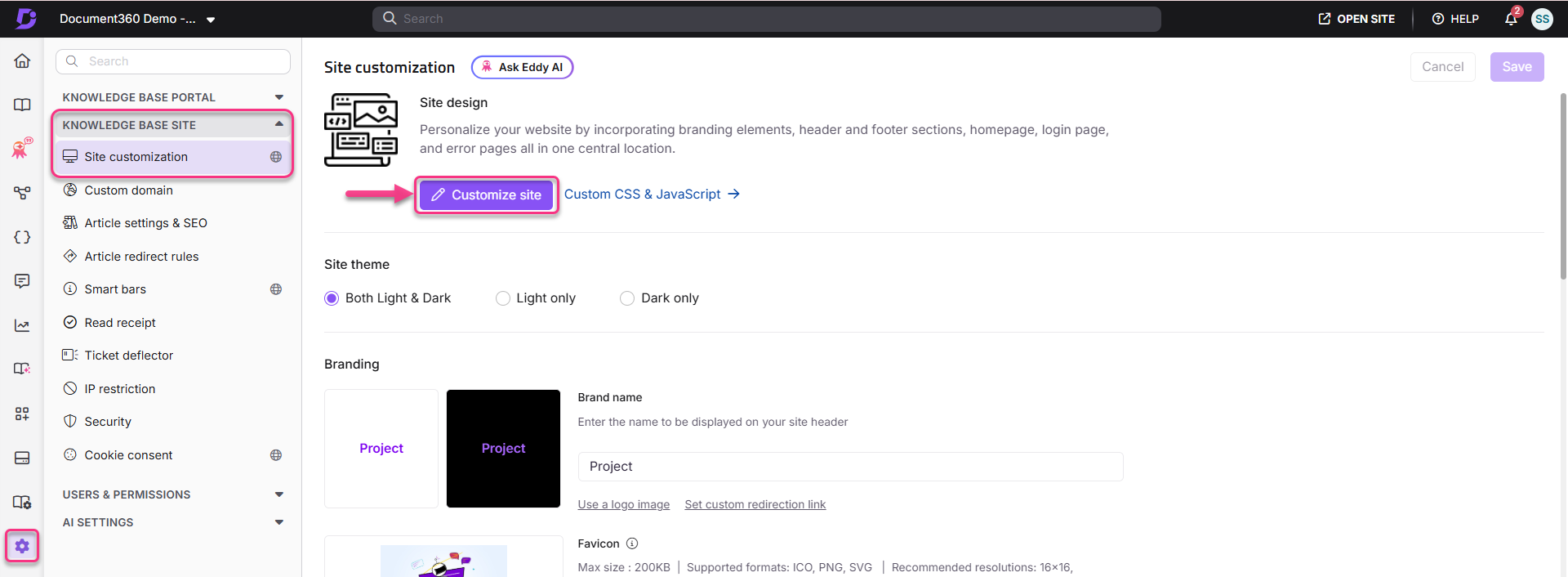
- Wählen Sie im Dropdown-Menü den Site-Header und -footer aus.
- Klicken Sie auf den Tab Fuß und wählen Sie die Option Benutzerdefinierter Fuß. Es erscheinen drei Optionen:
- Thema A – ein vorgegebenes, dunkles Thema. Du kannst den bereitgestellten Code bei Bedarf bearbeiten.
- Thema B – ein vordefiniertes Lichtthema. Du kannst den bereitgestellten Code bei Bedarf bearbeiten.
- Blank – ein leerer Editor, um einen eigenen HTML-Footer von Grund auf zu schreiben.
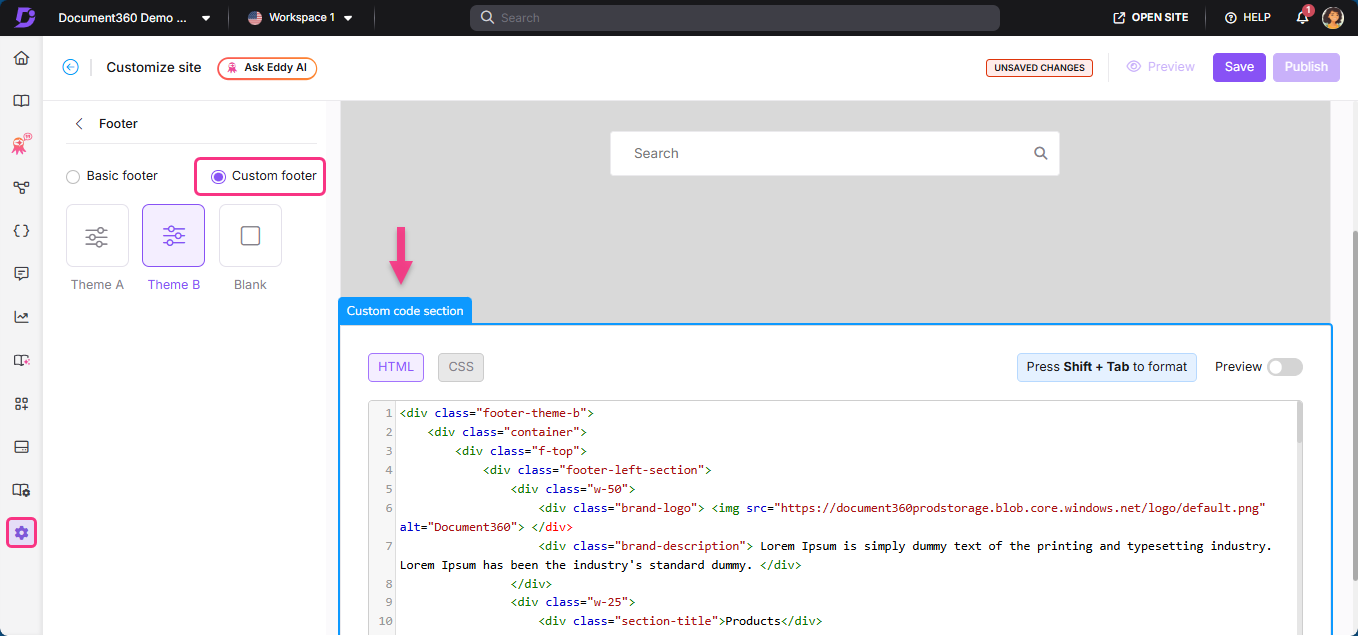
- Wählen Sie Ihre bevorzugte Option aus und fügen Sie HTML- und CSS-Code hinzu oder bearbeiten Sie.
Ein benutzerdefinierter Footer gilt für alle Seiten auf Ihrer Wissensdatenbank-Website.
Wie man speichert und veröffentlicht
- Nutzen Sie rechts den Schalter Vorschau, um Ihre Änderungen zu überprüfen.
- Klicken Sie auf Speichern , um Ihre Änderungen zu speichern.
- Klicken Sie auf Veröffentlichen , um Änderungen live vorzunehmen.
Wie man ein PDF oder eine Datei im benutzerdefinierten Footer verlinkt
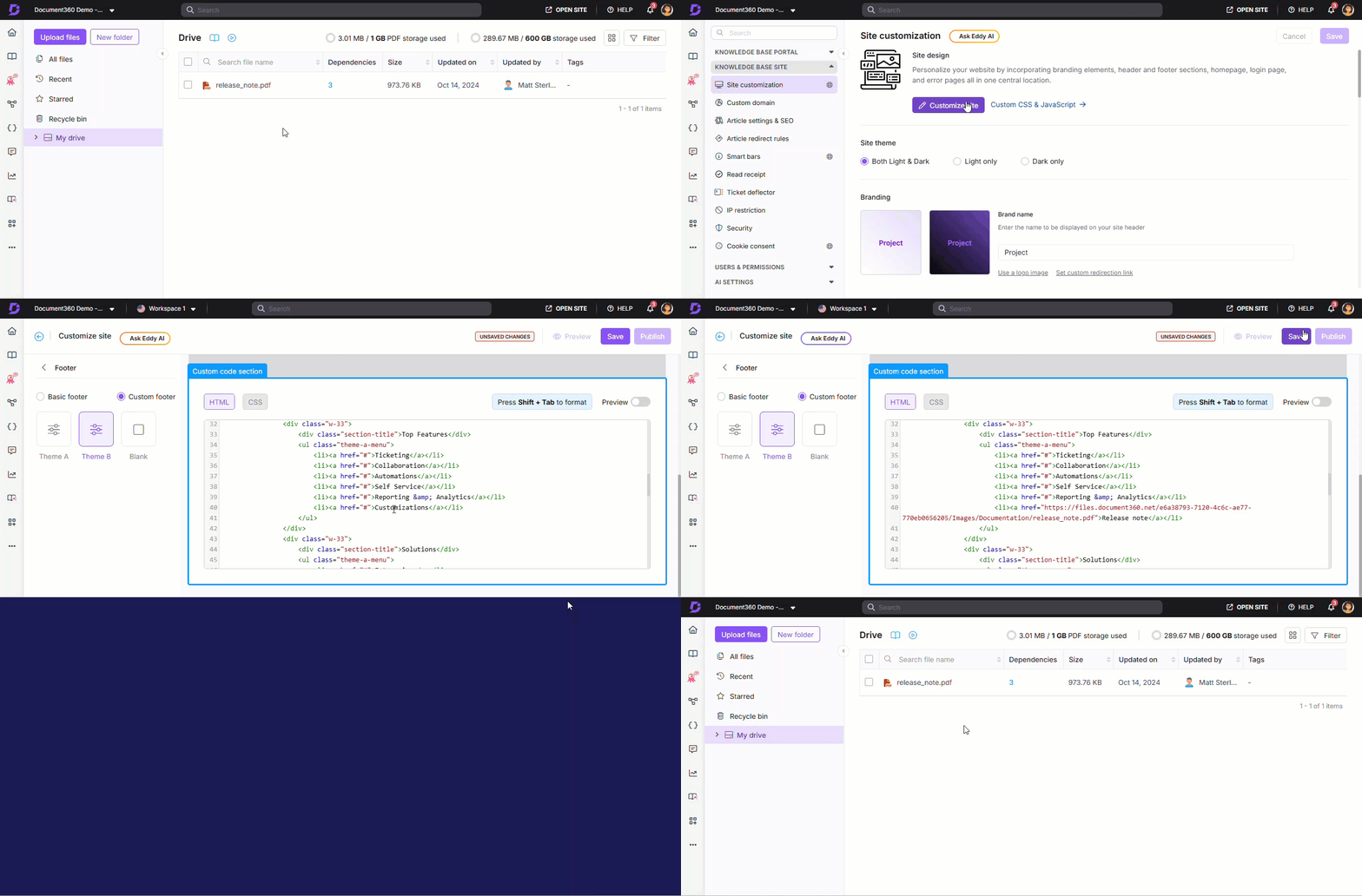
- Navigiere in der linken Navigationsleiste des Knowledge Base-Portals zu Drive () und wähle die gewünschte Datei aus. Das Dateidetail-Panel erscheint.
- Im Bereich Standort klicken Sie auf das Kopieren-Symbol , um den Dateilink zu kopieren.
- Navigiere zu () > Knowledge base site > Site-Anpassung und klicke auf Site anpassen.
- Wählen Sie im Dropdown-Menü den Site-Header und -footer aus.
- Klicken Sie auf den Tab Fuß und wählen Sie die Option Benutzerdefinierter Fuß.
- Wählen Sie Ihr gewünschtes Thema aus.
- Im Abschnitt Benutzerdefinierten Code fügen Sie den kopierten Link als Element
<a href>an die gewünschte Stelle ein.
Benutzerdefinierte Footer-Vorlagen
Die folgenden Vorlagen sind einsatzbereit. Um ein beliebiges Design umzusetzen, navigiere zu () > Knowledge base site > Customize Site > Site-Header & Footer > Footer > Custom Footer > Blank und füge HTML und CSS in die jeweiligen Abschnitte ein.
Sie können Stile wie Farben, Schriftgrößen oder Abstände anpassen, um besser zu Ihrer Marke zu passen.
Footer-Design 1
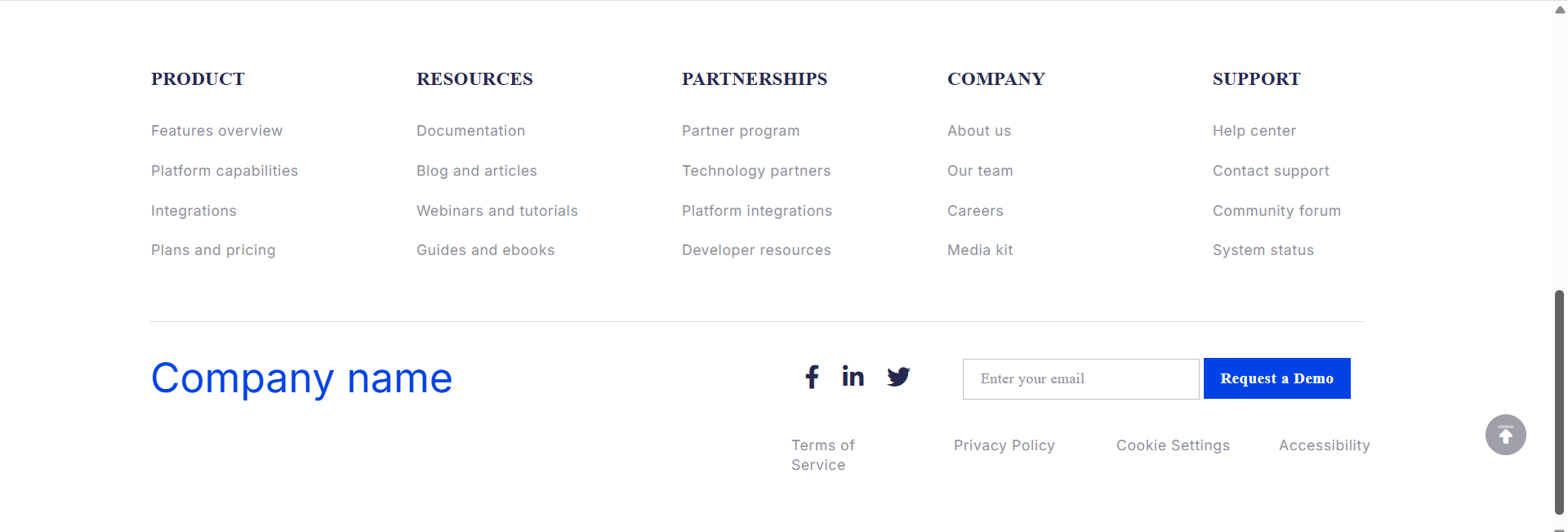
Ein mehrspaltiger Fußzeile mit Segmenten zu Produkt, Ressourcen, Partnerschaften, Unternehmen und Support, Social-Media-Symbolen, einer E-Mail-Eingabe und einem Button zur Demoanforderung. Enthält eine untere Leiste mit rechtlichen Links.
HTML-Code
<div class="container">
    <div class="footer">
        <div class="footer-top">
            <div>
                <h4>PRODUCT</h4>
                <ul>
                    <li>Features overview</li>
                    <li>Platform capabilities</li>
                    <li>Integrations</li>
                    <li>Plans and pricing</li>
                    <li>Use cases</li>
                    <li>Enterprise solutions</li>
                    <li>Industry applications</li>
                </ul>
            </div>
            <div>
                <h4>RESOURCES</h4>
                <ul>
                    <li>Documentation</li>
                    <li>Blog and articles</li>
                    <li>Webinars and tutorials</li>
                    <li>Guides and ebooks</li>
                    <li>Community stories</li>
                    <li>ROI calculators</li>
                    <li>Newsletter archive</li>
                    <li>Help articles</li>
                </ul>
            </div>
            <div>
                <h4>PARTNERSHIPS</h4>
                <ul>
                    <li>Partner program</li>
                    <li>Technology partners</li>
                    <li>Platform integrations</li>
                    <li>Developer resources</li>
                    <li>Partner directory</li>
                    <li>Affiliate program</li>
                </ul>
            </div>
            <div>
                <h4>COMPANY</h4>
                <ul>
                    <li>About us</li>
                    <li>Our team</li>
                    <li>Careers</li>
                    <li>Media kit</li>
                    <li>Events and webinars</li>
                    <li>Customer highlights</li>
                    <li>Contact us</li>
                </ul>
            </div>
            <div>
                <h4>SUPPORT</h4>
                <ul>
                    <li>Help center</li>
                    <li>Contact support</li>
                    <li>Community forum</li>
                    <li>System status</li>
                    <li>Release notes</li>
                    <li>Accessibility policy</li>
                    <li>API docs</li>
                    <li>Changelog</li>
                </ul>
            </div>
        </div>
        <div class="footer-bottom">
            <div class="footer-logo">
                <span style="font-size:40px;font-weight:1200;color:#0042E4;">Company name</span>
            </div>
            <div class="icons">
                <ul>
                    <li class="facebook"><a href="https://www.facebook.com"><i class="fab fa-facebook-f"></i></a></li>
                    <li class="linkedin"><a href="https://www.linkedin.com/in"><i class="fab fa-linkedin-in"></i></a></li>
                    <li class="twitter"><a href="https://www.twitter.com"><i class="fab fa-twitter"></i></a></li>
                </ul>
                <div class="footer-form">
                    <input type="text" id="fname" name="fname" placeholder="Enter your email" />
                    <button>Request a Demo</button>
                </div>
            </div>
        </div>
        <div class="footer-last">
            <p>Terms of Service</p>
            <p> Privacy Policy</p>
            <p> Cookie Settings</p>
            <p> Accessibility</p>
        </div>
    </div>
</div>
CSS-Code
.footer {
    padding-top: 112px;
}
.footer-top {
    display: flex;
    justify-content: space-between;
    margin: auto;
    width: 1225px;
}
.footer-top h4 {
    font-size: 18px;
    letter-spacing: 0.5px;
    line-height: 23px;
    font-weight: 600;
    color: rgba(39, 40, 80, 1);
    margin-bottom: 19px;
    margin-top: 0px;
}
.footer-top ul {
    list-style-type: none;
    padding: 0px;
}
.footer-bottom {
    display: flex;
    justify-content: space-between;
    position: relative;
    width: 1225px;
    margin: auto;
    margin-top: 103px;
}
.footer-bottom ul {
    list-style-type: none;
    padding: 0px;
    display: flex;
    justify-content: center;
    flex: 0 0 30%;
    margin: 0px;
    align-items: center;
}
.footer-bottom ul li a {
    color: rgba(39, 40, 80, 1);
}
.footer-top ul li {
    padding: 10px 0px 10px 0px;
    font-size: 14px;
    letter-spacing: 0.5px;
    line-height: 19px;
    font-weight: 400;
    color: rgba(143, 143, 160, 1);
    width: 185px;
}
.footer-last {
    display: flex;
    justify-content: flex-end;
    width: 1225px;
    margin-top: 25px !important;
    margin: auto;
    color: rgba(143, 143, 160, 1);
    font-size: 14px;
    margin-bottom: 76px;
}
.footer-last p {
    flex: 0 0 13%;
    color: rgba(143, 143, 160, 1);
    font-size: 14px;
    padding-left: 40px;
}
div.footer-bottom:before {
    content: "";
    position: absolute;
    left: 0%;
    right: 0;
    bottom: 82px;
    height: 5px;
    width: 97%;
    border-top: 1px solid #D9D9DF;
}
.icons {
    display: flex;
    flex: 0 0 50%;
    align-items: center;
}
.footer-form button {
    background-color: #0042E4;
    color: white;
    padding: 10px 16.34px 10px 16.5px;
    font-size: 15px;
    border: 0px;
    font-weight: 700;
}
input#fname {
    padding: 10px 100.84px 11px 16.6px;
    width: 232px;
    height: 40px;
    font-size: 14px;
    border: 1px solid RGB(193, 193, 204);
}
.fab {
    font-family: "Font Awesome 5 Brands";
    font-weight: 400;
    font-size: 23px;
}
.icons ul li {
    margin-right: 23px;
}
Footer-Design 2

Ein minimaler Fuß mit einer SVG-Grafik im Hintergrund, die farbige Kreise und Polygone verwendet, mit urheberrechtlich geschütztem Text, Datenschutzrichtlinie und Nutzungsbedingungen-Links im Mittelpunkt am unteren Rand.
HTML-Code
<footer class="footer">
<div class="footer-background">
<svg xmlns="http://www.w3.org/2000/svg" viewBox="0 0 1440 200" preserveAspectRatio="none">
<!-- Colored Circles -->
<circle cx="120" cy="60" r="15" fill="#FFD166" opacity="0.6" />
<circle cx="400" cy="140" r="20" fill="#06D6A0" opacity="0.4" />
<circle cx="700" cy="100" r="10" fill="#EF476F" opacity="0.6" />
<circle cx="1050" cy="80" r="18" fill="#118AB2" opacity="0.5" />
<circle cx="1300" cy="130" r="12" fill="#073B4C" opacity="0.3" />
<circle cx="200" cy="180" r="10" fill="#FF9F1C" opacity="0.4" />
<circle cx="600" cy="190" r="14" fill="#8338EC" opacity="0.5" />
<circle cx="1000" cy="185" r="16" fill="#3A86FF" opacity="0.3" />
<!-- Polygons -->
<polygon points="250,160 260,140 270,160" fill="#FB5607" opacity="0.4" />
<polygon points="800,150 810,130 820,150" fill="#FF006E" opacity="0.5" />
<polygon points="1150,170 1160,150 1170,170" fill="#1982C4" opacity="0.3" />
</svg>
</div>
    <div class="footer-content">
<div class="footer__col copyright">
<div class="footer__copy-links">
<a href="https://document360.com/privacy-policy" class="footer__copy-link">Privacy Policy |</a>
<a href="https://document360.com/terms-of-service" class="footer__copy-link">Terms of Service |</a>
<a href="tel:+1-800-000-0000" class="footer__copy-link">+1 800 000 0000</a>
</div>
<p>© 2025 Document360. All rights reserved.</p>
</div>
</div>
</footer>
CSS-Code
.footer {
    position: relative;
    background-color: #fff;
    color: #333;
    padding: 60px 20px 40px;
    text-align: center;
    font-family: 'Segoe UI', sans-serif;
    overflow: hidden;
}
.footer-background {
    position: absolute;
    top: 0;
    left: 0;
    width: 100%;
    height: 100%;
    z-index: 0;
    pointer-events: none;
}
.footer-background svg {
    width: 100%;
    height: 100%;
}
.footer-content {
    position: relative;
    z-index: 1;
}
.footer-content a {
    color: #118AB2;
    text-decoration: none;
}
.footer-content a:hover {
    text-decoration: underline;
}
Fundamentdesign 3
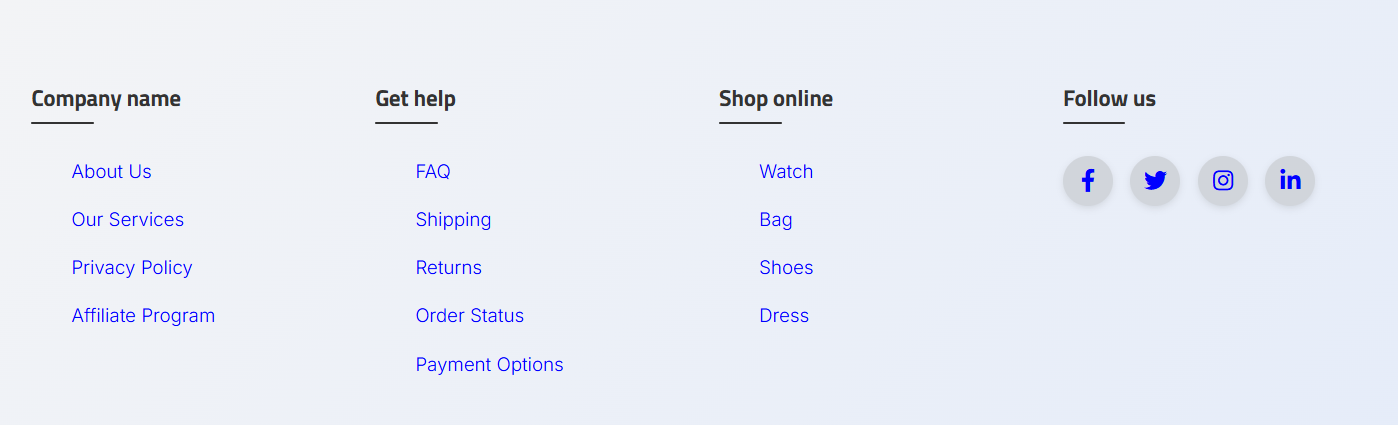
Ein Vollbreiten-Fußer mit Farbverlaufs-Hintergrund, vier Spalten (Unternehmen, Hilfe erhalten, Online-Shoppen, Folgen Sie uns) und kreisförmigen Social-Media-Icon-Links. Verwendet die Poppins-Schrift und ist vollständig reaktionsschnell.
HTML-Code
<!DOCTYPE html>
<html lang="en">
<head>
    <title>Footer Design</title>
    <meta charset="utf-8">
    <meta name="viewport" content="width=device-width, initial-scale=1">
    <link rel="stylesheet" href="css/style.css">
    <link rel="stylesheet" type="text/css" href="https://cdnjs.cloudflare.com/ajax/libs/font-awesome/5.15.1/css/all.min.css">
</head>
<body>
    <footer class="footer">
        <div class="container">
            <div class="row">
                <div class="footer-col">
                    <h4>Company name</h4>
                    <ul>
                        <li><a href="#">about us</a></li>
                        <li><a href="#">our services</a></li>
                        <li><a href="#">privacy policy</a></li>
                        <li><a href="#">affiliate program</a></li>
                    </ul>
                </div>
                <div class="footer-col">
                    <h4>Get help</h4>
                    <ul>
                        <li><a href="#">FAQ</a></li>
                        <li><a href="#">shipping</a></li>
                        <li><a href="#">returns</a></li>
                        <li><a href="#">order status</a></li>
                        <li><a href="#">payment options</a></li>
                    </ul>
                </div>
                <div class="footer-col">
                    <h4>Shop online</h4>
                    <ul>
                        <li><a href="#">watch</a></li>
                        <li><a href="#">bag</a></li>
                        <li><a href="#">shoes</a></li>
                        <li><a href="#">dress</a></li>
                    </ul>
                </div>
                <div class="footer-col">
                    <h4>Follow us</h4>
                    <div class="social-links">
                        <a href="#"><i class="fab fa-facebook-f"></i></a>
                        <a href="#"><i class="fab fa-twitter"></i></a>
                        <a href="#"><i class="fab fa-instagram"></i></a>
                        <a href="#"><i class="fab fa-linkedin-in"></i></a>
                    </div>
                </div>
            </div>
        </div>
    </footer>
</body>
</html>
CSS-Code
@import url('https://fonts.googleapis.com/css2?family=Poppins:wght@300;400;500;600;700&display=swap');
body {
    line-height: 1.5;
    font-family: 'Poppins', sans-serif;
    background-color: #f4f4f9;
}
* {
    margin: 0;
    padding: 0;
    box-sizing: border-box;
}
.container {
    max-width: 1170px;
    margin: auto;
    padding: 0 15px;
}
.row {
    display: flex;
    flex-wrap: wrap;
}
ul {
    list-style: none;
}
.footer {
    background: linear-gradient(135deg, #f3f4f6, #e5ecf9);
    padding: 70px 0;
    box-shadow: 0 -4px 20px rgba(0, 0, 0, 0.05);
}
.footer-col {
    width: 25%;
    padding: 0 15px;
    position: relative;
}
.footer-col h4 {
    color: #333333;
    font-size: 18px;
    margin-bottom: 25px;
    font-weight: 600;
    position: relative;
    padding-bottom: 10px;
}
.footer-col h4::before {
    content: '';
    position: absolute;
    left: 0;
    bottom: 0;
    background-color: #333333;
    height: 2px;
    width: 50px;
    border-radius: 4px;
}
.footer-col ul li:not(:last-child) {
    margin-bottom: 12px;
}
.footer-col ul li a {
    font-size: 15px;
    text-transform: capitalize;
    color: #555555;
    text-decoration: none;
    font-weight: 300;
    transition: all 0.3s ease;
    display: block;
    padding: 2px 0;
}
.footer-col ul li a:hover {
    padding-left: 10px;
    color: #1a1a1a;
}
.footer-col .social-links a {
    display: inline-block;
    height: 40px;
    width: 40px;
    background-color: #d1d5db;
    margin: 0 10px 10px 0;
    text-align: center;
    line-height: 40px;
    border-radius: 50%;
    color: #333333;
    font-size: 18px;
    transition: all 0.4s ease;
}
.footer-col .social-links a:hover {
    background-color: #ffffff;
    color: #4f46e5;
    transform: scale(1.1);
}
@media(max-width: 767px) {
    .footer-col {
        width: 50%;
        margin-bottom: 30px;
    }
}
@media(max-width: 574px) {
    .footer-col {
        width: 100%;
    }
}
Footer-Design 4

Ein kombiniertes Header- und Footer-Layout. Der Header verwendet einen Korallen-zu-Pfirsich-Gradienten mit Navigationslinks. Der Footer verwendet einen hellblauen Farbverlauf mit urheberrechtlichem Text und legalen Links.
HTML-Code
<!DOCTYPE html>
<html lang="en">
<head>
<meta charset="UTF-8">
<meta name="viewport" content="width=device-width, initial-scale=1.0">
<title>Product name</title>
<link rel="stylesheet" href="styles.css">
</head>
<body>
<div class="na-header">
<div class="na-logo">Product name</div>
<div class="na-nav">
<a href="#">Contact Us</a>
<a href="#">Careers</a>
<a href="#">SDS</a>
<a href="#">About Us</a>
<a href="#">Where to Buy</a>
</div>
</div>
<div class="na-footer">
© 2024 by Product. All rights reserved.
</div>
</body>
</html>
CSS-Code
* {
    margin: 0;
    padding: 0;
    box-sizing: border-box;
}
body {
    font-family: 'Poppins', sans-serif;
    line-height: 1.6;
    background-color: #fdfbff;
    color: #2c2c2c;
}
.na-header {
    background: linear-gradient(to right, #ff7e5f, #feb47b);
    color: white;
    padding: 20px 40px;
    display: flex;
    justify-content: space-between;
    align-items: center;
    flex-wrap: wrap;
    box-shadow: 0 2px 10px rgba(0, 0, 0, 0.1);
}
.na-logo {
    font-size: 26px;
    font-weight: 700;
    letter-spacing: 1px;
}
.na-nav a {
    margin-left: 20px;
    color: #ffffff;
    text-decoration: none;
    font-weight: 500;
    font-size: 15px;
    transition: all 0.3s ease;
    position: relative;
}
.na-nav a::after {
    content: '';
    display: block;
    height: 2px;
    background: #ffffff;
    width: 0%;
    transition: width 0.3s ease;
    position: absolute;
    bottom: -4px;
    left: 0;
}
.na-nav a:hover::after {
    width: 100%;
}
.na-footer {
    background: linear-gradient(to right, #f4f9ff, #e1ecf4);
    color: #333333;
    text-align: center;
    padding: 20px 10px;
    font-size: 14px;
    border-top: 1px solid #d2dce7;
}
.na-footer a {
    color: #0066cc;
    text-decoration: none;
    font-weight: 500;
}
.na-footer a:hover {
    text-decoration: underline;
    color: #004a99;
}
Footer-Design 5
.png)
Ein hellblau-grauer Bereich mit zwei Kartenfeldern nebeneinander: eine Liste der neuesten Dokumentationsupdates mit Daten und Weiterlese-Links sowie ein Kontaktfeld mit Adresse, E-Mail, Telefon und Button "Start Free Trial / Book a Demo". Enthält unten eine Copyright-Leiste.
HTML-Code
<!DOCTYPE HTML>
<html lang="en">
<head>
<meta charset="UTF-8">
<title>Document360 Highlights</title>
<link rel="stylesheet" href="style.css">
</head>
<body>
<div class="custom-section">
<div class="custom-container">
<div class="article-box">
<h3 class="section-heading">Latest Documentation Updates</h3>
<ul class="article-list">
<li>
<p class="article-title">Using AI Writer to Generate Articles</p>
<p class="article-date">2 August, 2025</p>
<a href="#">READ MORE</a>
</li>
<li style="margin-top:15px;">
<p class="article-title">Enabling SSO with Azure AD in Document360</p>
<p class="article-date">19 July, 2025</p>
<a href="#">READ MORE</a>
</li>
<li style="margin-top:15px;">
<p class="article-title">Setting Up Custom Domain & SSL</p>
<p class="article-date">11 July, 2025</p>
<a href="#">READ MORE</a>
</li>
</ul>
</div>
<div class="contact-box">
<h3 class="section-heading">Get in Touch</h3>
<p>Document360</p>
<p>London, UK</p>
<a href="mailto:support@document360.com">support@document360.com</a>
<p class="contact-number">+XX XX XXXX XXXX</p>
<div class="button-group">
<button class="btn-filled">Start Free Trial</button>
<button class="btn-outlined">Book a Demo</button>
</div>
</div>
</div>
<div class="footer-info">
<p>©2024 Document360. All Rights Reserved.</p>
<div class="footer-links">
<a href="#">Privacy Policy</a>
<a href="#">Terms of Use</a>
<a href="#">Knowledge Base</a>
<a href="#">Security Center</a>
<a href="#">Contact Support</a>
</div>
</div>
</div>
</body>
</html>
CSS-Code
body {
    margin: 0;
    font-family: Arial, sans-serif;
    background-color: #f9f9f9;
    color: #1a1a1a;
}
.custom-section {
    background-color: #e6f0f3;
    padding: 30px 20px;
}
.custom-container {
    display: flex;
    justify-content: space-evenly;
    flex-wrap: wrap;
    gap: 40px;
}
.article-box,
.contact-box {
    flex: 1 1 300px;
    background-color: #ffffff;
    padding: 20px;
    border-radius: 8px;
    box-shadow: 0 4px 8px rgba(0, 0, 0, 0.05);
}
.section-heading {
    border-bottom: 2px solid #005f73;
    padding-bottom: 5px;
    display: inline-block;
    margin-bottom: 15px;
    color: #005f73;
}
.article-list {
    list-style-type: none;
    padding-left: 0;
}
.article-title {
    margin: 5px 0;
    font-weight: 600;
}
.article-date {
    margin: 0;
    font-size: 12px;
    color: #666666;
}
.article-list a,
.contact-box a,
.footer-links a {
    color: #0077aa;
    text-decoration: none;
    font-weight: 500;
}
.contact-number {
    margin-top: 10px;
}
.button-group {
    margin-top: 15px;
}
.btn-filled,
.btn-outlined {
    padding: 10px 20px;
    border: none;
    cursor: pointer;
    font-weight: 600;
    border-radius: 4px;
}
.btn-filled {
    background-color: #0077aa;
    color: #ffffff;
}
.btn-outlined {
    background-color: transparent;
    color: #0077aa;
    border: 1px solid #0077aa;
    margin-left: 10px;
}
.footer-info {
    margin-top: 40px;
    font-size: 12px;
    text-align: center;
    padding-top: 20px;
    border-top: 1px solid #cccccc;
    color: #666666;
}
.footer-links {
    margin-top: 15px;
}
.footer-links a {
    margin: 0 10px;
}
Fußentwurf 6
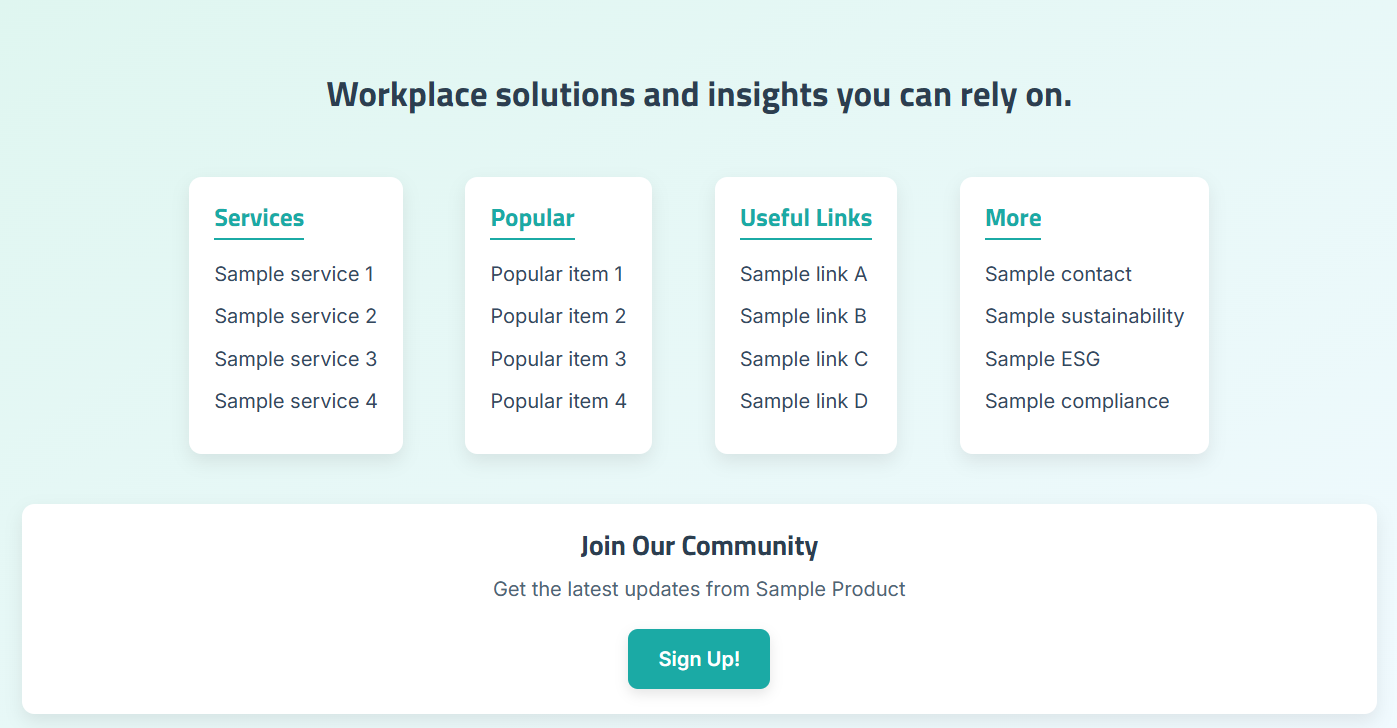
Ein hell türkisfarbener Farbverlauf mit großer Überschrift, vier Kartenspalten (Services, Beliebt, Nützliche Links, Mehr) und eine Community-Anmeldekarte mit einem gestalteten Button. Karten-Hover-Effekte fügen Tiefe hinzu.
HTML-Code
<!DOCTYPE html>
<html lang="en">
<head>
    <meta charset="UTF-8" />
    <meta name="viewport" content="width=device-width, initial-scale=1.0" />
    <title>Sample Footer</title>
    <link rel="stylesheet" href="styles.css" />
</head>
<body>
    <div class="footer">
        <div class="footer-content">
            <h2>Workplace solutions and insights you can rely on.</h2>
            <div class="footer-sections">
                <div class="footer-column box">
                    <h3>Services</h3>
                    <ul>
                        <li>Sample service 1</li>
                        <li>Sample service 2</li>
                        <li>Sample service 3</li>
                        <li>Sample service 4</li>
                    </ul>
                </div>
                <div class="footer-column box">
                    <h3>Popular</h3>
                    <ul>
                        <li>Popular item 1</li>
                        <li>Popular item 2</li>
                        <li>Popular item 3</li>
                        <li>Popular item 4</li>
                    </ul>
                </div>
                <div class="footer-column box">
                    <h3>Useful Links</h3>
                    <ul>
                        <li>Sample link A</li>
                        <li>Sample link B</li>
                        <li>Sample link C</li>
                        <li>Sample link D</li>
                    </ul>
                </div>
                <div class="footer-column box">
                    <h3>More</h3>
                    <ul>
                        <li>Sample contact</li>
                        <li>Sample sustainability</li>
                        <li>Sample ESG</li>
                        <li>Sample compliance</li>
                    </ul>
                </div>
            </div>
            <div class="footer-signup box">
                <h3>Join Our Community</h3>
                <p>Get the latest updates from Sample Product</p>
                <button>Sign Up!</button>
            </div>
        </div>
    </div>
</body>
</html>
CSS-Code
body {
    margin: 0;
    font-family: 'Segoe UI', Tahoma, Geneva, Verdana, sans-serif;
    background-color: #f0f4f8;
    color: #2c3e50;
}
.footer {
    background: linear-gradient(to bottom right, #dff6f0, #f1faff);
    padding: 60px 20px;
    text-align: center;
}
.footer h2 {
    font-size: 28px;
    margin-bottom: 50px;
    color: #2c3e50;
}
.footer-sections {
    display: flex;
    justify-content: center;
    gap: 50px;
    flex-wrap: wrap;
    margin-bottom: 40px;
}
.footer-column h3 {
    color: #1baaa5;
    margin-bottom: 15px;
    font-size: 20px;
    border-bottom: 2px solid #1baaa5;
    display: inline-block;
    padding-bottom: 5px;
}
.footer-column ul {
    list-style: none;
    padding: 0;
    margin: 0;
}
.footer-column li {
    margin-bottom: 10px;
    font-size: 16px;
    color: #34495e;
    cursor: pointer;
}
.footer-signup button {
    background-color: #1baaa5;
    color: #ffffff;
    padding: 12px 24px;
    font-size: 16px;
    font-weight: 600;
    border: none;
    border-radius: 8px;
    cursor: pointer;
}
.box {
    background-color: #ffffff;
    padding: 20px;
    border-radius: 10px;
    box-shadow: 0 6px 14px rgba(0, 0, 0, 0.08);
    transition: transform 0.3s ease, box-shadow 0.3s ease;
}
.box:hover {
    transform: translateY(-5px);
    box-shadow: 0 10px 18px rgba(0, 0, 0, 0.1);
}
@media (max-width: 768px) {
    .footer-sections {
        flex-direction: column;
        gap: 30px;
        align-items: center;
    }
}
Footer-Design 7
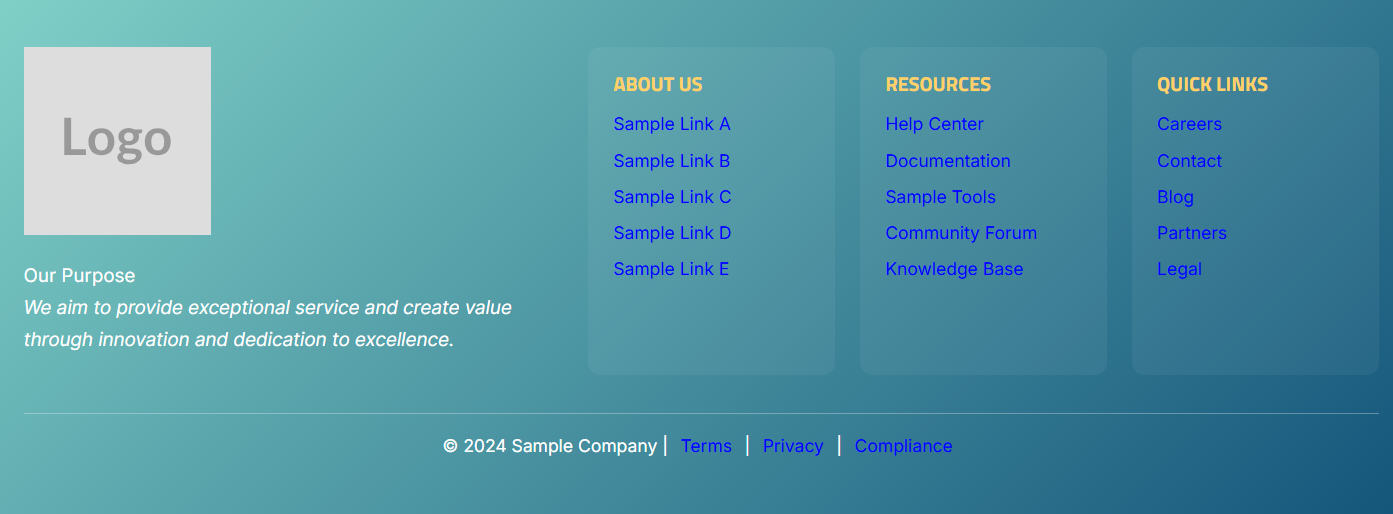
Ein fetter, türkisfarbener bis dunkelblauer Farbverlauf mit einem Logobild, einer Leitlinie links und drei Linkspalten (Über uns, Ressourcen, Schnelllinks) mit Schwebeanimationen. Enthält eine untere Copyright-Leiste mit Links zu Bedingungen, Datenschutz und Compliance.
HTML-Code
<!DOCTYPE html>
<html lang="en">
<head>
    <meta charset="UTF-8" />
    <meta name="viewport" content="width=device-width, initial-scale=1.0" />
    <link rel="stylesheet" href="style.css" />
    <title>Footer Sample</title>
</head>
<body>
    <div class="custom-footer">
        <div class="footer-container">
            <div class="footer-logo">
                <img src="https://placehold.co/150x150?text=Logo" alt="Brand Logo">
                <p class="mission-statement">
                    Our Purpose<br>
                    <em>We aim to provide exceptional service and create value through innovation and dedication to excellence.</em>
                </p>
            </div>
            <div class="footer-links">
                <div class="footer-column">
                    <h4>ABOUT US</h4>
                    <ul>
                        <li><a href="#">Sample Link A</a></li>
                        <li><a href="#">Sample Link B</a></li>
                        <li><a href="#">Sample Link C</a></li>
                        <li><a href="#">Sample Link D</a></li>
                        <li><a href="#">Sample Link E</a></li>
                    </ul>
                </div>
                <div class="footer-column">
                    <h4>RESOURCES</h4>
                    <ul>
                        <li><a href="#">Help Center</a></li>
                        <li><a href="#">Documentation</a></li>
                        <li><a href="#">Sample Tools</a></li>
                        <li><a href="#">Community Forum</a></li>
                        <li><a href="#">Knowledge Base</a></li>
                    </ul>
                </div>
                <div class="footer-column">
                    <h4>QUICK LINKS</h4>
                    <ul>
                        <li><a href="#">Careers</a></li>
                        <li><a href="#">Contact</a></li>
                        <li><a href="#">Blog</a></li>
                        <li><a href="#">Partners</a></li>
                        <li><a href="#">Legal</a></li>
                    </ul>
                </div>
            </div>
        </div>
        <div class="footer-bottom">
            <p>© 2024 Sample Company | <a href="#">Terms</a> | <a href="#">Privacy</a> | <a href="#">Compliance</a></p>
        </div>
    </div>
</body>
</html>
CSS-Code
body {
    margin: 0;
    font-family: 'Segoe UI', sans-serif;
    background-color: #f5f7fa;
}
.custom-footer {
    background: linear-gradient(135deg, #80d0c7, #13547a);
    color: #ffffff;
    padding: 40px 20px;
}
.footer-container {
    display: flex;
    justify-content: space-between;
    flex-wrap: wrap;
    max-width: 1200px;
    margin: 0 auto;
    gap: 30px;
}
.footer-logo {
    flex: 2;
    min-width: 260px;
}
.footer-logo img {
    max-width: 160px;
    margin-bottom: 20px;
}
.mission-statement {
    font-size: 15px;
    line-height: 1.7;
    color: #fefefe;
}
.footer-links {
    flex: 3;
    display: flex;
    justify-content: space-between;
    flex-wrap: wrap;
    gap: 20px;
}
.footer-column {
    flex: 1;
    min-width: 180px;
    background-color: rgba(255, 255, 255, 0.05);
    padding: 20px;
    border-radius: 10px;
    transition: transform 0.3s ease, box-shadow 0.3s ease;
}
.footer-column:hover {
    transform: translateY(-5px);
    box-shadow: 0 8px 20px rgba(0, 0, 0, 0.2);
}
.footer-column h4 {
    font-size: 16px;
    margin-bottom: 12px;
    color: #ffd166;
}
.footer-column ul {
    list-style: none;
    padding: 0;
    margin: 0;
}
.footer-column ul li a {
    color: #ffffff;
    text-decoration: none;
    font-size: 14px;
    transition: color 0.3s;
}
.footer-column ul li a:hover {
    color: #ffeebb;
    text-decoration: underline;
}
.footer-bottom {
    text-align: center;
    margin-top: 30px;
    border-top: 1px solid rgba(255, 255, 255, 0.3);
    padding-top: 15px;
    font-size: 14px;
}
.footer-bottom a {
    color: #ffffff;
    margin: 0 6px;
    text-decoration: none;
}
@media (max-width: 768px) {
    .footer-container {
        flex-direction: column;
        align-items: center;
    }
    .footer-links {
        flex-direction: column;
    }
}
Footer-Design 8
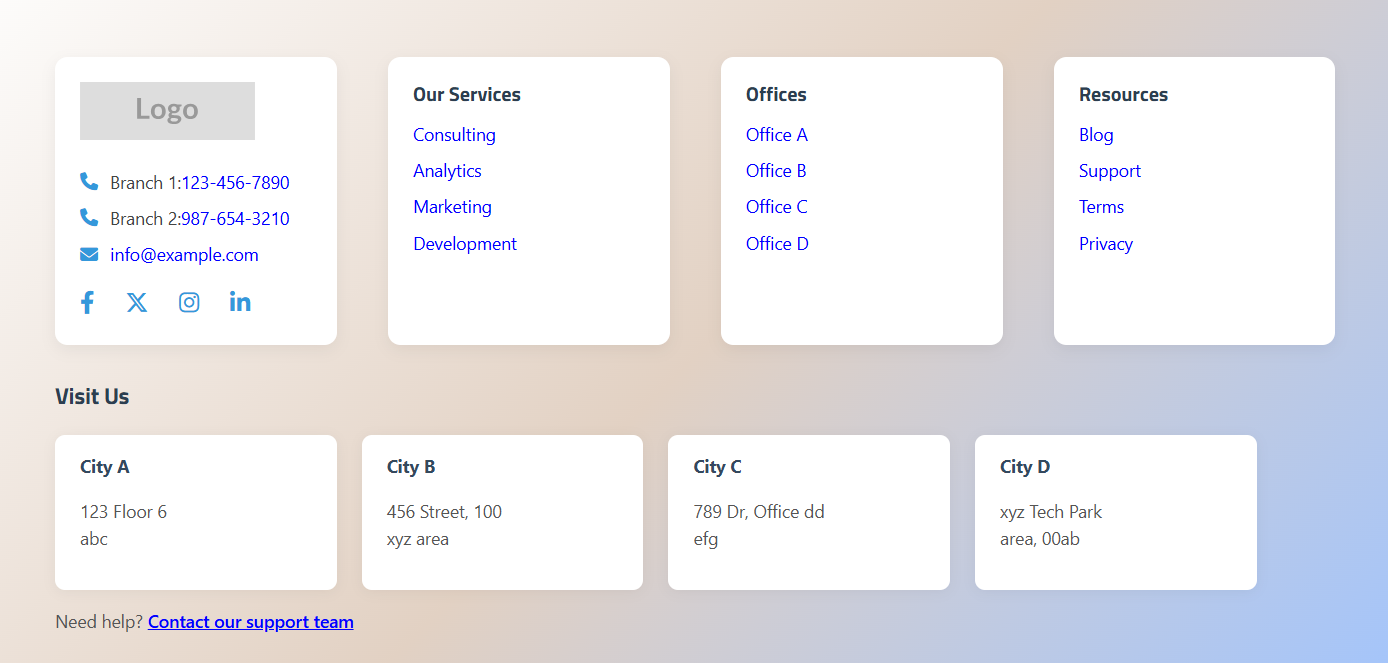
Ein pastellfarbener Farbverlauf mit vier weißen Kartenspalten (Logo und Kontakt, Unsere Dienste, Büros, Ressourcen) und ein Besuchen Sie uns-Adressblock mit Karten für mehrere Stadtbüros. Enthält Schwebanimationen auf allen Karten.
HTML-Code
<footer>
    <div class="footer-container">
        <div class="footer-card footer-logo">
            <img src="https://placehold.co/150x50?text=Logo" alt="Sample Brand Logo">
            <p><i class="fas fa-phone"></i> Branch 1: <a href="tel:1234567890">123-456-7890</a></p>
            <p><i class="fas fa-phone"></i> Branch 2: <a href="tel:9876543210">987-654-3210</a></p>
            <p><i class="fas fa-envelope"></i> <a href="mailto:info@example.com">info@example.com</a></p>
            <div class="social-icons">
                <a href="#"><i class="fab fa-facebook-f"></i></a>
                <a href="#"><i class="fab fa-x-twitter"></i></a>
                <a href="#"><i class="fab fa-instagram"></i></a>
                <a href="#"><i class="fab fa-linkedin-in"></i></a>
            </div>
        </div>
        <div class="footer-card">
            <h3>Our Services</h3>
            <ul>
                <li><a href="#">Consulting</a></li>
                <li><a href="#">Analytics</a></li>
                <li><a href="#">Marketing</a></li>
                <li><a href="#">Development</a></li>
            </ul>
        </div>
        <div class="footer-card">
            <h3>Offices</h3>
            <ul>
                <li><a href="#">Office A</a></li>
                <li><a href="#">Office B</a></li>
                <li><a href="#">Office C</a></li>
                <li><a href="#">Office D</a></li>
            </ul>
        </div>
        <div class="footer-card">
            <h3>Resources</h3>
            <ul>
                <li><a href="#">Blog</a></li>
                <li><a href="#">Support</a></li>
                <li><a href="#">Terms</a></li>
                <li><a href="#">Privacy</a></li>
            </ul>
        </div>
    </div>
    <div class="footer-addresses">
        <h3>Visit Us</h3>
        <div class="address-block">
            <div class="address-card">
                <strong>City A</strong>
                <p>123 Floor 6<br> abc</p>
            </div>
            <div class="address-card">
                <strong>City B</strong>
                <p>456 Street, 100<br>xyz area</p>
            </div>
            <div class="address-card">
                <strong>City C</strong>
                <p>789 Dr, Office dd<br> efg</p>
            </div>
            <div class="address-card">
                <strong>City D</strong>
                <p>xyz Tech Park<br>area, 00ab</p>
            </div>
        </div>
        <p>Need help? <a href="#">Contact our support team</a></p>
    </div>
</footer>
CSS-Code
footer {
    background: linear-gradient(135deg, #fdfcfb, #e2d1c3, #a1c4fd);
    color: #2c3e50;
    padding: 50px;
    font-family: 'Segoe UI', sans-serif;
}
.footer-container {
    display: flex;
    justify-content: space-between;
    flex-wrap: wrap;
    gap: 20px;
    margin-bottom: 30px;
}
.footer-card {
    background: #fff;
    border-radius: 10px;
    box-shadow: 0 4px 12px rgba(0, 0, 0, 0.06);
    padding: 20px;
    width: 22%;
    transition: transform 0.3s ease, box-shadow 0.3s ease;
}
.footer-card:hover {
    transform: translateY(-5px);
    box-shadow: 0 8px 20px rgba(0, 0, 0, 0.12);
}
.footer-logo img {
    max-width: 140px;
    margin-bottom: 15px;
}
.footer-logo a {
    color: #3498db;
    text-decoration: none;
}
.social-icons {
    margin-top: 15px;
    display: flex;
    gap: 15px;
}
.social-icons a {
    font-size: 18px;
    color: #3498db;
    transition: color 0.3s ease;
}
.footer-card h3 {
    font-size: 16px;
    font-weight: bold;
    margin-bottom: 12px;
    color: #2c3e50;
}
.footer-card ul {
    list-style: none;
    padding: 0;
}
.footer-card ul li a {
    color: #555;
    font-size: 14px;
    text-decoration: none;
    transition: color 0.3s ease;
}
.footer-card ul li a:hover {
    color: #1abc9c;
}
.address-block {
    display: flex;
    gap: 20px;
    flex-wrap: wrap;
}
.address-card {
    background: #fff;
    padding: 15px 20px;
    border-radius: 8px;
    box-shadow: 0 2px 10px rgba(0, 0, 0, 0.05);
    width: 22%;
    min-width: 200px;
}
Fundamentdesign 9
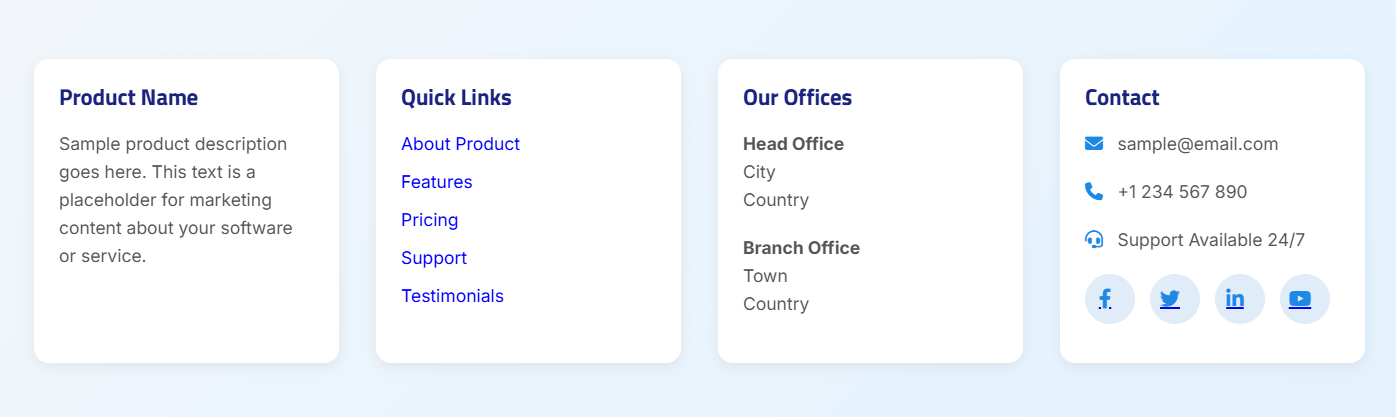
Ein hellblauer Farbverlauf mit vier weißen Kartenspalten: eine Produktbeschreibung, Schnelllinks, Bürostandorte und ein Kontaktbereich mit E-Mail, Telefon, Support-Verfügbarkeit und sozialen Symbolen mit kreisförmigen Hover-Effekten.
HTML-Code
<footer>
    <div class="footer-container">
        <div class="footer-box">
            <h3>Product Name</h3>
            <p>Sample product description goes here. This text is a placeholder for marketing content about your software or service.</p>
        </div>
        <div class="footer-box">
            <h4>Quick Links</h4>
            <ul>
                <li><a href="#">About Product</a></li>
                <li><a href="#">Features</a></li>
                <li><a href="#">Pricing</a></li>
                <li><a href="#">Support</a></li>
                <li><a href="#">Testimonials</a></li>
            </ul>
        </div>
        <div class="footer-box">
            <h4>Our Offices</h4>
            <p><strong>Head Office</strong><br>City<br>Country</p>
            <p><strong>Branch Office</strong><br>Town<br>Country</p>
        </div>
        <div class="footer-box">
            <h4>Contact</h4>
            <p><i class="fas fa-envelope"></i> sample@email.com</p>
            <p><i class="fas fa-phone"></i> +1 234 567 890</p>
            <p><i class="fas fa-headset"></i> Support Available 24/7</p>
            <div class="social-icons">
                <a href="#" class="social-icon"><i class="fab fa-facebook-f"></i></a>
                <a href="#" class="social-icon"><i class="fab fa-twitter"></i></a>
                <a href="#" class="social-icon"><i class="fab fa-linkedin-in"></i></a>
                <a href="#" class="social-icon"><i class="fab fa-youtube"></i></a>
            </div>
        </div>
    </div>
</footer>
CSS-Code
@import url('https://fonts.googleapis.com/css2?family=Poppins:wght@300;400;600&display=swap');
body {
    font-family: 'Poppins', sans-serif;
    background-color: #f7f9fc;
    margin: 0;
    padding: 0;
}
footer {
    background: linear-gradient(135deg, #f2f6fb, #e3f2fd);
    color: #333;
    padding: 50px 30px;
}
.footer-container {
    display: flex;
    flex-wrap: wrap;
    justify-content: space-between;
    gap: 30px;
    max-width: 1200px;
    margin: 0 auto;
}
.footer-box {
    flex: 1 1 22%;
    background-color: #ffffff;
    padding: 20px;
    border-radius: 12px;
    box-shadow: 0 3px 10px rgba(0, 0, 0, 0.06);
    transition: transform 0.3s, box-shadow 0.3s;
}
.footer-box:hover {
    transform: translateY(-5px);
    box-shadow: 0 6px 18px rgba(0, 0, 0, 0.1);
}
.footer-box h3,
.footer-box h4 {
    margin-bottom: 15px;
    color: #1a237e;
    font-size: 18px;
}
.footer-box ul {
    list-style: none;
    padding: 0;
}
.footer-box ul li a {
    text-decoration: none;
    color: #1e88e5;
    transition: color 0.3s;
}
.social-icons {
    display: flex;
    gap: 12px;
    margin-top: 10px;
}
.social-icon {
    background-color: #e1ecf9;
    color: #1e88e5;
    width: 40px;
    height: 40px;
    border-radius: 50%;
    display: flex;
    align-items: center;
    justify-content: center;
    transition: all 0.3s ease;
}
.social-icon:hover {
    background-color: #1e88e5;
    color: #ffffff;
    transform: scale(1.1);
}
@media (max-width: 768px) {
    .footer-container {
        flex-direction: column;
        align-items: center;
    }
}
Footer-Design 10
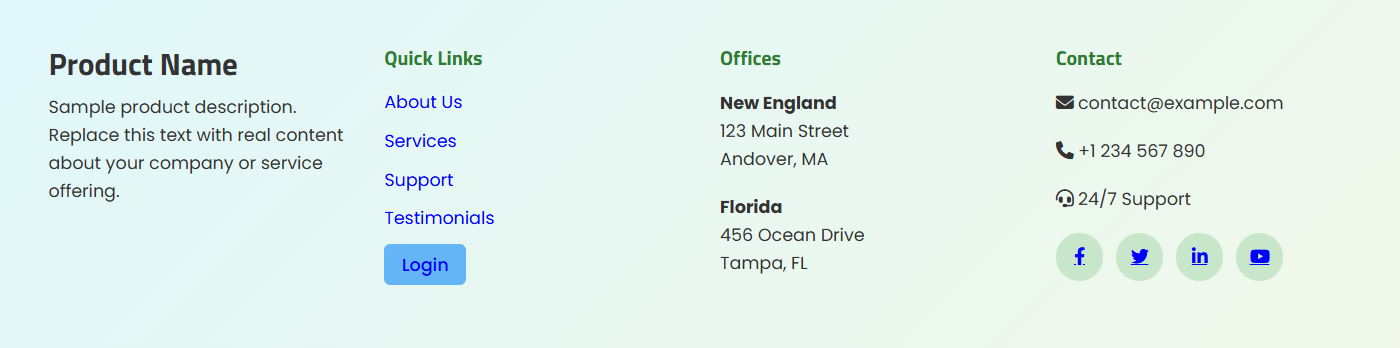
Ein hell cyan-grün Farbverlauf mit vier Spalten: Produktbeschreibung, Schnelllinks (einschließlich eines gestalteten Login-Buttons), Büroadressen und einem Kontaktbereich mit sozialen Symbolen. Geeignet für Wissensdatenbanken, die einen Leser-Login-Link im Footer benötigen.
HTML-Code
<footer>
    <div class="footer-container">
        <div class="footer-box">
            <h3>Product Name</h3>
            <p>Sample product description. Replace this text with real content about your company or service offering.</p>
        </div>
        <div class="footer-box">
            <h4>Quick Links</h4>
            <ul>
                <li><a href="#">About Us</a></li>
                <li><a href="#">Services</a></li>
                <li><a href="#">Support</a></li>
                <li><a href="#">Testimonials</a></li>
                <li><a href="/Account/Login" class="login-link">Login</a></li>
            </ul>
        </div>
        <div class="footer-box">
            <h4>Offices</h4>
            <p><strong>New England</strong><br>123 Main Street<br>Andover, MA</p>
            <p><strong>Florida</strong><br>456 Ocean Drive<br>Tampa, FL</p>
        </div>
        <div class="footer-box">
            <h4>Contact</h4>
            <p><i class="fas fa-envelope"></i> contact@example.com</p>
            <p><i class="fas fa-phone"></i> +1 234 567 890</p>
            <p><i class="fas fa-headset"></i> 24/7 Support</p>
            <div class="social-icons">
                <a href="#" class="social-icon"><i class="fab fa-facebook-f"></i></a>
                <a href="#" class="social-icon"><i class="fab fa-twitter"></i></a>
                <a href="#" class="social-icon"><i class="fab fa-linkedin-in"></i></a>
                <a href="#" class="social-icon"><i class="fab fa-youtube"></i></a>
            </div>
        </div>
    </div>
</footer>
CSS-Code
footer {
    background: linear-gradient(135deg, #e0f7fa, #f1f8e9);
    color: #333;
    padding: 40px 40px;
    font-family: 'Poppins', sans-serif;
}
.footer-container {
    display: flex;
    justify-content: space-between;
    flex-wrap: wrap;
    gap: 30px;
}
.footer-box {
    flex: 1 1 22%;
    min-width: 220px;
}
.footer-box h4 {
    font-size: 16px;
    margin-bottom: 15px;
    font-weight: 600;
    color: #2e7d32;
}
.footer-box ul {
    list-style: none;
    padding: 0;
}
.footer-box ul li a {
    text-decoration: none;
    color: #0277bd;
    transition: color 0.3s, padding-left 0.3s;
    font-size: 14px;
}
.footer-box ul li a:hover {
    color: #01579b;
    padding-left: 8px;
}
.footer-box ul li a.login-link {
    background-color: #64b5f6;
    color: white;
    padding: 6px 14px;
    border-radius: 5px;
    font-weight: 500;
    display: inline-block;
}
.social-icons {
    display: flex;
    gap: 10px;
    margin-top: 10px;
}
.social-icon {
    background-color: #c8e6c9;
    color: #2e7d32;
    width: 38px;
    height: 38px;
    border-radius: 50%;
    display: flex;
    justify-content: center;
    align-items: center;
    transition: background 0.3s, transform 0.3s;
}
.social-icon:hover {
    background-color: #a5d6a7;
    transform: scale(1.1);
}
@media (max-width: 768px) {
    .footer-container {
        flex-direction: column;
        text-align: center;
    }
}
Best Practices
- Beginne mit einer Vorlage – selbst wenn du vorhast, den Fuß stark anzupassen, ist es schneller, von einer der bereitgestellten Vorlagen zu beginnen, als von Grund auf neu zu schreiben, und sorgt für eine funktionierende Basis.
- Halte den Footer leicht – vermeide große Bilder oder schwere Skripte im Footer. Footer werden auf jeder Seite geladen, daher zählt die Leistung.
- Verwenden Sie CSS-Variablen für Markenfarben – definieren Sie Ihre Markenfarben als CSS-Variablen am Anfang Ihres CSS, damit Sie sie an einem Ort aktualisieren können, falls sich Ihre Markenpalette ändert.
- Teste sowohl im Hell- als auch im Dunkelmodus – Footer-Hintergründe und Textfarben, die im Hellmodus gut aussehen, können im Dunkelmodus Kontrastprobleme haben. Immer beides vorschauen.
- Überprüfe die mobile Reaktionsfähigkeit – nutze
@media (max-width: 768px)Breakpoints, um sicherzustellen, dass der Footer auf kleineren Bildschirmen sauber gestapelt ist.