
Document360 v12.3.1 is now live, bringing new features and improvements that enhance access management, content discovery, and the overall knowledge base experience. This release introduces SCIM provisioning for SSO, MCP server integration, custom fields for structured metadata, and interactive table filtering and sorting on the knowledge base site. Alongside these updates, several enhancements across AI-powered support workflows, SEO behavior, content management, accessibility, and platform usability help teams manage documentation more efficiently and deliver a better experience for readers.
Features/Enhancements
SCIM provisioning for SSO enabling simplified user management
Category: SSO | Feature
You can now automatically manage users, readers, and groups in Document360 directly from your Identity Provider (IdP) using System for Cross-domain Identity Management (SCIM) provisioning. Once enabled, changes made in your IdP, such as adding, updating, deactivating, or removing users, are reflected in Document360 automatically. This ensures accurate access control as teams grow or change, reduces manual effort, and keeps user management secure and consistent across projects.
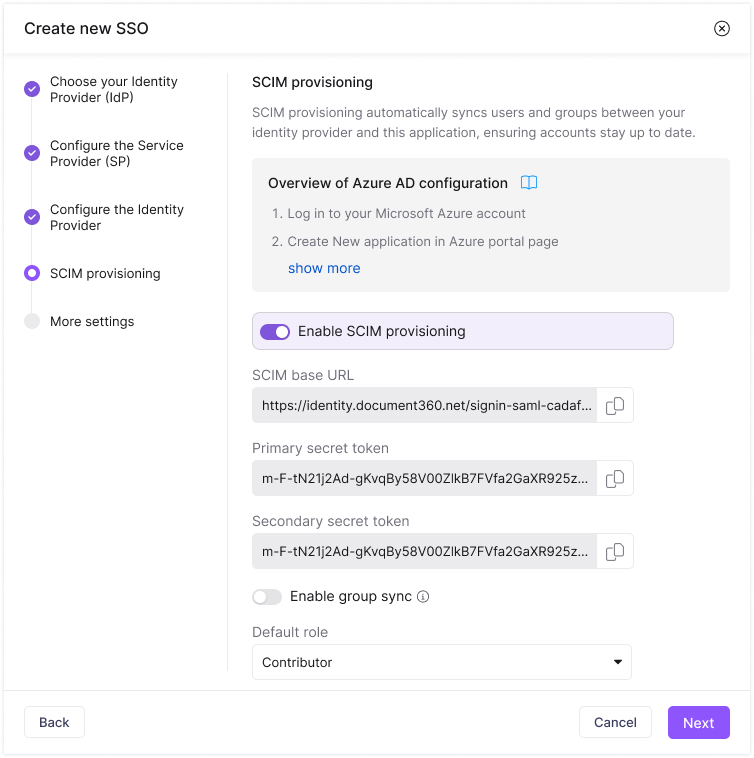
For more information, read the article on Managing users and readers with SCIM.
MCP server for simpler content discovery
Category: AI Settings | Feature
You can now connect Model Context Protocol (MCP)- compatible AI assistants such as ChatGPT, Claude, or Copilot, or use custom connectors to integrate other AI systems with Document360 using secure tokens. This enables you to access and work with your knowledge base directly from your AI environment.
Through the MCP server, AI tools can perform semantic and keyword searches, read articles, retrieve article URLs, identify available languages, access project versions, and list categories. Based on configured permissions, AI-driven workflows can also create categories, write new articles, and update existing articles directly in Document360. This enables users to search for, create, and maintain documentation within their AI tools while continuing to enforce Document360’s existing access controls.
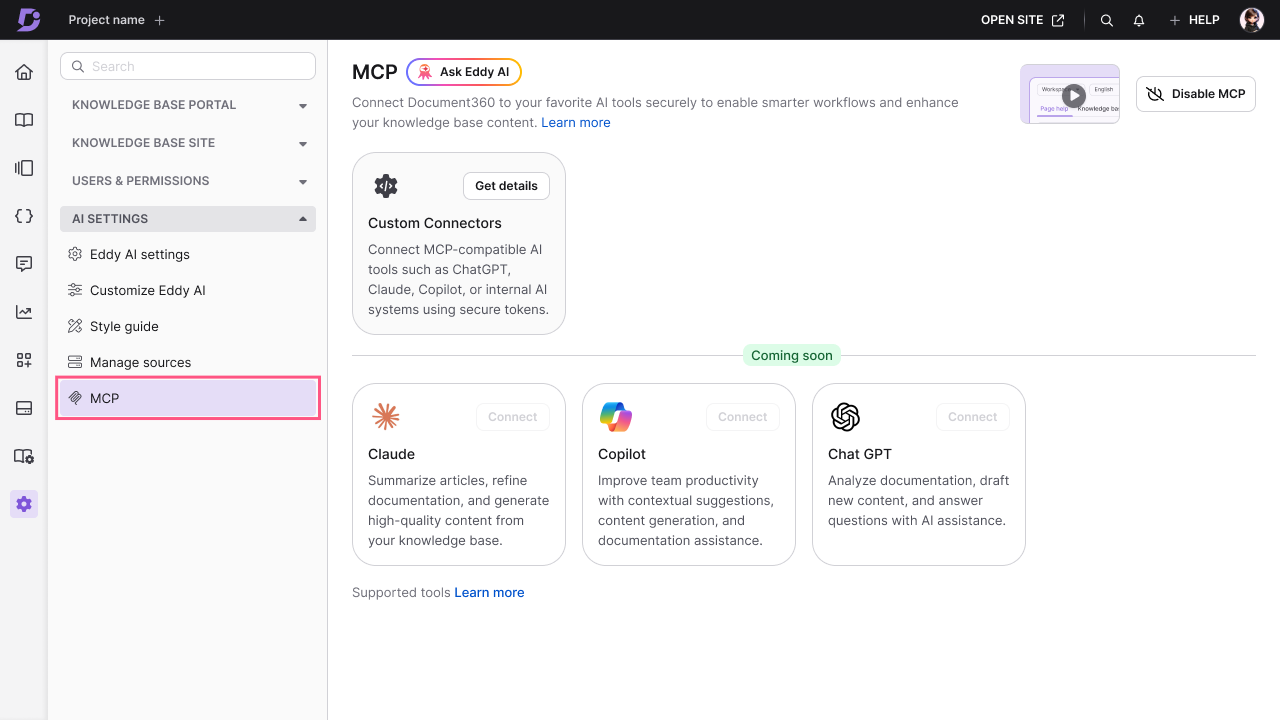
For more information, read the article on MCP.
Custom fields for structured metadata
Category: Knowledge Base Portal | Feature
You can now create and manage custom fields to capture structured data across your knowledge base content.
This allows teams to go beyond default data and store information such as product versions, ownership, release status, or any custom attributes relevant to their workflows. Custom fields help standardize content, improve consistency, and make it easier to manage large-scale documentation.
.png)
For more information, read the article on Custom fields.
AI-powered replies and article suggestions in Freshdesk
Category: Extensions | Enhancement
The Document360 + Freshdesk extension now helps support agents respond to tickets faster and with more accuracy. Agents can:
Generate AI-powered responses: Draft a contextual response directly in Freshdesk based on the knowledge base content in Document360. Replies include proper salutations and the agent’s signature and can be customized before sending.
View suggested articles: See the most relevant knowledge base articles for the ticket and insert the corresponding link into the replies with one click.
Support for multiple languages: Draft replies and fetch article suggestions in supported languages, ensuring consistent support across multilingual tickets.
Stay in control: Admins can manage settings such as workspace and language preferences, AI feature capability configuration.
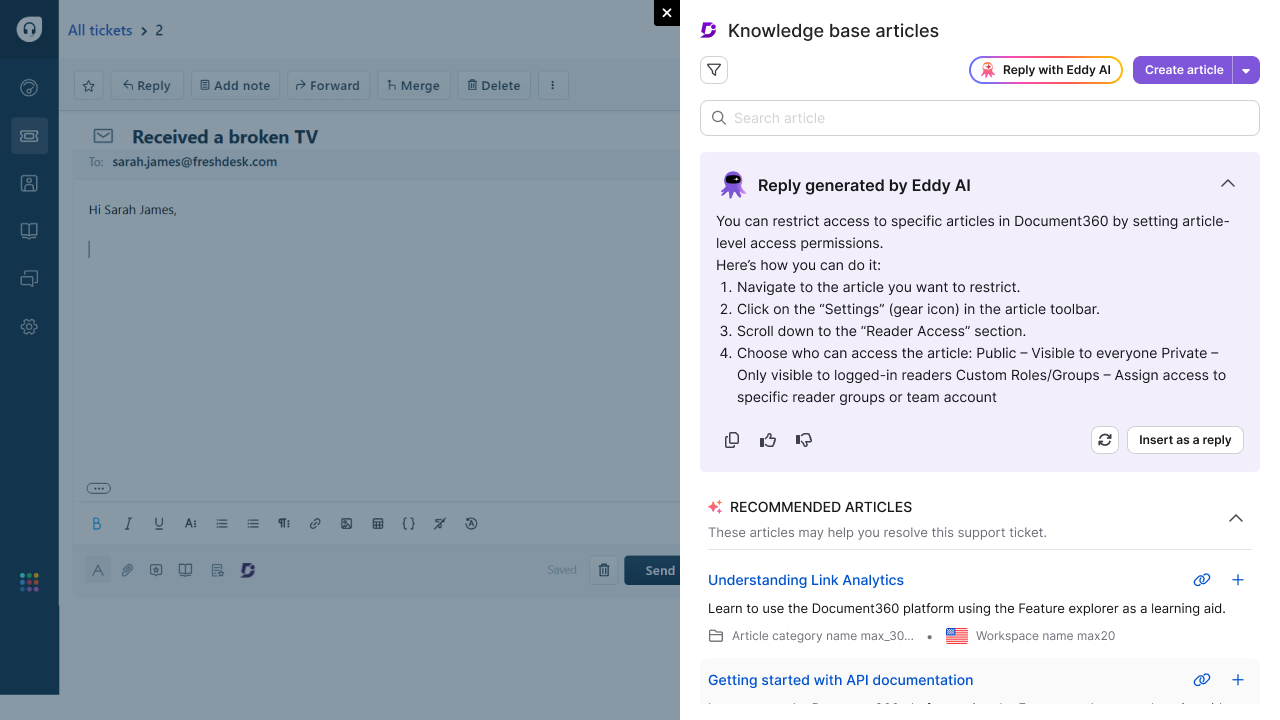
For more information, read the article on Freshdesk.
Enhanced category selection for project export/import
Category: Content tools | Improvement
Project export and import (JSON & HTML) now features a redesigned selection tree with cascading parent–child relationships, partial selections, and intuitive controls. The new structured view makes it easier to manage complex hierarchies, apply precise selections, and use search to quickly locate categories, sub‑categories, or versions. This update delivers greater clarity, reduces errors, and ensures a faster, more reliable export and import experience for large projects.
.png)
For more information, read the article on Import & Export project/article.
SEO improvements for default workspace & localization URLs
Category: SEO | Improvement
We’ve improved how URLs behave when navigating across languages and workspaces in your knowledge base to ensure a more consistent and predictable experience. Pages in the default workspace and default language now always display clean URLs without additional identifiers. When switching to a non-default language or workspace, the URL updates to reflect that context. Switching back to the default language or workspace automatically restores the clean version.
If a direct link includes a default language or workspace identifier, the system now resolves it to the correct canonical URL. This ensures a single authoritative URL for each page, reducing duplicate variations and improving overall SEO hygiene. No configuration changes are required, and the update applies automatically across your knowledge base.
For more information, read the article on Articles SEO.
Enhanced Table Filtering & Sorting
Category: Advanced WYSIWYG editor | Feature
Tables on the Knowledge Base site are now interactive with the new Table Filter & Sort feature, making it easier for readers to navigate large, data-heavy tables. Users can filter across multiple columns and sort by any column to quickly find the information they need, with all actions applied directly on the KB site without affecting authoring workflows. The feature is optimized for performance even with very large datasets and is available across all plans. By turning static tables into dynamic views, this update delivers faster data lookup, improved readability, and a more polished documentation experience.
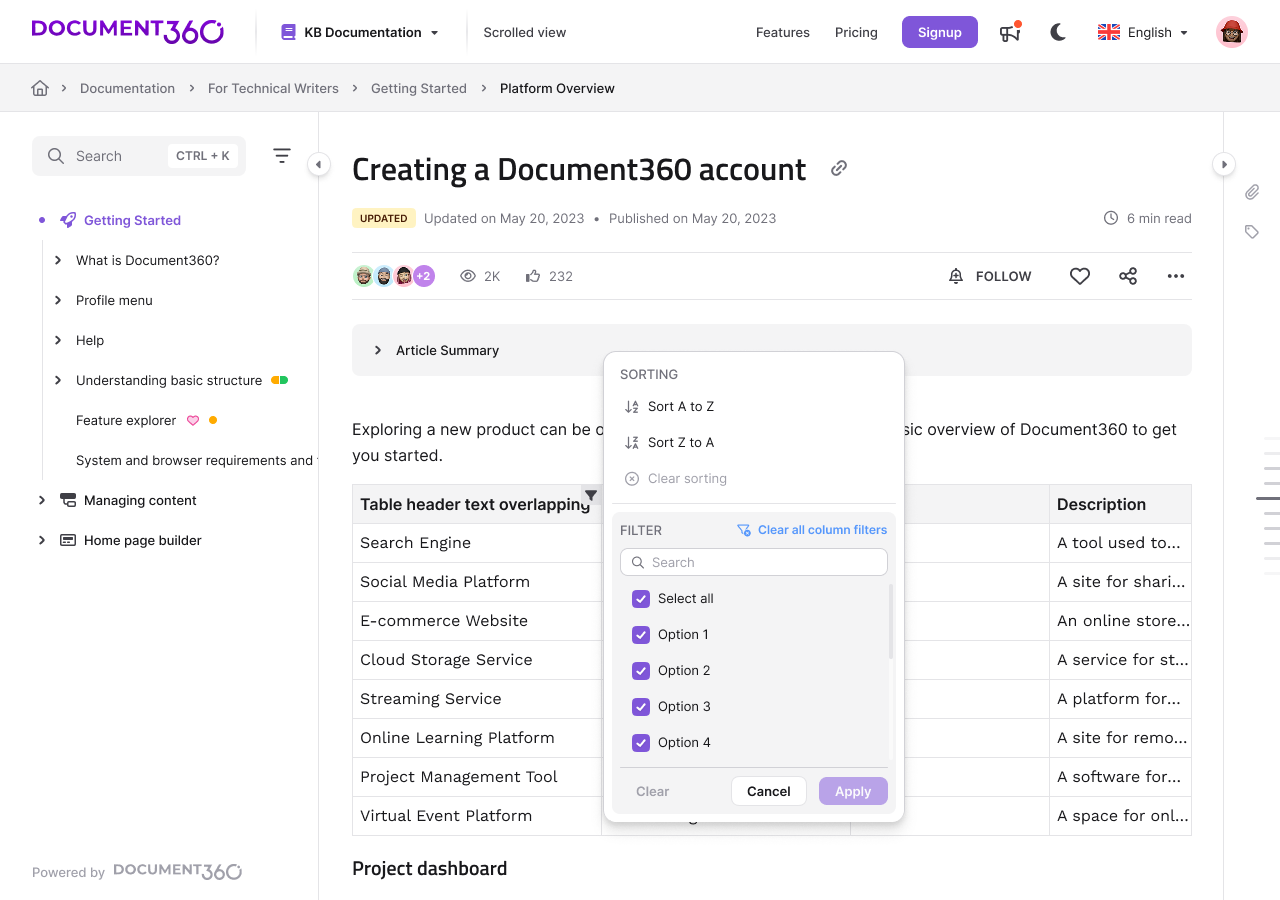
For more information, read the article on Tables in Advanced WYSIWYG editor
Other updates
Titles across documentation now support a broader range of special characters, including symbols such as $, %, *, {, }, ", =, <, and > with consistent rendering across the platform.
Article titles now support up to 300 characters. Long titles are handled more consistently across the platform, with responsive truncation applied where required.
Bulk deletion of Users and Readers from the list view has been restricted to prevent accidental mass removals. Admins must now delete accounts individually, reducing the risk of unintended large-scale deletions.
Citation references in Eddy AI responses on the Analytics page will now show the exact source articles they were pulled from. You will be able to see the specific article titles or links that Eddy AI used to generate each response, directly within the portal.
You can now configure the expiry duration for drive assets when creating or editing an API token. The expiry time can be configured and set from 15 minutes up to 36 hours, allowing applications and integrations to cache media assets longer without frequent token regeneration. The default expiry remains 15 minutes, and existing API tokens continue using this value unless updated manually.
Retrieve articles, categories, or documents to return all languages the content exists in along with their publish states, including draft-only languages that have never been published.
The delete webhook response now includes a slugs field containing the slugs of the deleted article across all its available languages.
GET calls on the Customer API now run independently of the Document360 portal, so readers can continue accessing the knowledge base site even during scheduled maintenance or portal downtime.
We’ve enhanced web accessibility with improved ARIA labels, keyboard navigation, color contrast, heading structures, alt text, and screen‑reader support, delivering a faster, clearer, and more inclusive experience.
Custom domain setup now includes clear, persistent, and step-specific error messages for TXT, CNAME, and SSL verification. Errors remain visible until resolved and provide actionable details on what failed and how to fix it, improving transparency and reducing support dependency during domain configuration.
Cantonese is now supported as a new language. Eddy AI can now search across all supported Chinese language variants for improved content discoverability.
NOTE
Minor security updates, bug fixes, and performance improvements have also been implemented across the Knowledge base portal and Knowledge base site.