L’auto-enregistrement permet aux utilisateurs de créer leurs propres comptes lecteurs sans avoir besoin d’invitation d’un membre de l’équipe de projet. Pour permettre l’auto-enregistrement, partagez l’URL de votre base de connaissances avec les utilisateurs, leur permettant ainsi de créer leur compte de manière indépendante.
Une fois inscrits, les lecteurs sont automatiquement ajoutés à la liste des lecteurs . Les membres du projet ayant accès aux paramètres Utilisateur et permissions peuvent modifier ou supprimer ces lecteurs selon les besoins.
NOTE
La fonction d’auto-enregistrement des lecteurs n’est disponible que si l’accès Reader de votre projet Document360 est réglé en mode Privé ou mixte.
Ce que vous pouvez faire avec l’auto-enregistrement des lecteurs
| Tâche | Ce que ça fait |
|---|---|
| Activez et désactivez l’auto-enregistrement | Activez ou désactivez l’auto-enregistrement pour votre projet |
| Inscrivez-vous vous-même sur un site de base de connaissances | Comment les lecteurs créent leurs propres comptes à partir du site de la base de connaissances |
| Ajouter une restriction de domaine | Autoriser ou bloquer l’auto-enregistrement pour des domaines de messagerie spécifiques |
| Importer plusieurs domaines | Restrictions de domaine à ajout en masse via CSV |
| Modifier et supprimer une restriction de domaine | Modifier ou supprimer les restrictions de domaine existantes |
| Comprendre les restrictions du domaine | Guide de référence sur la façon dont le type de restriction et le statut affectent l’auto-enregistrement |
Aperçu de la page d’auto-enregistrement des lecteurs
Pour accéder à la page d’auto-inscription des lecteurs :
- Naviguez dans Paramètres () > Utilisateurs et sécurité dans la barre de navigation de gauche du portail de la base de connaissances.
- Dans le panneau de navigation de gauche, naviguez vers Lecteurs & groupes > Lecteurs.
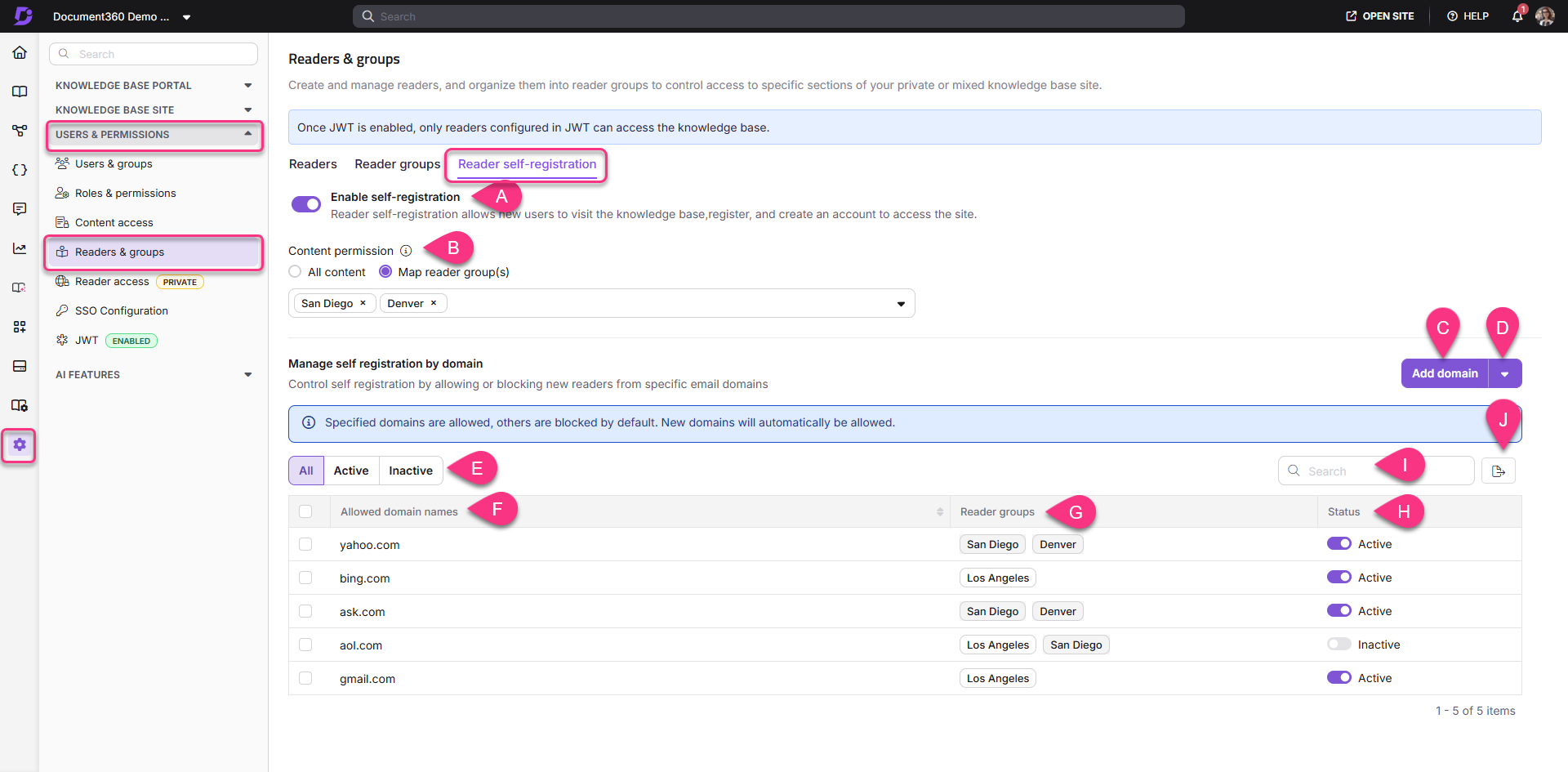
Éléments clés de la page d’auto-inscription des lecteurs :
| Élément | Description |
|---|---|
| A. Permettre l’auto-enregistrement des lecteurs | Activez le bouton pour permettre aux lecteurs de s’enregistrer eux-mêmes |
| B. Autorisation de contenu | Sélectionnez l’accès par défaut au contenu pour les lecteurs auto-enregistrés : Tout le contenu ou groupe(s) de lecteurs Map |
| C. Ajouter le domaine | Ajouter un nouveau domaine pour la restriction de domaine |
| D. Importation de domaine | Importez plusieurs domaines pour les restrictions de domaine |
| E. Options de filtre | Voir les domaines filtrés comme Tout, Actif ou Inactif |
| F. Domaines autorisés / Bloqués | Affiche tous les domaines du projet. Cliquez sur l’en-tête de la colonne pour trier par ordre alphabétique ; Cliquez à nouveau pour inverser l’ordre. |
| G. Groupes de lecteurs | Affiche les groupes de lecteurs mappés aux domaines |
| H. Statut | Indique si les domaines sont actifs ou inactifs |
| I. Recherche | Recherche de noms de domaine spécifiques |
| J. Export | Exporter la liste des domaines sous forme de fichier CSV |
Avant que tu commences
L’auto-enregistrement des lecteurs n’est disponible que lorsque l’accès lecteur de votre projet est réglé sur Privé ou mixte.
FAQ
Quel accès ont les lecteurs ayant plusieurs membres de groupes ?
Lorsqu’un lecteur fait partie de plusieurs groupes, le niveau d’accès le plus élevé est accordé à chaque élément de contenu.
Par exemple, si un lecteur appartient au Groupe A (qui a accès à toutes les langues dans l’espace de travail « V1 ») et au Groupe B (qui n’a accès qu’à l’anglais dans « V1 »), le lecteur aura accès à toutes les langues de l’espace de travail « V1 ».
L’accès au contenu individuel supprime-t-il l’accès au groupe de lecteurs ?
Non, l’accès individuel au contenu ne remplace pas l’accès au groupe. Le lecteur bénéficie toujours des plus grands privilèges, tant individuels que collectifs.
Par exemple, si un lecteur est individuellement configuré pour accéder uniquement à l’anglais dans l’espace de travail « V2 » mais fait aussi partie d’un groupe ayant accès à toutes les langues de « V2 », le lecteur aura accès à toutes les langues de « V2 ».
Comment l’accès des lecteurs est-il priorisé ?
L’accès est déterminé par le privilège le plus élevé attribué à chaque niveau de contenu. Les lecteurs n’ont accès qu’au contenu qui leur a été spécifiquement attribué.
Pourquoi l’auto-enregistrement ne fonctionne-t-il pas pour mon projet ?
L’auto-enregistrement ne fonctionne pas comme prévu lorsque SSO (Single Sign-On) est activé, car SSO contourne la page de connexion Document360, où l’auto-enregistrement a généralement lieu. L’auto-enregistrement avec la configuration du domaine est conçu uniquement pour être utilisé sur la page de connexion Document360.