Document360 v12.2.2 is now live, introducing improvements to the article review reminder experience with a clearer Stale state and enhanced review governance controls.
Features/Enhancements
Enhanced article review reminder and stale status
Category: Review | Improvement
We’ve streamlined the article review reminder lifecycle to provide a single, clear review state and reduce ambiguity for authors and reviewers. When a published article reaches its review due date, it now transitions directly into a Stale state. The Stale badge is interactive, allowing users to mark the article as reviewed directly from the editor with relevant context details. Stale articles are clearly indicated across the knowledge base, including a red dot indicator in the category tree for quick visibility. Users can mark articles as reviewed from multiple entry points, including the Stale badge, the article’s context menu, and the All articles view (including bulk actions). Draft-only articles will not become stale until they are first published.
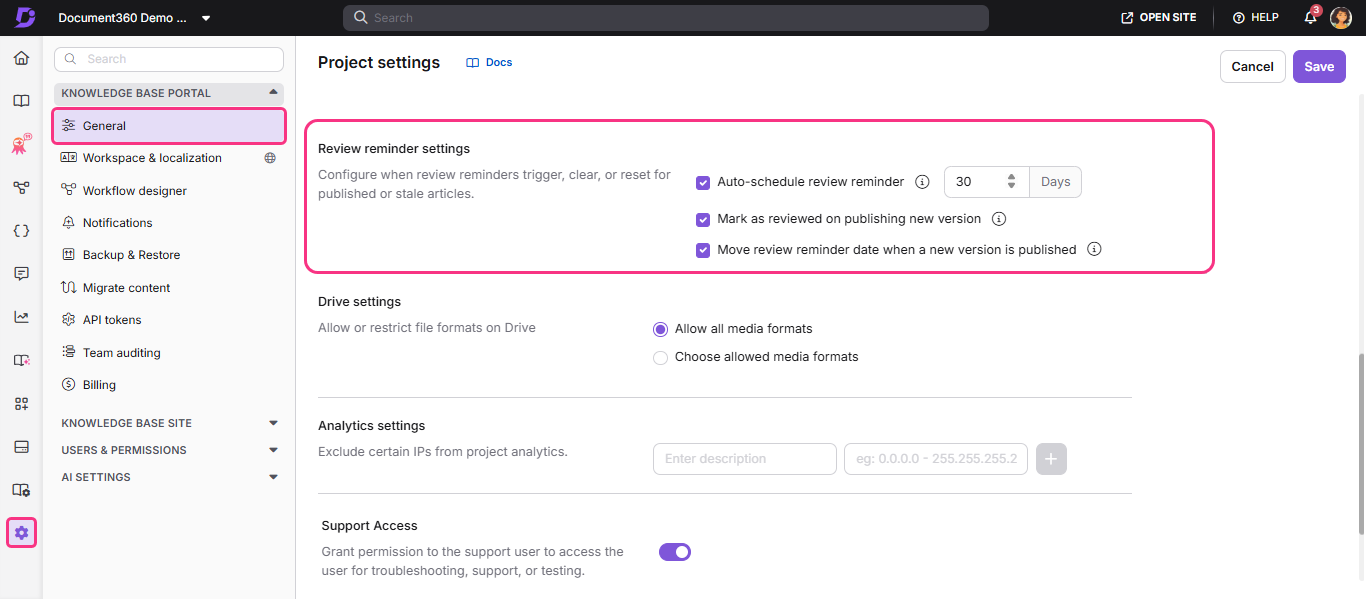
Project-level review governance has also been enhanced. Admins can now configure automatic review reminders, define whether stale status should clear when a new version is published, and control whether the review timeline resets upon republishing. Article-level review options have been simplified, allowing users to either mark an article for immediate review or schedule a reminder using predefined intervals or custom number of days.
For more information, read the article on Article review reminders
NOTE
Minor security updates, bug fixes, and performance improvements have also been implemented across the Knowledge base portal and Knowledge base site.