Document360's API documentation feature gives you a complete, end-to-end solution for publishing, managing, and testing API references. Whether you're a startup shipping your first public API or an enterprise maintaining dozens of internal microservices, Document360 turns your OpenAPI specification into polished, interactive developer documentation without requiring any custom tooling or manual formatting.
The reader experience
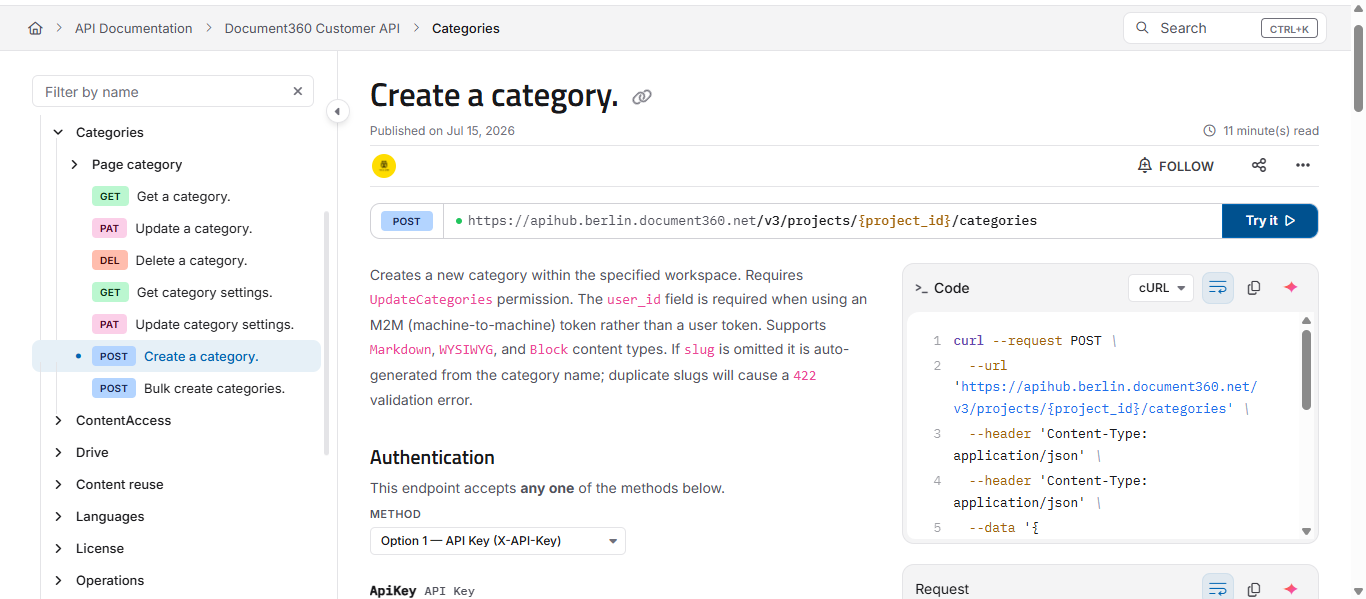
When you publish an API reference, developers land on an interactive, three-pane page — not a static document. Understanding this layout helps you picture what your readers actually see, and points you to the article that explains each part in depth.
- Left - navigation tree. Every endpoint in your specification, grouped by tag into categories and subcategories, with a method label (GET, POST, PUT, PATCH, DELETE) beside each. Readers filter by name to jump to an endpoint quickly.
- Centre - documentation. The endpoint's description, path and query parameters, request body schema and authentication requirements - all generated from your spec.
- Right - Code and Response panels. Ready-to-use request samples and example responses, side by side with the documentation.
Code panel
The Code panel shows a ready-to-copy request sample for the endpoint, and readers can switch the language to match their stack. Six languages are available:
- cURL
- Shell
- Python
- Java
- JavaScript
- C#
Each sample updates to reflect the endpoint's real path, parameters, and authentication, so a reader can copy it straight into their own environment.
Response panel
The Response panel shows example responses for the endpoint, organised by status code (for example, success and error responses such as 200, 401, 403, 404, 422, 429, 500). Readers select a status code to see the shape of the response they should expect in each case, which makes it easier to handle both success and error paths in their integration.
Try It
Try It turns the reference from something readers read into something they can run. It opens an interactive console inline on any endpoint, so developers can send a real request and see the live response - status, timing, headers, and body, without leaving the page or writing any code. See Testing endpoints with Try it! for the full walkthrough.
Authentication
Readers supply credentials directly in the Try It console using whichever scheme your API defines — API key, HTTP Basic, HTTP Bearer, OAuth 2.0, or OpenID Connect. Try It reads the schemes from your specification and shows the right fields for each. See Authorizing requests in the Try It console for details on every method.
Variables
Variables let readers store a value once, such as an ID or a token, and reuse it across every endpoint in the reference with a {{placeholder}}. This saves re-typing common values as they move from one endpoint to the next. See Using variables in the Try It console.
Eddy AI
Eddy AI is built into the reference so readers can ask questions about an endpoint - how it works, how to authenticate, or for a code sample in a specific language and get answers without leaving the page. See Using Eddy AI in the API reference.
What is API documentation and why does it matter?
API documentation is the technical reference that tells developers exactly how to interact with your API: which endpoints exist, what parameters they accept, what responses they return, and how authentication works. Unlike general knowledge base articles, API docs follow a strict, structured format derived from a machine-readable specification file.
Why it matters:
- Reduces integration time. Clear docs cut onboarding from days to hours. Developers spend less time guessing and more time building.
- Reduces support burden. When docs answer the "how do I authenticate?" and "what does a 422 mean?" questions, your team fields fewer tickets.
- Builds developer trust. Incomplete or outdated API docs signal an unreliable product. High-quality documentation is a direct signal of product quality.
- Enables self-service. External partners, customers, and third-party developers can integrate without needing hand-holding from your team.
API documentation vs regular documentation
| Aspect | API documentation | Regular documentation |
|---|---|---|
| Primary audience | Developers and technical integrators | End users, internal teams |
| Structure | Driven by a specification file (OpenAPI, Postman) | Manually authored articles |
| Content type | Endpoints, parameters, schemas, auth methods | Guides, how-tos, conceptual articles |
| Interactivity | Live testing via Try It! | Static reading |
| Versioning | Tied to API spec versions | Managed editorially |
| Auto-generation | Yes, from spec file | No |
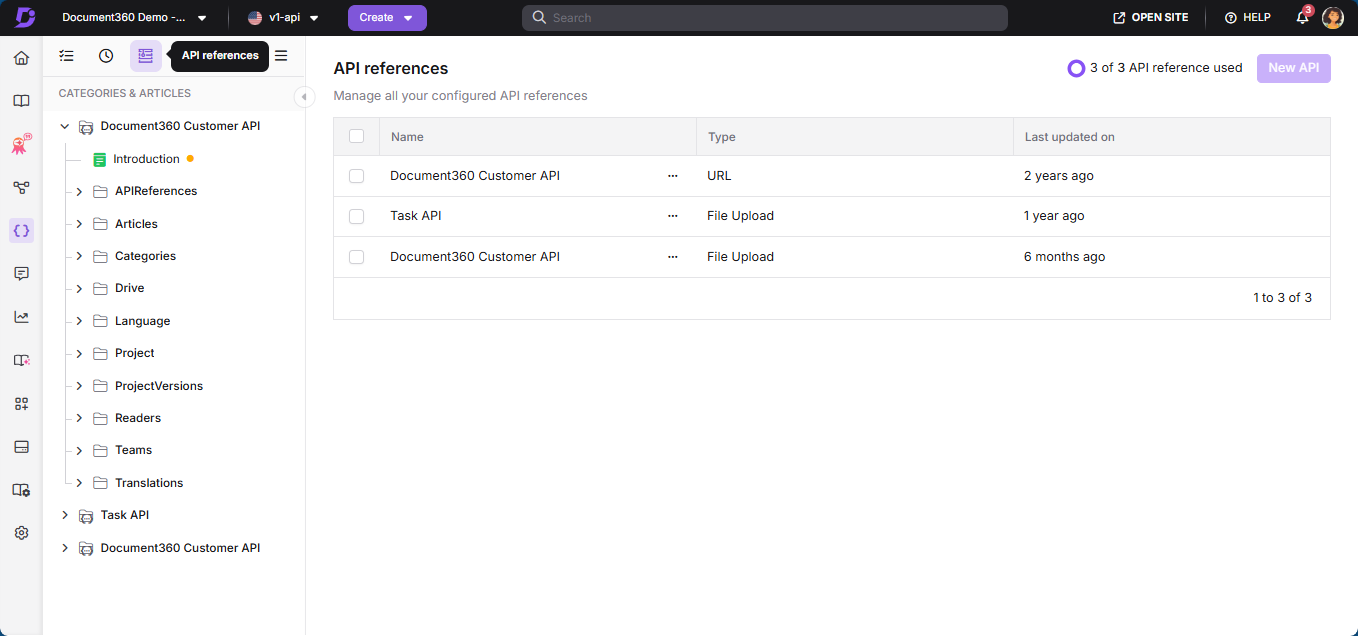
In Document360, API documentation lives in a dedicated API workspace that is separate from your standard knowledge base. This allows different access controls, routing, and branding for your developer-facing content. For a full reference of all available endpoints and schemas, see the Document360 developer docs.
Supported specification formats
Document360 supports the following specification formats:
- OpenAPI 3.2
- OpenAPI 3.1 (includes webhook support)
- OpenAPI 3.0
- OpenAPI 2.0 (formerly Swagger)
- Postman Collections
Files can be uploaded as JSON, YAML, or YML.
OpenAPI 3.2 adds support for:
- The QUERY HTTP method for read operations that need a request body
- Nested categories generated automatically from tag hierarchies
- The Device Authorization flow (RFC 8628) as an additional OAuth2 option
- Streaming response schemas for Server-Sent Events and JSON Lines
- Named servers, richer example values, and canonical document URIs (
$self)
If you're starting fresh, use OpenAPI 3.2. It includes everything from 3.1 plus the additions above. If you're migrating from an existing Swagger 2.0 setup, Document360 accepts it as-is while you upgrade incrementally.
Webhooks in OpenAPI 3.1
Document360 supports webhooks defined in OpenAPI 3.1. Webhooks appear with an event icon in your API reference and include a payload section based on your schema. If no example is provided, Document360 shows a default example and a sample payload. Try It! is not available for webhooks. Webhooks are supported for file uploads, URL imports, and CI/CD flows.
Authorization techniques
When interacting with an API, it is important to ensure that only authorized users can access certain data or perform specific actions. Document360 supports the following authorization methods:
- Basic authentication - Requires a username and password passed in the request.
- Bearer token - Authenticates with a token generated after login.
- API key - Uses a unique key, passed in the request headers, for authentication.
- OAuth2 - Secures APIs through various flows: Authorization Code, PKCE, Client Credentials, and Implicit.
- OpenID Connect - Extends OAuth2 by adding user identity verification.
To authenticate requests to the Document360 Customer API, you will need an API token. For more information, see the API tokens article.
To make your first authenticated API request using Swagger, Postman, or curl, refer Making your first request.
OAuth2 and OpenID Connect: additional configuration
When working with APIs that use OAuth2 or OpenID Connect, two settings are required for Try It! to work correctly:
- Redirect URI - Set this in your OAuth provider to the API reference's OAuth callback URL:
https://<your-knowledge-base-domain>/assets/apidocs-oauth-callback.html. - Silent renewal - Document360 automatically refreshes the authorization token in the background during active Try It! sessions, so users do not need to re-authenticate manually.
FAQ
What is an API reference?
An API reference is a documentation resource that provides comprehensive information about the functions, classes, methods, parameters, return types, and other components of an API. It is a guide or manual for developers who want to integrate or use the API in their applications.
How many API references can I create?
Within each API workspace, you can create a maximum of 3 API references.
What is the default ordering of categories when uploading an OpenAPI specification file?
Categories in Document360 are created based on the tag order defined in your spec file. For example, if your spec defines tags in the order Pet, Store, User — the categories will appear in that same order.
The "Try It!" option is not available on the Knowledge base site. What could be the reason?
If the Try It! feature isn't visible, ensure that both the server variable and the server URL are properly defined in your API specification file. Without these, the feature will not function.
Can API reference dropdown values be modified through the UI?
No. Changes to API reference elements such as dropdown values can only be made through the OpenAPI specification file. Modifying these values through the UI is not currently supported.