Document360 v12.8.3 is now live, with improvements focused on performance, navigation, and publishing. Publishing is made simpler now with the redesigned Publish dialog bringing one-click AI suggestions and pre-publish checks right where you need them. We’ve also improved offline documentation sync to keep it better aligned with your live knowledge base, along with a range of smaller improvements across the portal.
Features and enhancements
Publish dialog updated with AI assistance and publishing checks
Category: Content management | Enhancement
Publishing an article is now faster, smarter, and easier with the redesigned Publish dialog. It brings everything you need to review, refine, validate, and publish an article into one streamlined workspace, so you can complete the entire publishing workflow in one place. The dialog brings article metadata, publishing options, and AI-powered suggestions together in one view. You can regenerate suggestions with a single click using Auto Fix.
Before publishing, the dialog surfaces potential issues, including broken links, unresolved comments, and reader acknowledgement information, so you can address them upfront. Publish immediately or schedule for a specific date and time, and access advanced settings such as Preferences and Search visibility, all without leaving the dialog.
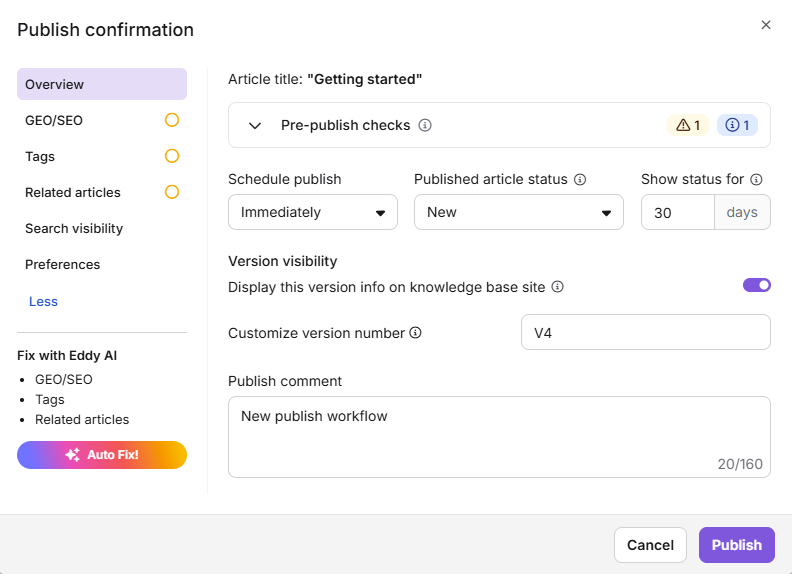
For more information, read the article on Publishing articles.
Offline documentation exports now mirror your live knowledge base
Category: Offline documentation export | Enhancement
Offline and Web Help exports now more closely match the look and feel of your live knowledge base, addressing several gaps in exported content and improving readability and usability. H1 and H2 headings now render at distinct sizes to preserve document hierarchy. Articles in Markdown with right-to-left (RTL) languages also retain the correct text direction and layout.
Exported articles now include the table of contents, breadcrumbs, and previous/next article navigation, making it easier for readers to find their way through your documentation. They also use the same font family as your live knowledge base for a more consistent reading experience. Images embedded through snippets retain their original display size, while glossary term definitions and links are preserved. Code blocks now include a copy button that works offline, making it easier for readers to copy code without an internet connection.
For more information, read the article on Offline documentation.
Other updates
- The Widget configuration page has been reorganized, with fields and tabs regrouped for a clearer layout.
- The Article settings and Localization variables pages now have an improved UI for easier navigation.
- Minor security updates, bug fixes, and performance improvements have also been implemented across the Knowledge base portal and Knowledge base site.