Deleting a reader group in Document360 permanently removes the group and disassociates all readers from it. The individual reader accounts are not deleted — only the group itself is removed. After deletion, each reader's access reverts to their individually assigned permissions, or to the permissions of any other groups they belong to. The highest permission level takes priority.
When to delete a reader group
- A group is no longer needed and the readers in it should revert to their individual access settings.
- You are restructuring reader groups and need to remove outdated ones.
WARNING
Deleting a reader group cannot be undone. The individual reader accounts within the group are not deleted, but they are disassociated from the group. Their access will revert to their individually assigned permissions or to the permissions of other groups they belong to.
Before you begin
- You must have the Admin or Owner portal role, or a custom role with Manage user permission.
- Review the readers in the group before deleting. After deletion, readers whose access was solely defined by this group will fall back to their individual-level permissions. If no individual permissions are set, their access may change significantly.
How to delete a reader group
-
Navigate to Settings () > Users and security in the left navigation bar in the knowledge base portal.
-
In the left navigation pane, navigate to Readers & groups > Reader groups.
-
Hover over the desired reader group. The Edit () icon and Delete () icon appear.
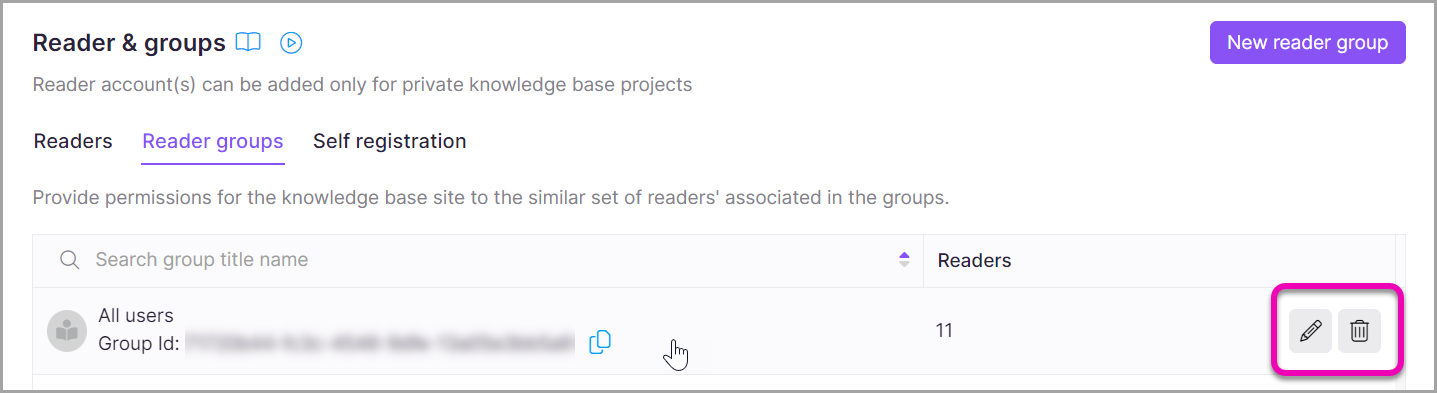
-
Click the Delete () icon.
A confirmation dialog appears.
-
Click Confirm to delete the reader group.
The group is removed. All readers previously in the group are disassociated from it. Their access reverts to their individual-level permissions or to the permissions of any other groups they belong to, with the highest permission level taking priority.
Limitations
| Limit | Detail |
|---|---|
| Reversibility | Deletion is permanent and cannot be undone. |
| Reader accounts | Individual reader accounts are not deleted. Only the group is removed. |
| Access after deletion | Readers revert to individually assigned permissions or to other group permissions they hold. The highest permission level takes priority. |
Best practices
- Before deleting a group, export the reader list from the group detail page so you have a record of which readers were associated. See Export a reader group.
- Check each reader's individual access settings before deleting the group, especially if their access was solely defined by group membership. Readers with no individual access set may lose access to content they need.
- If you need to restructure groups rather than remove them entirely, consider editing the group instead of deleting it. See Edit a reader group.
FAQ
Will deleting a reader group delete the individual reader accounts in it?
No. Deleting a reader group only removes the group and disassociates the readers from it. The individual reader accounts remain intact. Their access reverts to their individually assigned permissions or to the permissions of any other groups they belong to, with the highest permission level taking priority.
What happens to a reader's access after their group is deleted?
After the group is deleted, the reader's access reverts to their individually assigned permissions. If they belong to other reader groups, the permissions from those groups apply, with the highest permission level taking priority. If no individual permissions or other group memberships exist, their access defaults accordingly.