The Export CSV feature on the reader group detail page lets you download the list of readers in a specific group as a CSV file. Use this export for auditing group membership, maintaining an offline record, or reviewing access before making changes.
When to export a reader group
- You want an offline record of which readers belong to a group.
- You are preparing for an access review and need the group membership list.
- You are about to delete or restructure a reader group and want to preserve the list of associated readers beforehand.
Before you begin
- You must have the Admin or Owner portal role, or a custom role with Manage user permission.
How to export a reader group
-
Navigate to Settings () > Users and security in the left navigation bar of the knowledge base portal.
-
In the left navigation pane, navigate to Readers & groups > Reader groups.
-
Click the desired reader group to view its details.
-
Click Export CSV in the top-right corner.
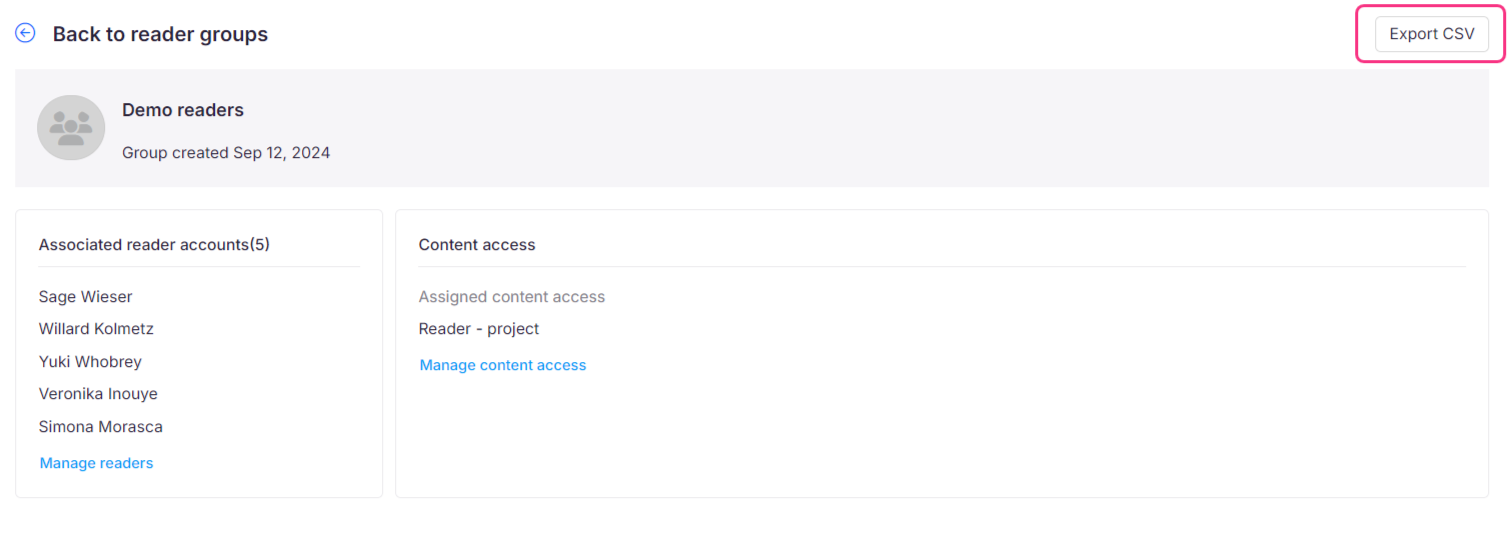
The list of readers in the group downloads as a CSV file to your device's local storage.
Considerations
| Item | Detail |
|---|---|
| File format | CSV (Excel-compatible) |
| Scope | Export is only available from an individual reader group's detail page. There is no option to export readers directly from the Reader Groups listing page, and no bulk export across all groups. |
| JWT reader groups | If a reader group's members are authenticated entirely through JWT, the Export CSV button is disabled, even for Admin or Owner roles. Document360 does not store JWT reader details in the portal, so there is no reader record to export. If a project supports a mix of Normal, SSO, and JWT readers, Normal and SSO readers can still be exported as CSV, since their information is stored in the portal. JWT readers within that same export are excluded, as their data is not stored in Document360. |
Best practices
- Export the reader group list before deleting a group or making significant changes to membership. This gives you a recoverable reference if you need to recreate the group later.
- Run periodic exports of large groups to maintain up-to-date access records for compliance or reporting purposes.