Document360 version 12.8.5 is now live, with a redesigned navigation and unified menu for moving between projects, workspaces and languages. This release also brings new label management tools to keep your content organized, and redesigned status icons that make draft content easier to spot at a glance. Other updates include minor UI fixes, security fixes, bug fixes, and performance improvements across the Knowledge base portal and site.
Features and enhancements
Redesigned navigation and unified menu
Category: Navigation | Enhancement
The redesigned top and left navigation bars give you a sleek, more streamlined experience. You can switch between projects, workspaces, and languages from a single unified dropdown in the top navigation instead of navigating through separate menus. Projects appear at the top, with their workspaces and available languages organized in an expandable hierarchy, and you can access Manage projects and Manage Workspace & language directly from the dropdown. You can also expand the left navigation bar to see item names when you need more context. This feature is being rolled out in phases. If you don't see it yet, it will be available in your project soon.
.png)
For more information, read the article on Managing projects, workspaces, and languages.
Manage labels and label groups
Category: Content tools | Feature
Labels were easy to create and impossible to clean up. Removing a label from every article only stopped it from being used; the label stayed in your project indefinitely. The new Manage labels page fixes this. Go to Content tools > Labels to create, rename, group, and delete labels and label groups, delete or move labels in bulk, filter the list, and see how many times a label is in use before removing it. Only Owner and Admin roles can access Manage labels. If your project still has flat, ungrouped labels, you now have a one-time prompt to organize them into groups.
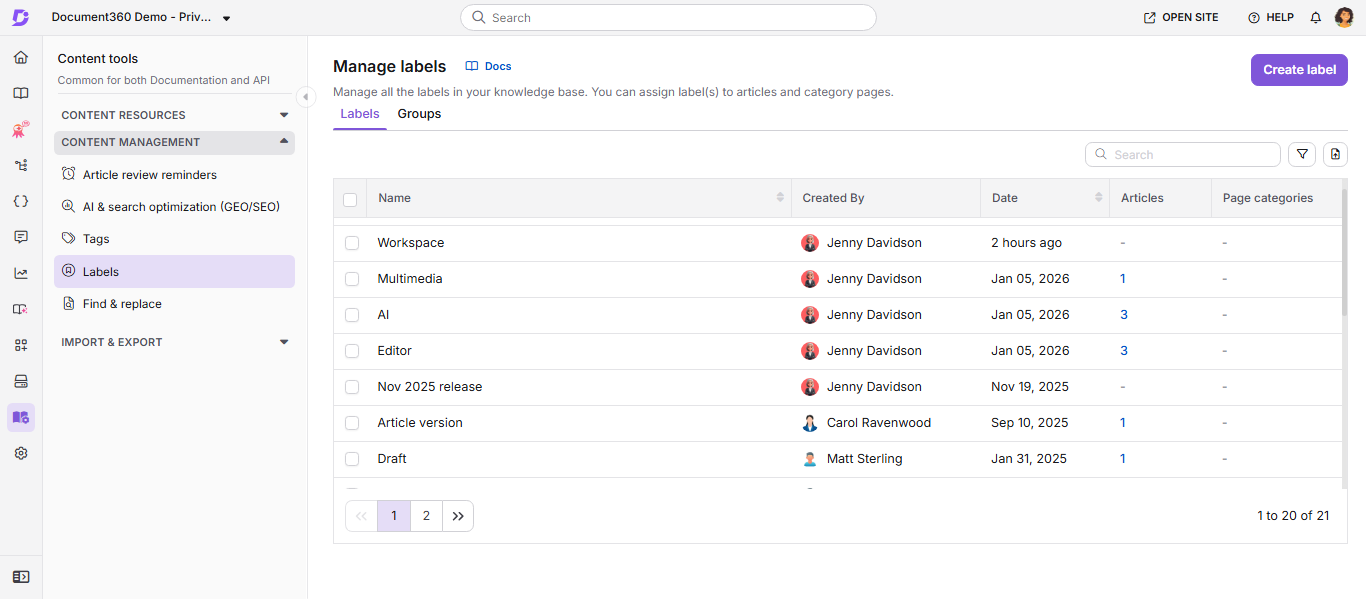
For more information, read the article on Managing labels.
Redesigned status icons for articles and page categories
Category: Content management | Enhancement
Article and page category status indicators have been redesigned for better clarity. When a published article has an active draft, instead of a yellow status dot shown alongside the title, the icon itself now reflects the article's state with a dual-tone icon, so you can tell draft content apart at a glance.
.png)
Other updates
- When configuring an AI chatbot's knowledge base source, the Content access configuration dropdown now includes a None option. Selecting knowledge base content is no longer mandatory, so you can set up a chatbot without your knowledge base as a source, letting it draw solely on other configured sources.
- The My profile and Change Password menus in the top navigation bar now have an improved UI.
- Minor security updates, bug fixes, and performance improvements have also been implemented across the Knowledge base portal and Knowledge base site.