Deleting a reader in Document360 permanently removes their account and revokes access to the knowledge base site. You can delete a single reader from the list or select multiple readers and delete them in bulk. This action cannot be undone.
When to delete a reader
- A reader no longer needs access to the knowledge base and their account should be fully removed.
- You are offboarding a user from your organisation and need to clean up their access.
- You want to free up reader account slots on your plan.
WARNING
Deleting a reader is permanent and cannot be undone. If you want to temporarily suspend access without removing the account, use Deactivate a reader instead.
Before you begin
- You must have the Admin or Owner portal role, or a custom role with Manage user permission.
- Confirm you want to permanently remove the account. Analytics data and feedback submitted by the reader are retained after deletion, but the account itself cannot be recovered.
How to delete a reader
Delete a single reader
- Navigate to Settings () > Users and security in the left navigation bar of the knowledge base portal.
- In the left navigation pane, navigate to Readers & groups > Readers.
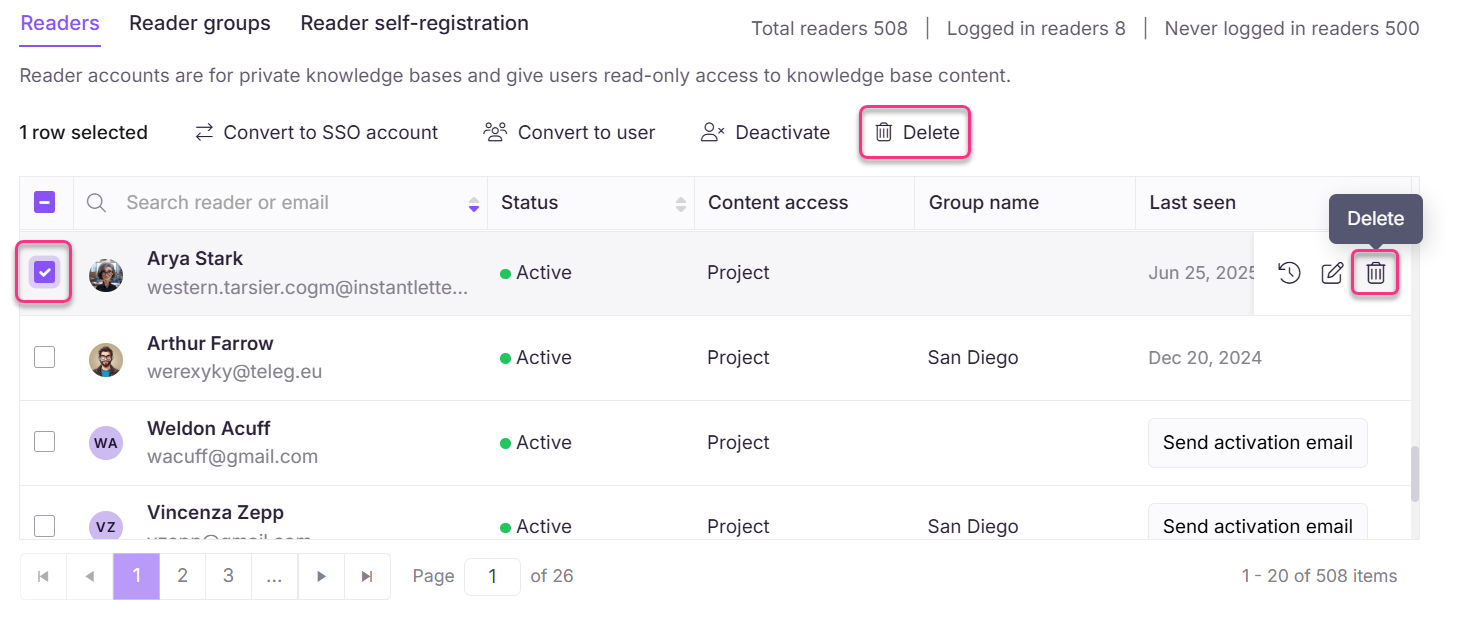
- Hover over the desired reader and click the Delete () icon.
- Click Yes in the delete confirmation panel.
Delete multiple readers
- Navigate to Settings () > Users and security in the left navigation bar of the knowledge base portal.
- In the left navigation pane, navigate to Readers & groups > Readers.
- Select the checkbox next to one or more accounts and click Delete () at the top.
- Click Yes in the delete confirmation panel.
Limitations
| Limit | Detail |
|---|---|
| Reversibility | Deletion is permanent. Accounts cannot be restored after deletion. |
| Data retention | Analytics data and feedback submitted by the deleted reader are retained in the project. |
Best practices
- If there is any chance the reader will need access again in the future, use Deactivate a reader instead of deleting. Deactivated accounts can be reactivated without re-creating them.
- Use bulk deletion to clean up multiple inactive or lapsed reader accounts at once. Use the Filter feature to find candidates first. See Filter and export readers.
- Export the reader list as a CSV before performing bulk deletions so you have a record of the accounts removed. See Filter and export readers.
FAQ
Can I recover a deleted reader account?
No. Deletion is permanent. You would need to create a new account for that reader if access is needed again.
Does deleting a reader remove their feedback and analytics data?
No. Analytics data and feedback submitted by the reader are retained in the project even after the account is deleted.
What is the difference between deleting and deactivating a reader?
Deleting permanently removes the account and cannot be undone. Deactivating suspends access while preserving the account — the reader can be reactivated at any time. Use deactivation when access may need to be restored later.