If your Eddy AI Chatbot is deployed on a private or authenticated site, you can use JWT (JSON Web Tokens) to verify the identity of users before they can interact with the chatbot. This ensures that only authenticated users on your site can access the chatbot, protecting sensitive knowledge base content from unauthorized access.
JWT authentication for the chatbot works alongside your existing application login. Your system handles user authentication and token generation. The chatbot then uses that token to verify the user's identity before allowing interaction.
JWT authentication is one part of the chatbot's security settings. To also restrict which domains can embed your chatbot, see Chatbot security settings
When to use JWT for the chatbot
Use JWT authentication for the chatbot when:
- Your knowledge base or website requires users to log in before accessing content.
- You want the chatbot session to be tied to the authenticated user's identity.
- You need to prevent unauthenticated users from interacting with the chatbot on private or mixed-visibility projects.
Before you begin
- You must have created an Eddy AI Chatbot and embedded it on your site. Learn how to create a chatbot.
- Have the following details ready before configuring JWT: Client ID, Client secret, Chatbot ID, and Token endpoint. These are generated when you set up JWT in Document360.
- You must have access to your backend server to implement the token endpoint.
How to configure JWT authentication for the chatbot
- Navigate to AI Chatbot () in the left navigation bar and click Customize.
- Navigate to the Security () tab.
- Enable the JWT toggle.
- Configure the following fields:
| Field | Description |
|---|---|
| Client ID | The unique identifier for your client application. |
| Chatbot ID | The unique identifier for your chatbot. |
| Token endpoint | The URL your server uses to generate and return JWT tokens. |
| Client secret | The secret key used to sign and verify JWT tokens. Click Regenerate to generate a new secret. Save it securely as it is shown only once and is not stored in Document360. |
- Configure your Authorization URLs.
- Click Save to apply changes.
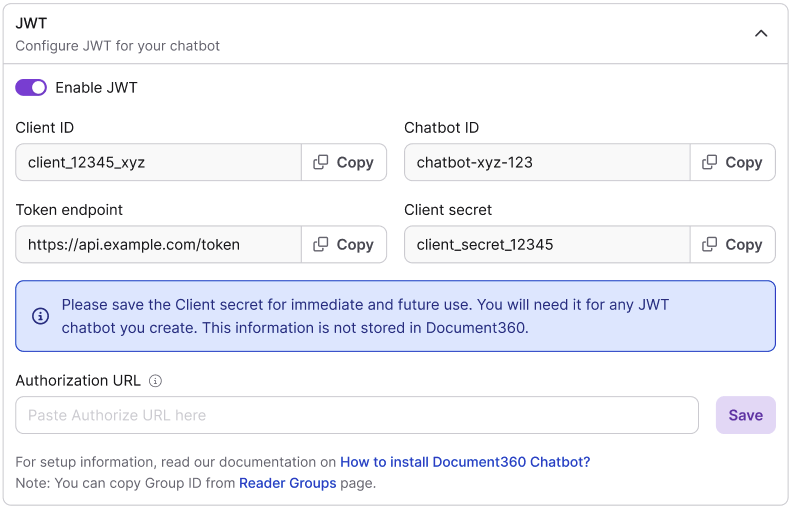
The chatbot now requires JWT verification before users can interact with it.
The client secret is shared across all JWT-enabled widgets and chatbots in the project. If you regenerate the secret, you must update it in all JWT-configured widgets and applications immediately to prevent authentication failures.
Best practices
- Enable JWT for the chatbot whenever your knowledge base requires users to log in. This ties the chatbot session to the authenticated user and prevents unauthorized access.
- Rotate your client secret periodically. Treat it like a password and update your token endpoint configuration whenever you rotate it.
- Test the authentication flow thoroughly after configuration before deploying to production.
- If you encounter authentication issues after regenerating the client secret, verify that the new secret has been updated in all JWT-configured widgets and chatbots in the project.
- For additional chatbot security controls such as restricting which domains can embed the chatbot, see Chatbot security settings.
FAQ
What should I check if JWT authentication is not working?
Verify that the client secret and token endpoint are correctly configured. Also confirm that the user is authenticated in your application before a request is made to the token endpoint. If you recently regenerated the client secret, ensure the new value has been updated everywhere it is used.
What happens if I lose my client secret?
You will need to regenerate a new client secret and update your token endpoint configuration accordingly. The client secret is shown only once at the time of generation and is not stored in Document360.
Is the client secret shared with other JWT-enabled features in my project?
Yes. The client secret is shared across all JWT-enabled widgets and chatbots in the project. Regenerating it affects all integrations that use it. Update the new secret in every affected widget and application without delay.
Can I use JWT for the chatbot without enabling JWT SSO for the knowledge base site?
Yes. JWT authentication for the chatbot is configured independently from JWT SSO for the knowledge base site. You can enable one without the other depending on your requirements.