Widget security in Document360 refers to the set of controls that protect the Knowledge base widget from unauthorized access and misuse. The primary security measure is domain restriction — restricting the widget to a specific list of trusted domains so it can only be embedded where you authorize it.
Because the widget API key is visible in plain text within the widget JavaScript code and cannot be encrypted, domain restriction is the recommended way to prevent unauthorized embedding.
When to configure widget security
- Immediately after installing the widget on your production site, to prevent unauthorized embedding on other domains.
- When you have multiple environments (staging, production) and need the widget restricted to specific domains per environment.
Security controls available
| Control | Description |
|---|---|
| Domain restriction | Restrict the widget to specific trusted domains. Only listed domains can load the widget. |
| JWT authentication | For private knowledge bases — require authenticated tokens for the widget to render content. |
Before you begin
You must have a Project Owner or Admin role.
Access widget security settings
- Navigate to Connections () > Knowledge base widget in the left navigation bar.
- Hover over the desired widget and click the Edit () icon.
- In the Advanced settings tab, expand the Widget security accordion.
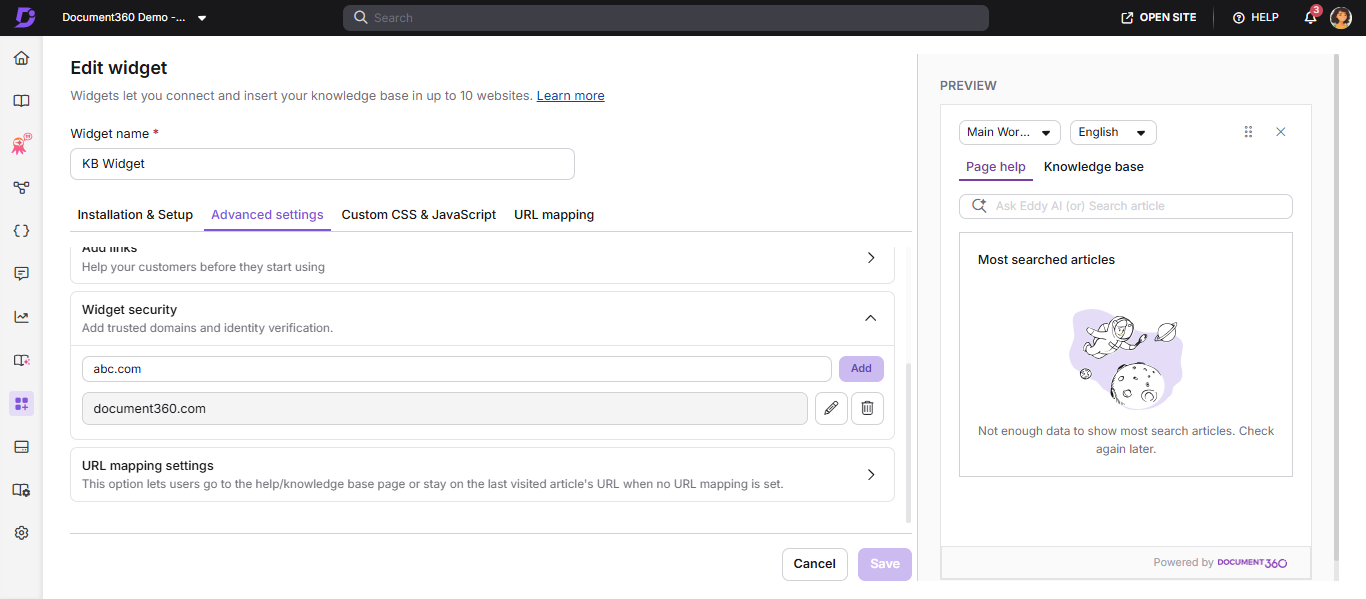
Add a trusted domain
- In the Widget security accordion, enter the domain where you want the widget to load.
- Click Add.
- Click Save to apply changes.
NOTE
- Enter only what comes after the
www.in your URL. Example:document360.com - Wildcard notation is not supported. You cannot use
*.domain.com. - URL paths are not supported. Entries like
domain.com/path/pageare not valid. - Adding the parent domain is sufficient — all subdomains are automatically included.
- An empty list means the widget is unrestricted and can load on any domain.
Best practices
- Add both your production and staging domains so both environments function correctly.
- Periodically review the domain list and remove old or decommissioned environments.
- For private knowledge bases, combine domain restriction with JWT authentication for maximum security.