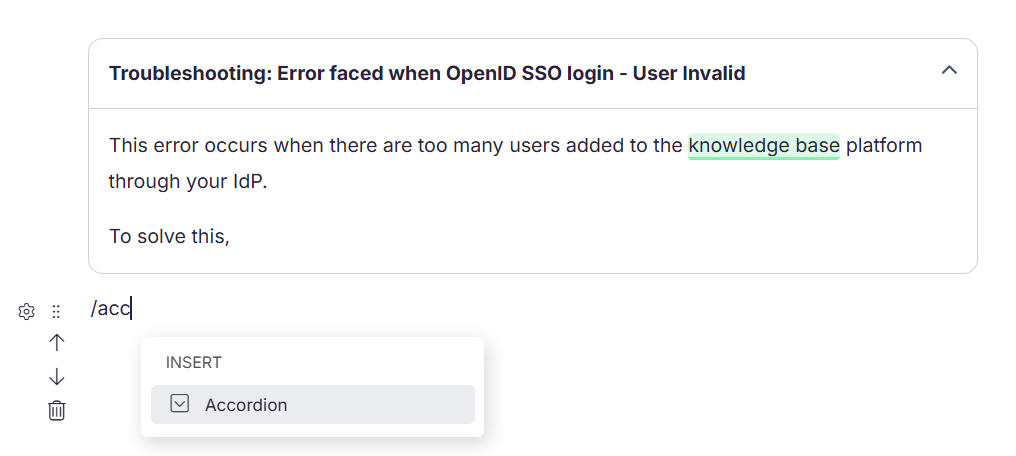
An accordion is a collapsible content block that lets readers expand or collapse sections to reveal content on demand. Each accordion item has a header that readers click to show or hide the content beneath it.
Accordions are fully manual — you control both the header and the content inside each item, making them suitable for any type of collapsible content, not just FAQs.
When to use Accordion
- Build a custom FAQ section anywhere within an article — unlike the AI FAQ Generator, accordions give you full control over the questions and answers
- Hide advanced, optional, or technical details so readers who need them can expand them without distracting others
- Keep long reference articles with many sub-topics compact and scannable without requiring readers to scroll through everything
- Present each troubleshooting scenario as an accordion item so readers can jump directly to the issue they are experiencing
- Collapse older release note entries to keep the most recent content visible while preserving historical entries
Insert an accordion
- Place your cursor where you want to insert the accordion.
- Type
/accordionand pressEnter. - An accordion item is inserted with a header and a content area.
- Click the header to enter your title or question.
- Click the content area below to enter the body content.
To add another accordion item below an existing one, click the + icon that appears between or below accordion items.
Expand and collapse accordion items
- In the editor, click the accordion header to expand or collapse the content area while editing
- On the knowledge base site, readers click the header to expand or collapse each item individually
Delete an accordion block
You can delete an accordion block in two ways:
- Remove all content from the accordion and press the Backspace key.
- Hover over the accordion block, click the drag handle (six dots on the left), then press Delete or use the delete option from the toolbar that appears on hover.
Tabs cannot be created inside accordions.
Accordion vs FAQ Templates vs AI FAQ Generator
All three use accordion-style formatting, but they differ in how content is added and managed.
| Accordion | FAQ Templates | AI FAQ Generator |
|---|---|---|
Insert using/accordion slash command |
Insert using /FAQs slash command |
Insert via the Eddy AI menu in the editor |
| Content is fully manual — you write both header and content | Structure provided, you fill in questions and answers | Content is AI-generated based on the article content |
| Can be placed anywhere in the article | Can be placed anywhere in the article | It is automatically placed at the end of the article |
| Expand/collapse control at each accordion item level only | Expand/collapse control across the entire project via Settings | Expand/collapse control across the entire project via Settings |
| No predefined layout | Consistent layout reusable across articles | Regenerated per article based on content |
Best practices
- Keep accordion headers short and descriptive — readers decide whether to expand based on the header alone.
- Use accordions for content that is optional or supplementary, not for content that all readers need to read. Critical information should always be visible by default.
- Avoid nesting accordions inside each other — this creates a confusing and hard-to-navigate experience for readers.
- If you need consistent FAQ-style formatting with project-level expand/collapse control, use FAQ Templates or the AI FAQ Generator instead of manually built accordions.
- Limit the number of accordion items in a single block to keep the section manageable — too many items can make even collapsible content feel overwhelming.
FAQ
Can I add formatting inside an accordion?
Yes. You can add headings, lists, images, code blocks, links, and other supported elements inside the accordion content area.
Can I use an accordion inside a tab?
Yes. Accordions can be added inside tabs.