Liking or disliking an article in Document360 lets readers give direct feedback on content quality from the Knowledge base site. Readers can like an article to signal it was helpful, or dislike it and explain what's missing, such as an unclear step or a screenshot that would make a process easier to follow. This feedback flows into the Knowledge base portal, helping your team identify and improve content that isn't meeting reader needs.
When to use like and dislike
Use this feature to capture lightweight, in-context feedback without requiring readers to file a support ticket or leave the page.
- A reader finds an article helpful and wants to signal that without leaving a comment.
- A reader notices a gap, such as a missing screenshot or an outdated step, and wants to flag it directly on the article.
- Your team wants a steady feedback stream to prioritize content updates based on real reader input.
How to like or dislike an article
Like an article
- Navigate to the desired article on the Knowledge base site.
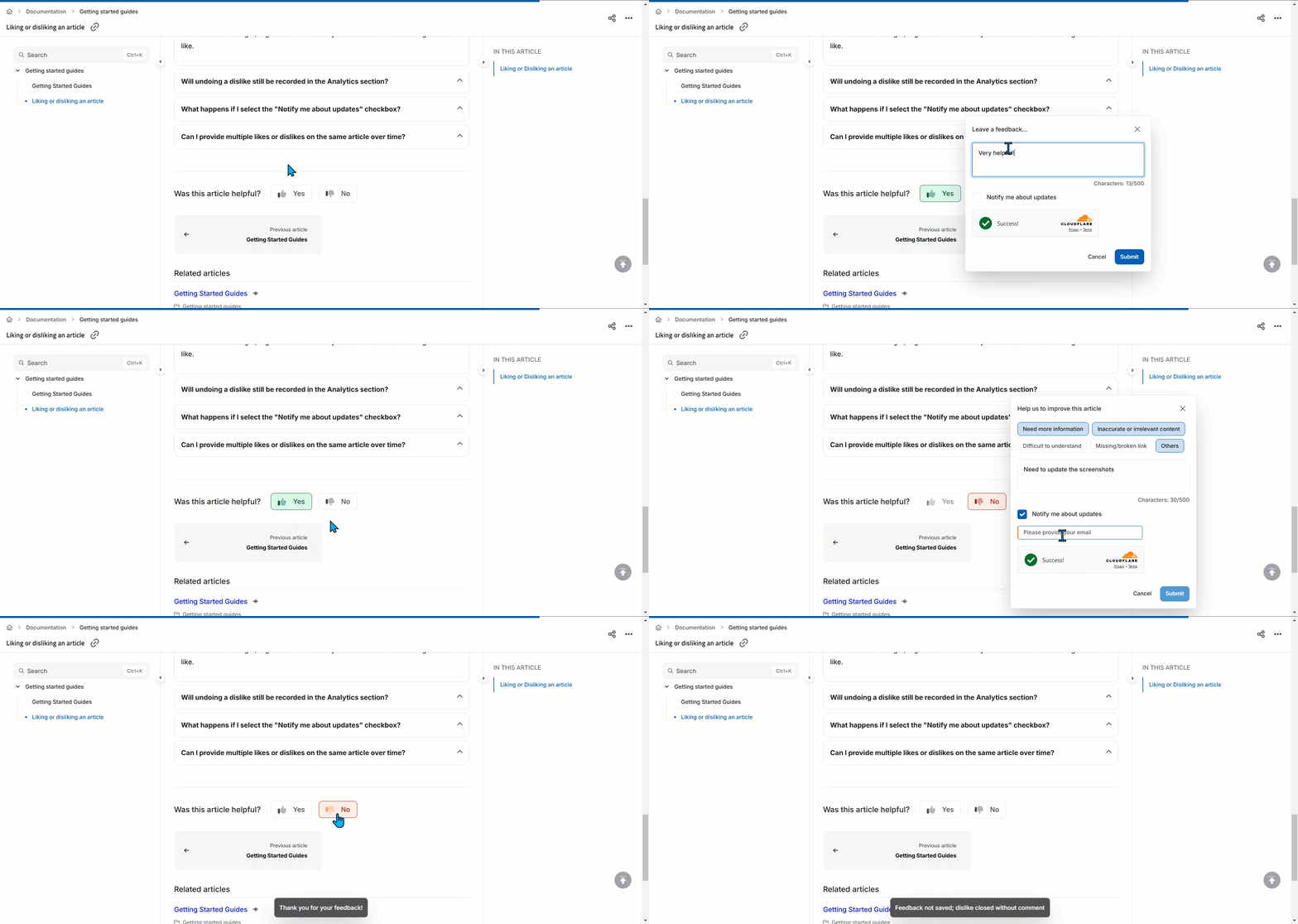
- Scroll to the end of the article and click the like () icon. The Leave a feedback panel appears.
- Optionally, enter feedback in the provided space.
- Select the Notify me about updates checkbox and enter your email address if you want to be notified about updates related to your feedback.
- Click Submit.
For public projects, readers must manually enter their email address. For private and mixed projects, the Email field is automatically prefilled for logged-in users.
A like is only recorded if the reader clicks Submit. If the feedback panel is closed or cancelled before Submit is clicked, the like is not recorded in the Feedback manager.
Dislike an article
- Navigate to the desired article on the Knowledge base site.
- Scroll to the end of the article and click the dislike () icon. The Help us to improve this article panel appears.
- Select an existing feedback option, or click Others to provide custom feedback.
- If required, select the Notify me about updates checkbox and enter your email address.
- Click Submit.
A dislike is only recorded if the reader selects a predefined reason or enters feedback in the text box and clicks Submit. If the reader selects Others, written feedback is mandatory.
Undo a like or dislike
Click the like () or dislike () icon again to undo the action.
The article's feedback now reflects the reader's latest action.
Limits and limitations
| Limit | Value | Notes |
|---|---|---|
| Undo window | 30 days | Undo is unavailable if the reader clears their browser cache, since this deletes the saved data needed to reverse the action. |
| Feedback per reader | One active like or dislike per article | Readers can switch between like and dislike, but can't submit multiple of the same type. Existing comments carry over to the new feedback type. |
Readers can also like or dislike articles from the Knowledge base widget.
Best practices
- Review dislike feedback regularly in the Feedback manager to catch specific, actionable gaps like missing screenshots or unclear steps.
- Encourage readers to use Notify me about updates when they leave feedback, so they see when their input leads to a content fix.
- Treat repeated dislikes on the same article as a signal to prioritize that content for revision over newer, unflagged articles.
FAQ
What happens to my feedback if I undo a dislike after submitting it?
If the feedback is still open in the Feedback manager, it's deleted. If it's already assigned to a team member or in another state, it's marked as Removed to indicate it's no longer active.
Will undoing a dislike still be recorded in Analytics?
No. Once a dislike is undone, the action is canceled and isn't recorded in the Analytics section, so only active interactions are captured.
What happens if I select "Notify me about updates"?
The team handling feedback can respond to it in the Knowledge base portal, and you'll be notified of any replies related to your feedback.
Can I provide multiple likes or dislikes on the same article over time?
No, you can't submit multiple likes or dislikes on the same article. You can switch your feedback by clicking the opposite button, and any existing comments carry over to the new feedback type.