400 error – API access is disabled
Error message: "400 error – API access is disabled. Please contact your project administrator."
When it occurs: When attempting to use the public API and public API access has been deactivated in the project settings.
How to fix it:
- Navigate to Settings (⚙️) > AI settings > Eddy AI settings in the Knowledge base portal.
- Under the AI search suite section, ensure that the Public API checkbox is selected.
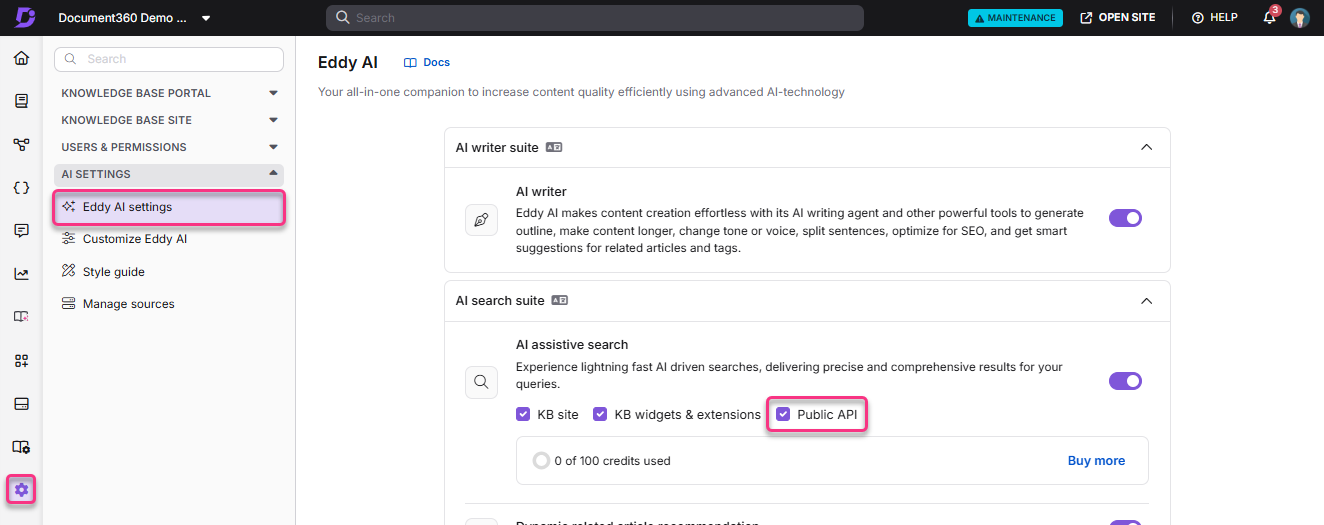
- If the issue persists, contact the Document360 support team.
403 error when posting via API endpoint
When it occurs: When attempting a POST request through the API endpoint and receiving a 403 response.
Why it happens: The API token being used does not have the required permissions to make POST requests.
How to fix it: Review the permissions assigned to your API token. Ensure it has write and POST permissions enabled. Update the token settings and retry.
A 403 error when updating content via the API can also occur if you attempt to modify spec-generated content (endpoint articles generated from an OpenAPI/Swagger file). Spec-generated content cannot be retrieved or updated through regular content API endpoints, regardless of your API token's permissions. To update this type of content, update your API specification file and resync the documentation instead. See Managing API references for details. If the content you are updating is a regular knowledge base article (not generated from a spec), verify your API token's permissions as described above.