The Change password option in Document360 lets you update your login credentials directly from the top navigation bar of the Knowledge base portal.
Before you begin
- This option is only available for standard Document360 accounts. SSO users authenticate through their identity provider and cannot change their password from within the portal.
- You must know your current password to complete the change. If you have forgotten it, use the Forgot password? link on the login page instead. See Account locked for reset steps.
How to change your password
-
Select your profile picture in the top navigation bar.
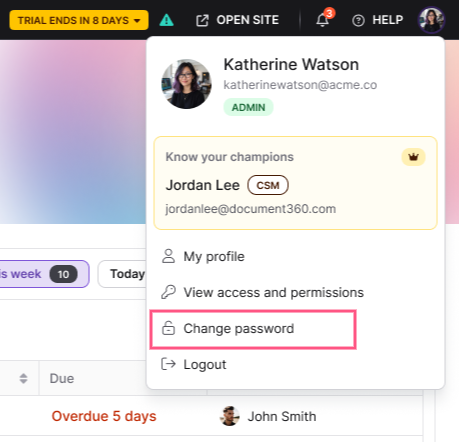
-
Select Change password from the dropdown. The Change password dialog opens.
-
Enter your current password in the Current password field.
-
Enter a new password in the New password field.
-
Re-enter the new password in the Confirm password field.
-
Select Save.
.png)
You are logged out immediately. Log back in using your new password.
Password changes apply to your entire Document360 account and are not project-specific.
Password requirements
Your new password must meet all of the following criteria:
| Requirement | Detail |
|---|---|
| Minimum length | At least 8 characters |
| Uppercase letter | At least 1 |
| Lowercase letter | At least 1 |
| Number | At least 1 |
| Special character | At least 1 (for example, !, @, _, -) |
Best practices
- Use a mix of character types. Combine uppercase and lowercase letters, numbers, and special characters. For example:
En37df_n4r-hufling. - Avoid predictable patterns. Passwords based on your birth date, name, phone number, or keyboard sequences like
qwertyor123456are easy to guess. - Change your password periodically. Regular rotation limits the impact if credentials are ever compromised.
FAQ
Does changing my password affect all Document360 projects?
Yes. Your password is tied to your Document360 account, not to any individual project. Changing it applies everywhere you use the same login credentials.
Why can't I see the Change password option?
The Change password option is not available for SSO users. If you log in through an identity provider such as Okta, Azure AD, or Google Workspace, password management is handled by your IdP, not Document360.
What happens if I forget my current password?
You cannot change your password without entering the current one. Use the Forgot password? link on the Document360 login page to receive a reset email and set a new password.
Will I be logged out of all sessions when I change my password?
Yes. Saving a new password logs you out immediately from your current session. You will need to log back in with your updated password.