Eddy AI is Document360's built-in AI assistant. It helps your team work faster, write better content, and make information easier for users to find, all without switching between apps or tools.
Eddy AI is organized into three suites, each built around a specific part of your workflow. You can enable each suite independently so that Eddy AI supports exactly what you need.
The Eddy AI page is your central hub for configuring and personalizing Eddy AI to match how your team works. Whether you create content, manage a knowledge base, or support users through search and chatbots, Eddy AI helps you do more in less time.
Eddy AI suites at a glance
AI writer suite
The AI Writer Suite streamlines content creation by putting a full set of writing tools at your fingertips. It's ideal for anyone who regularly drafts, edits, or publishes articles in Document360.
Key capabilities of AI writer suite
- Generate structured article outlines instantly.
- Extend or expand existing content to add depth.
- Adjust tone and voice to match your brand or audience.
- Split long, complex sentences into clear, concise ones.
- Optimize content for search engines (SEO).
- Get smart suggestions for related articles and tags to improve discoverability.
The suite includes the AI Writing Agent, a powerful tool that can handle end-to-end writing tasks within your workspace.
For more details, see AI Writer Suite documentation.
AI search suite
The AI Search Suite enhances how users find information across your knowledge base, widgets, and chatbots. Instead of returning a simple list of links, it delivers precise, context-aware answers to user queries.
Key capabilities of AI search suite
- Enable AI-powered search across your knowledge base site, embedded widgets, and chatbots.
- Surface dynamically recommended articles that are relevant to what the user is reading.
- Automatically summarize articles so users get the key points without reading the full page.
For more details, see AI for knowledge base site documentation.
AI premium suite
The AI Premium Suite unlocks advanced capabilities designed for teams that need richer content structure and greater consistency across their documentation.
Key capabilities of AI premium suite
- Use the AI glossary generator to automatically identify, organize, and define key terms across your content.
- Improve clarity and comprehension for readers by maintaining consistent terminology throughout your knowledge base.
For more details, see AI Knowledge pulse documentation.
Enable Eddy AI suites
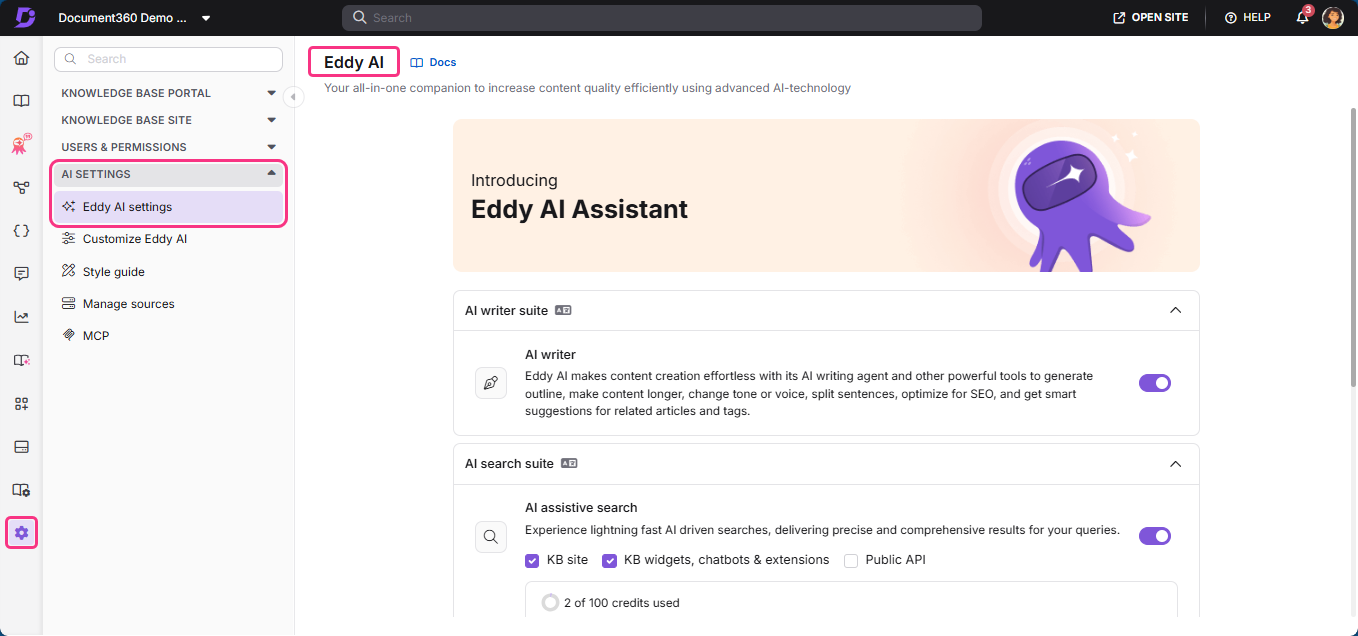
- Navigate to Settings () > AI settings in the left navigation bar in the Knowledge base portal.
- In the left navigation pane, navigate to Eddy AI settings.
- Expand the accordion for the AI suite you want to configure: AI writer suite, AI search suite, or AI premium suite.
- Toggle individual features on or off based on your team needs.
Best practices
- Align suites to roles - Match the suite to who uses it. Writers benefit most from the AI writer suite, support team from the AI search suite.
- Review AI suggestions - Always review AI generated content before publishing to ensure accuracy.
FAQ
How is Eddy AI different from a chatbot?
A chatbot is a conversational interface. Users interact with it by asking questions and getting answers in chat format. It's typically designed for end users seeking information or support.
Whereas, Eddy AI is a set of embedded AI tools that are built into Document360. It helps writers, powers smart search results, and auto-generates glossary terms.
| Aspect | Chatbot | Eddy AI |
|---|---|---|
| Interaction style | Conversational | Embedded tools |
| Who it serves | End user asking questions | Writers, editors, and knowledge managers |
| Where it lives | A separate chat window or widget | Built into Document360's editor and settings |
| Output | Text responses | Content improvements, search results, glossary entries |
| User control | Prompt-driven | Toggle on/off per feature |