Document360 version 12.9.3 is now live, bringing a smarter, more connected way to manage your knowledge base. From renaming and reusing files without breaking existing references to escalating Eddy AI conversations to support, and working with Drive assets in AI capture, this release helps you get more done with less friction.
Rename files in Drive
Category: Drive | Feature
Managing file names can be difficult when files are uploaded from different locations or reused across a project, especially when names need to follow a consistent convention. You can now rename files in Drive without affecting where they are used.
Rename any file directly from the file's context menu, the selection toolbar, or while uploading a file, including uploads from the Editor's Insert panel. For images, Eddy AI can generate a descriptive name based on your customized naming configuration in the project settings. Renaming only changes the file name, so articles, content reuse blocks, and decision trees that use the file continue to work without breaking existing file references.
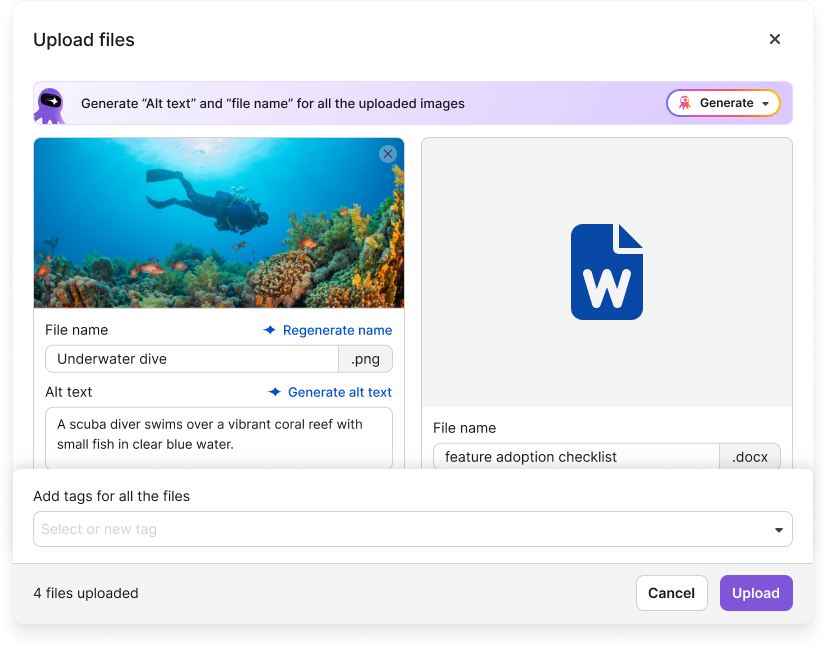
For more information, read the article on Rename a file.
Email support ticket notifications from Eddy AI Chatbot
Category: Eddy AI | Enhancement
Previously, tickets raised through the Eddy AI chatbot were sent directly to connected ticketing platforms. You can now choose email as the destination for ticket notifications, giving project admins more flexibility in how support requests are routed. Admins can customize the To and CC recipients and subject prefix for these notification emails, and configure the Raise a ticket? option to appear automatically after a specified number of reader conversations or queries.
Eddy AI chatbot also recognizes support-related requests contextually, such as “raise a ticket” or “talk to an agent,” and surfaces the Raise a ticket? option with a more visible UI alongside the existing feedback option.
For more information, read the article on Ticket escalation.
Insert images in AI capture from Drive
Category: Document360 AI capture | Enhancement
Updating visuals in your Document360 AI capture content is now easier without redoing the capture. You can insert or replace images directly from Drive as step slides for step by step guides. You can also insert or replace overlay images for guides, recorded videos, and interactive demos. Document360 validates the resolution, size, and type before inserting an image into the selected AI capture element.
For more information, read the article on Advanced elements: Images.
Clearer content access inheritance
Category: Content access | Enhancement
When assigning content access to users, readers and groups, understanding which categories inherit access and which have inheritance blocked was not always straightforward. Category selection now clearly indicates the inheritance status of each item, making it easier to understand what is included. You can also explicitly select categories or subcategories with blocked inheritance badge to grant access based on your specific requirements.
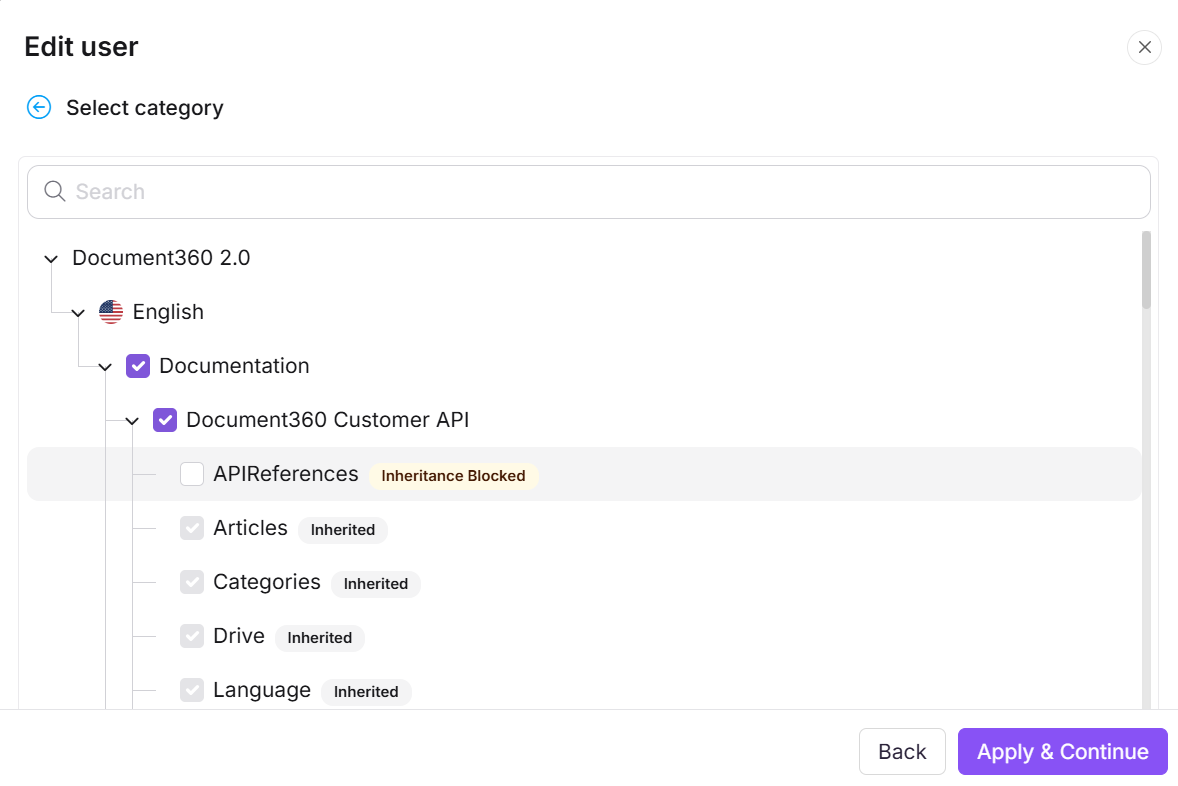
For more information, read the article on Content access levels.
Other updates
- In the All articles page, the category filter now supports selecting an entire category which includes all sub-categories, with a single click.
- Large file uploads are now supported beyond the standard 150 MB limit through the new Large file uploads add-on, with usage tracked against a separate storage allocation.
- Google Workspace and Microsoft sign-up are now supported for faster Document360 account creation and login.
- The login page now supports data center selection, allowing you to choose the appropriate project environment: EU, US, and CA.
- The global search bar in the Knowledge base portal now features a refreshed UI, with its filters displayed as selectable chips for easier search refinement.
- Minor UI improvements have been made to the IP restriction page.
- Minor security updates, bug fixes, and performance improvements have also been implemented across the Knowledge base portal and Knowledge base site.