Dynamic related articles recommendation is an AI-powered feature in Document360 that automatically links relevant articles across your entire knowledge base, helping readers discover related content without any manual configuration per article. Eddy AI analyses your articles and surfaces up to three recommendations per article on the Knowledge Base site, marked with a spark icon to distinguish them from manually added related articles.
For a full list of languages supported by Eddy AI, see Multilingual support for Eddy AI Search Suite.
When to use dynamic related articles
- Large knowledge bases — manually curating related articles across hundreds of articles is time-consuming; enabling this feature applies recommendations to all articles in one step.
- Improving self-service — surface contextually relevant content to readers who may not know the right search terms, keeping them on the knowledge base longer.
- New or growing knowledge bases — as you add articles, Eddy AI automatically reassesses relationships so recommendations stay current without ongoing maintenance.
Before you begin
- Eddy AI recommends up to 3 related articles per article.
- Recommendations are based on a relevance threshold. If no articles meet the threshold for a given article, no recommendations are generated for it.
- If manually curated related articles overlap with Eddy AI's recommendations, the total number of displayed related articles may vary.
Enable dynamic related articles for your entire knowledge base
-
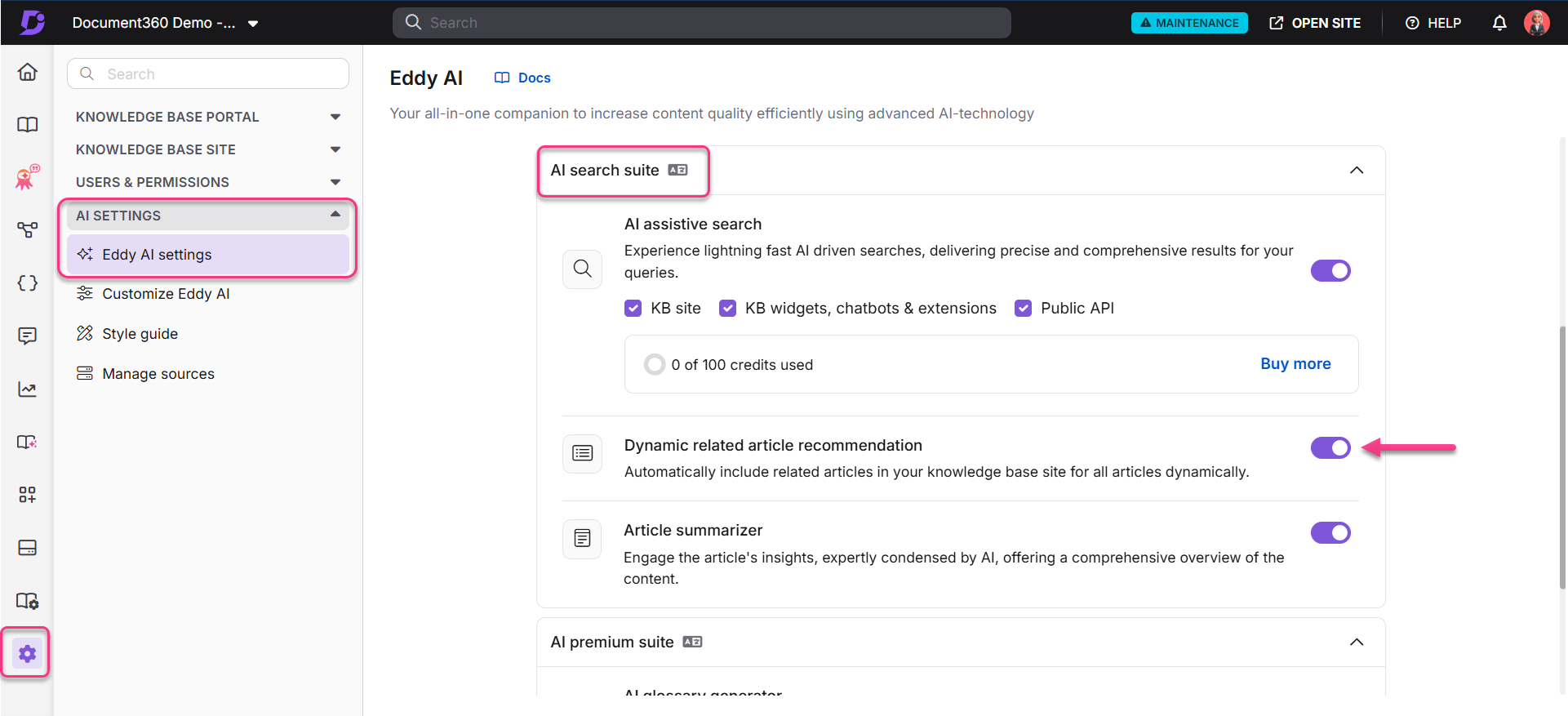
In the Knowledge Base portal, select Settings in the left navigation bar.
-
In the left navigation pane, go to AI settings > Eddy AI settings.
-
Expand the AI search suite accordion and turn on the Dynamic related article recommendation toggle.
Eddy AI will now automatically add related articles to all articles in your knowledge base site.
If the Dynamic related article recommendation toggle is not yet enabled, the following applies when you open the Related articles panel on an article:
- If you have permission to enable the toggle — a banner appears with an Enable recommendations button. Clicking it redirects you to the Eddy AI settings page where you can turn it on.
- If you do not have permission — an I'm Interested button appears instead. Clicking it sends an email to your account owner notifying them of your interest in enabling the feature.
Manually add related articles to a specific article
In addition to the global dynamic recommendations, you can manually add related articles to individual articles. You can also use Eddy AI to generate recommendations for a single article at a time.
- In the Knowledge Base portal, select Documentation in the left navigation bar and open the article you want to update.
- Click the More (⋯) option and select Related articles.
- Click Ask Eddy AI. Eddy AI generates recommended related articles for that article.
- Click the Add (+) icon next to any article to include it in the related articles list.
- Turn on the Auto relate this article toggle if needed.
- Click Save.
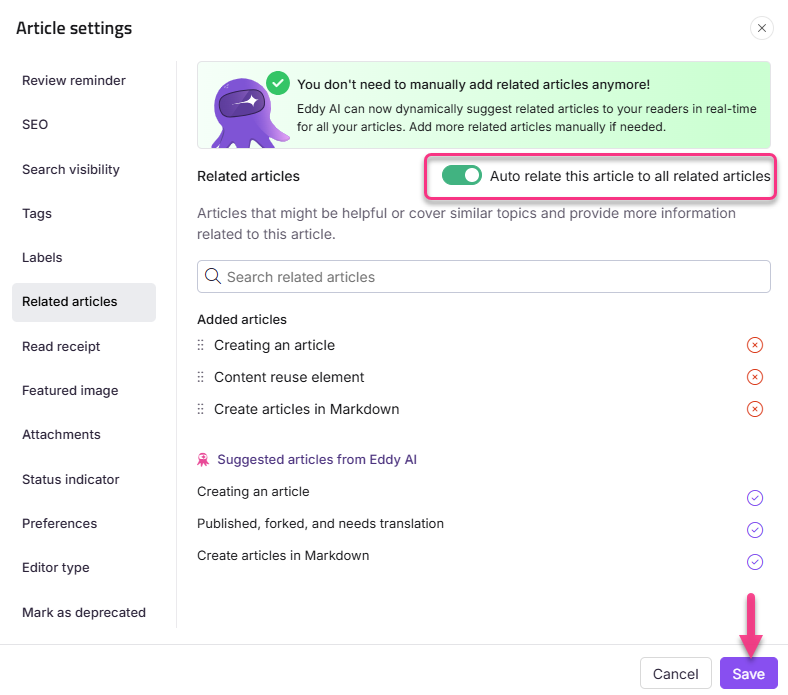
When Auto relate this article is enabled, the relationship is bidirectional — if Article A is added as a related article in Article B, Article B will automatically appear as a related article in Article A.
How related articles appear on the Knowledge Base site
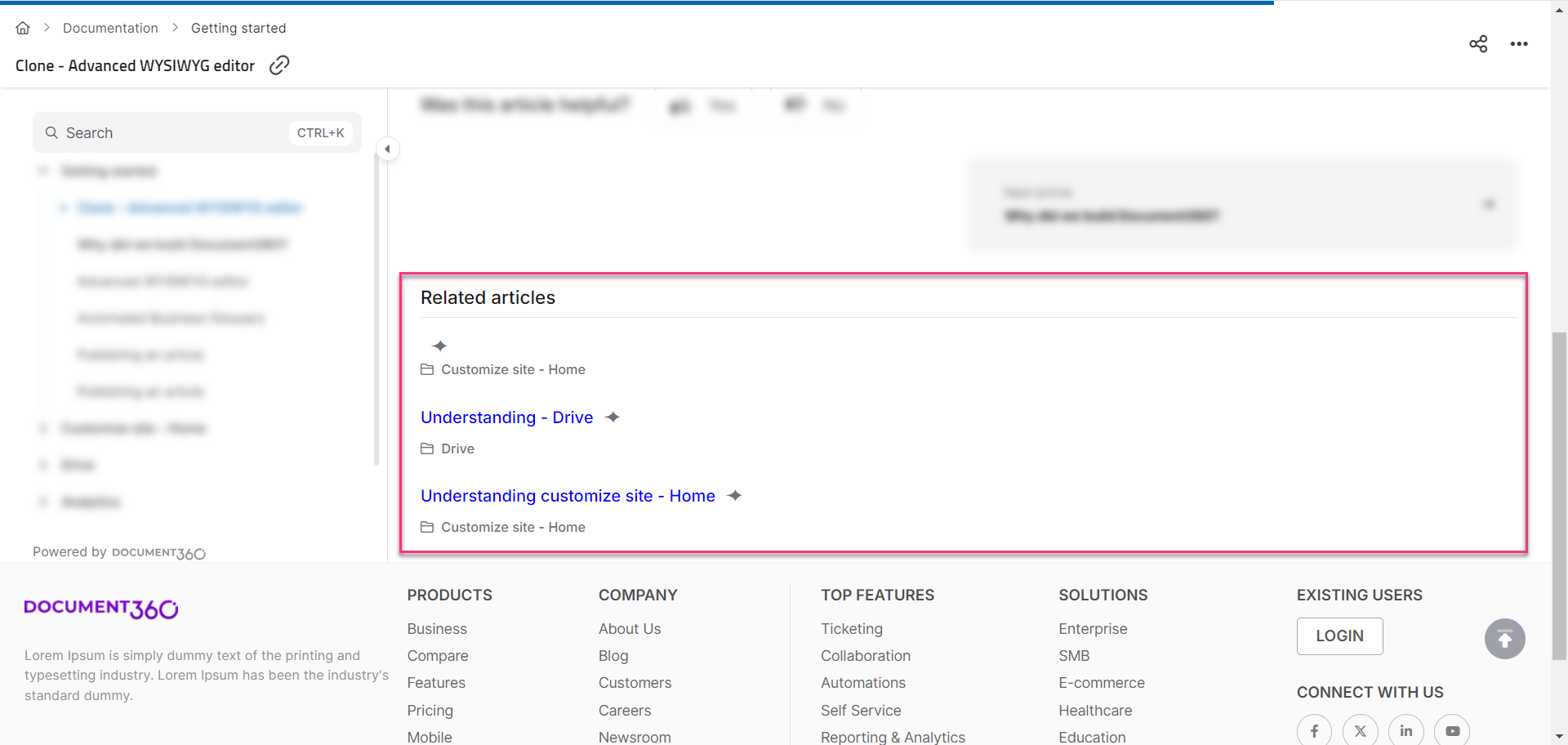
After enabling the feature, all articles in your knowledge base display dynamically recommended related articles. Articles recommended by Eddy AI are marked with a ✦ spark icon next to the article name. Articles that were manually added, or added using the Ask Eddy AI option in the Related articles panel, do not display the spark icon.
FAQ
What is the Dynamic related articles recommendation feature?
It is an AI-powered feature that automatically links relevant articles across your knowledge base, improving navigation and helping readers find related content without manual configuration per article.
Why are related articles not appearing for certain articles?
Eddy AI uses a relevance algorithm to assess article similarity. Only articles that meet a specific relevance threshold appear as recommendations. If no articles in your knowledge base are sufficiently similar to a given article, no recommendations are generated for it.
How do I identify which related articles were recommended by Eddy AI versus manually added?
Articles recommended by the Dynamic related articles feature are marked with a ✦ spark icon next to the article name on the Knowledge Base site. Articles added manually or via the Ask Eddy AI option in the Related articles panel do not display this icon.
How do I enable the Dynamic related articles recommendation feature?
Go to Settings > AI settings > Eddy AI settings in the Knowledge Base portal. Expand the AI search suite accordion and turn on the Dynamic related article recommendation toggle. See How to enable dynamic related articles for the full steps.