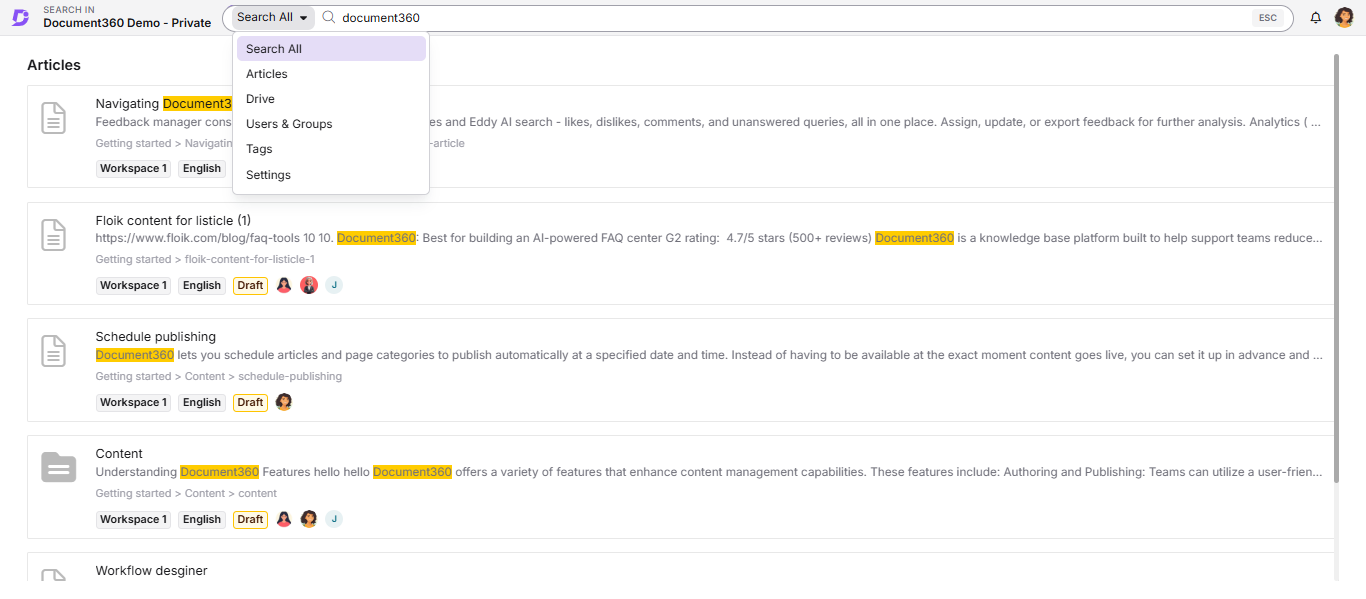
Full portal search lets you search across your entire Document360 project from a single search bar, including articles, categories, Drive files, tags, labels, users, content tools, and settings. You can search across all workspaces and languages simultaneously, making it faster to locate any resource without navigating to individual sections of the portal.
When to use full portal search
Use full portal search when you need to:
- Locate an article or category page without knowing its exact location in the project
- Find a Drive file, tag, label, or user without opening the respective module
- Search for a specific setting or content tool configuration quickly
How to use full portal search
-
Click the Search () field in the top navigation bar.
You can view the project in which the search is performed on the left. -
Enter your keyword in the search bar.
-
Select the desired module from the Search all dropdown on the left of the search bar to narrow down results.
The following modules are available:
Module What it searches Search all Searches across all modules simultaneously Articles Article and category pages Drive file Files stored in Drive Users & Groups Team members and groups Tags Tags applied across the project Labels Labels applied across the project Settings Portal configuration and settings pages NOTEPress the Escape key to close the full portal search overlay.
Only five results per module are displayed initially.
-
To view additional results, click More articles below the displayed results.
-
To refine results further, click the Filter () icon in the top right of the search panel.
-
Click any result to preview it.
Best practices
- Use the Search all module first to get a broad view, then switch to a specific module to narrow results.
- Search keywords are highlighted in the results. Use distinctive terms to quickly spot the right item.
- Use full portal search to locate settings pages instead of navigating through the sidebar manually.
FAQ
What can I search using the full portal search, and is the search keyword highlighted in the results?
Full portal search covers article and category pages, Drive files, Users & Groups, Tags, Labels, Content tools, and Settings. The search keyword is highlighted in the matching results on the search panel.
Why isn't my analytics information appearing in the full portal search results?
Full portal search does not index data from the Analytics sections of the Knowledge base portal. However, analytics-related configuration items are visible when you search using the **Settings** module.