Articles are the core of your knowledge base. Document360 gives you full control over how articles are created, organized, published, and maintained, from a single article to bulk operations across your entire workspace.
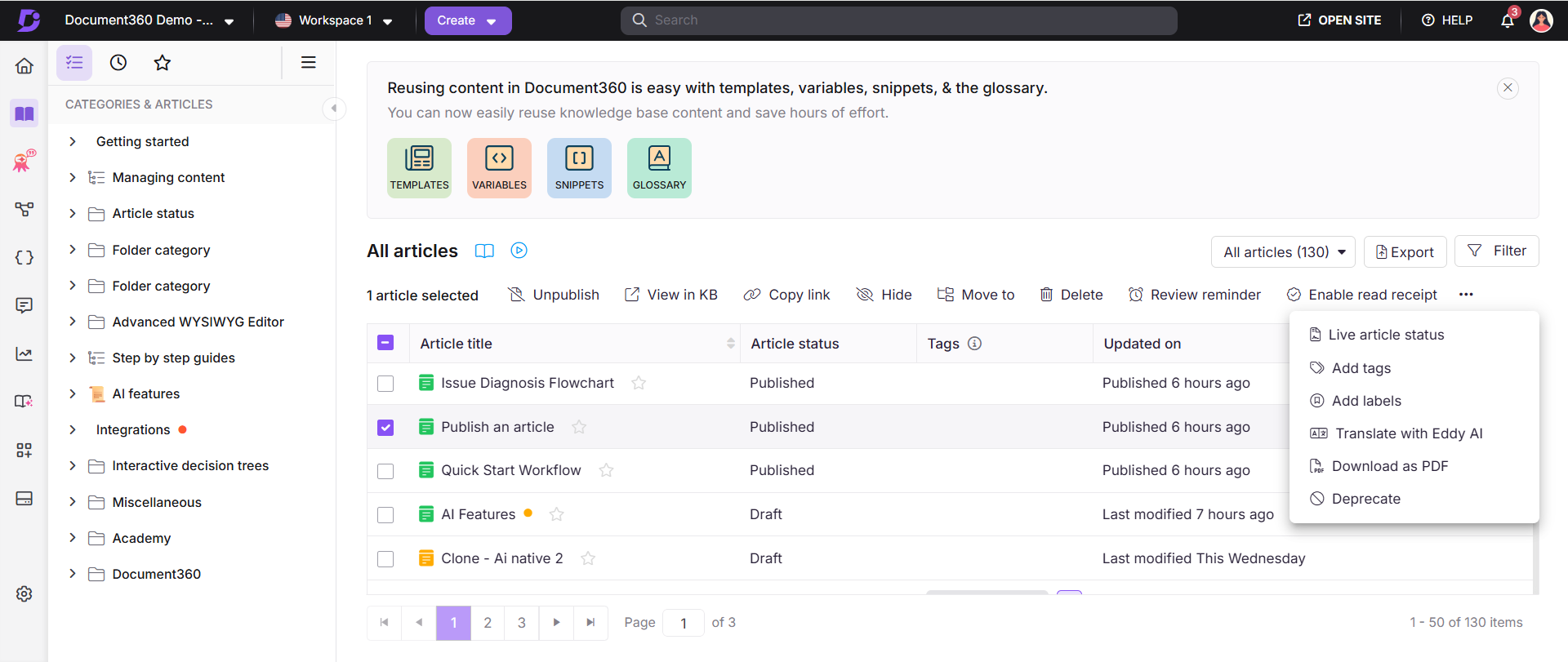
The All articles page () is your central hub for managing articles at scale. From here, you can view every article across your workspace, filter and search by a wide range of criteria, export the article list, and perform bulk actions on multiple articles at once without having to open each one individually.
Access the All articles page
- Navigate to Documentation () in the left navigation bar.
- Click All articles () in the left navigation pane.
- Use the workspace and language dropdown in the top navigation bar to switch between workspaces.
- Use the Filter button to narrow results by Status, Workflow status, Contributor, Category, Date, Tags, Labels, and more, including saved custom filters you can reuse.
- Click Export icon to download the full article list as a CSV file.
Managing individual articles
| Article | What it covers |
|---|---|
| Create articles Learn more → |
All methods for creating a new article, from blank, from template, or with Eddy AI. |
| Move articles Learn more → |
Move an article to a different category or workspace, including cross-workspace moves and link updating. |
| Clone articles Learn more → |
Create an independent copy of an article within or across workspaces. |
| Mirror articles Learn more → |
Display the same article in multiple categories without creating duplicates. |
| Delete articles Learn more → |
Delete individual or multiple articles, recover from the recycle bin, and understand the difference between deleting and deprecating. |
| Hide & Unhide articles Learn more → |
Temporarily hide articles from the knowledge base site without deleting them. |
| Archive & Unarchive articles Learn more → |
Remove the article from the category tree and the knowledge base site while keeping its version history and metadata intact. |
| Star articles Learn more → |
Add frequently used articles to your Starred list for quick access in the portal. |
| Lock & Unlock articles Learn more → |
Set articles to read-only during active review to prevent unintended edits. |
| Publish articles Learn more → |
Publish articles individually or in bulk, and configure article settings before publishing. |
| Schedule publishing Learn more → |
Schedule articles to publish automatically at a specified date and time. |
| Unpublish articles Learn more → |
Remove published articles from the knowledge base site while keeping them in the portal. |
| Article status Learn more → |
Understand article statuses as they appear in the portal: New, Draft, Published, Hidden, Scheduled, and Deprecated. |
| Update article contributors Learn more → |
Add or update the contributors credited on an article. |
| Filter articles Learn more → |
Filter the All articles list by Status, Workflow status, Contributor, Category, Date, Tags, Labels, and more. Save and reuse custom filters. |
| Export all articles Learn more → |
Export the full article list as a CSV file for audits, content planning, or sharing with stakeholders. |
Bulk actions from the All articles page
Select one or more articles on the All articles page to access the following actions:
| Action | What it does |
|---|---|
| Publish | Publish multiple draft or new articles at once. |
| Publish later | Schedule selected draft or new articles to publish at a specified time. |
| Unpublish | Unpublish multiple published articles at once. |
| View preview / View in KB | Preview draft articles on the knowledge base site, or open published articles directly in the knowledge base site. |
| Copy link | Copy the direct link for selected articles. |
| Hide | Hide selected articles from the knowledge base site. |
| Move to | Move selected articles to a different category or workspace. |
| Mirror | Mirror selected articles into a destination workspace and category in one operation. |
| Delete | Delete selected articles. Deleted items are moved to the recycle bin for 30 days. |
| Review reminder | Set a review reminder for selected articles. |
| Enable / Disable read receipt | Enable or disable read receipts for selected articles. Available for Private and Mixed projects only. |
| Live article status | Update the workflow status for selected articles. |
| Add tags | Create and assign tags to selected articles. |
| Add labels | Create and assign labels to selected articles. |
| Translate with Eddy AI | Automatically translate selected articles into other languages. |
| Download as PDF | Download published articles as PDF. Multiple selected articles are combined into a single PDF. |
| Deprecate | Mark selected articles as deprecated. A Deprecated status tag appears on the knowledge base site. |
If a Page category contains both articles and subcategories, the Hide, Move, and Delete actions are not available for it. These actions are only available for Page categories that have no sub-articles.
Best practices
- Use the All articles page for bulk operations. Performing actions one article at a time is inefficient for large knowledge bases. Use filters and bulk actions to manage content at scale.
- Filter before acting. Before bulk publishing, unpublishing, or deleting, apply status and date filters to confirm you are only selecting the intended articles.
- Export the article list periodically. The CSV export gives you a full snapshot of your knowledge base, useful for audits, content planning, and sharing with stakeholders.
- Use Deprecate instead of Delete for outdated content. Deprecated articles remain accessible on the knowledge base site with a clear status tag, useful for content that still has historical search traffic but is no longer current.